Email Guide: What Is Email? A Simple Guide for Beginners
Summary Box
- A beginner-friendly explanation of what is email
- How email works behind the scenes
- The common parts of an email you should know
- Simple tips for using email safely and correctly
What You’ll Learn
- What email is in simple words
- How messages travel from sender to receiver
- The basic sections inside every email
- Common beginner mistakes and how to avoid them
- Where to get IT help if email problems slow you down
👉 Get Help Now: https://www.archer-its.com/contact-us/
Email, short for electronic mail, is a way to send and receive digital messages over the internet. It lets people communicate quickly using email addresses, and messages can include text, files, images, and links. It is one of the most common tools for personal, school, and business communication.
If you have ever wondered what is email, you are not alone. Many beginners use email every day without fully understanding how it works or what all the buttons mean. The good news is that email is easier to learn than it seems, and once you understand the basics, it becomes one of the most useful tools for work, school, and daily life.
What Is Email and How Does It Actually Work?
Email is short for electronic mail. It is a digital way to send messages from one person to another using the internet. Instead of mailing a paper letter to a house address, you send a message to an email address, such as name@example.com.
When you send an email, your message goes through email servers that help move it to the right destination. Think of these servers like digital post offices. They receive your message, process it, and deliver it to the recipient’s inbox, often within seconds.
This is why email is so popular for both personal and business use. It is fast, low-cost, and easy to access from phones, tablets, and computers. Whether you are sending a quick update, a job application, or a receipt, email is often the preferred method.
A typical email system involves a sender, a recipient, an email provider, and the internet connection between them. Popular providers include Gmail, Outlook, and Yahoo Mail. Businesses may also use custom email addresses tied to their own domain names, which look more professional.
For example, a personal address might be johnsmith@gmail.com, while a business address could be sales@yourcompany.com. A custom email address helps build trust, especially for small businesses and website owners. If you run a business website, reliable hosting and IT support can also make email setup easier.
If you need help with domains, websites, or business systems, Archer IT Solutions also offers services like web hosting, managed IT services, and local IT support. These services can help keep your communication tools working smoothly.
Email works using a few basic technical steps, but you do not need to be an expert to understand the process. First, you write a message in your email app or browser. Then you click send, and your provider transfers the message using special mail protocols and servers.
The receiving server checks where the email belongs and places it in the recipient’s inbox. When that person opens their email app, they can read it, reply to it, forward it, or delete it. All of this happens very quickly, even if the sender and recipient are in different countries.
In simple terms, email is just digital messaging with structure. It is more formal than a text message and more practical for longer communication, file sharing, and recordkeeping. That is why it remains a core tool in offices, schools, and homes around the world.
Pros and Cons of Email
Pros
- Fast and easy to use
- Works for personal and business communication
- Lets you send attachments like PDFs, images, and documents
- Creates a written record of conversations
- Accessible from almost any device
Cons
- Spam and phishing emails can be a problem
- Beginners may feel confused by folders and settings
- Important messages can get buried in a busy inbox
- Wrong recipients can receive a message if addresses are mistyped
Comparison Table: Email vs Text Messaging
| Feature | Text Messaging | |
|---|---|---|
| Best for | Formal and detailed communication | Quick short updates |
| Attachments | Yes, commonly used | Limited |
| Business use | Very common | Less formal |
| Message length | Longer | Shorter |
| Record keeping | Strong | Limited |
Supporting Images
Image Suggestion 1
- Description: Simple illustration showing a sender, email server, and recipient inbox
- ALT text: How email works for beginners diagram
Image Suggestion 2
- Description: Screenshot of a basic email inbox with labeled sections
- ALT text: Beginner email inbox example with labels
Helpful Resources
Common Parts of an Email Every Beginner Should Know
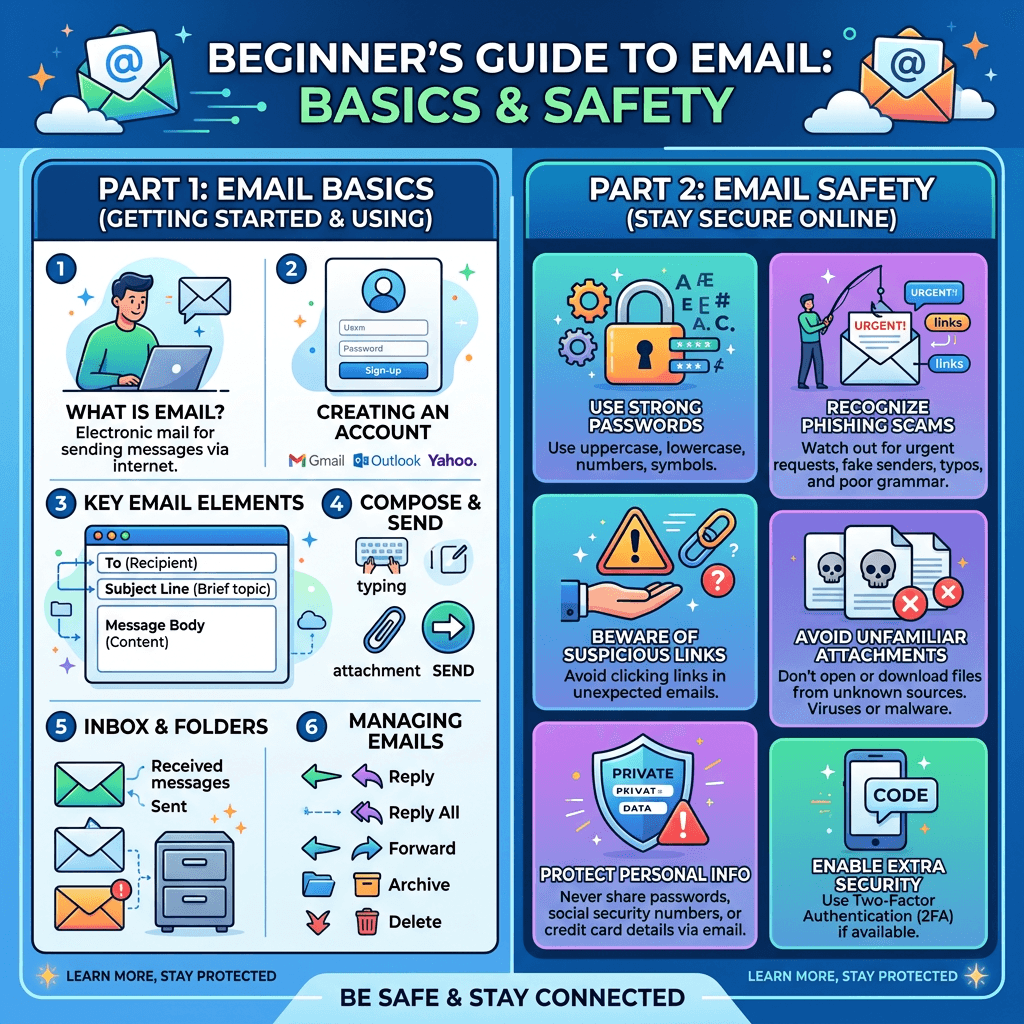
Every email has a few standard parts. The most common ones are the To, From, Subject, Body, and Send button. Once you understand these, reading and writing emails becomes much easier.
The To field is where you enter the recipient’s email address. The From field shows who sent the email. The Subject line gives a short summary of what the message is about, which helps the reader understand it before opening it.
The Body is the main message itself. This is where you write your question, update, request, or response. Good email writing is usually clear, polite, and short enough to read quickly without confusion.
You may also see CC and BCC fields. CC means carbon copy, and it sends a visible copy to someone else. BCC means blind carbon copy, which sends a copy without other recipients seeing that person’s address.
Attachments are another important part of email. These are files you add to your message, such as resumes, invoices, photos, or reports. Before clicking send, always double-check that the correct file is attached.
Many email tools also include folders like Inbox, Sent, Drafts, Spam, and Trash. These help you organize your messages. For example, Drafts stores unfinished emails, while Spam catches suspicious or unwanted messages.
Beginners should also learn common actions such as Reply, Reply All, and Forward. Reply sends a response only to the sender. Reply All responds to everyone included in the email, and Forward sends the message to a new person.
A simple example would be sending a doctor’s office your contact information. You would type their email in the To field, write a clear Subject like “New Patient Information,” add your message in the Body, attach any required forms, and then click Send.
Once you understand these parts, email becomes much less intimidating. You do not need advanced technical skills. You just need to know what each section does and build the habit of reviewing your message before sending it.
Troubleshooting Common Beginner Email Problems
Problem: Email won’t send
- Check your internet connection
- Confirm the recipient’s email address is correct
- Make sure attachments are not too large
- Refresh the app or sign out and back in
Problem: Not receiving emails
- Check your spam or junk folder
- Make sure your inbox is not full
- Verify the sender used the right address
- Review filters or blocked contacts
Problem: Suspicious email received
- Do not click any links
- Do not download attachments
- Check the sender address carefully
- Mark it as spam or phishing
If you are building a website or business online, these resources may help:
- Free Website Speed Checklist
- Small Business IT Setup Guide
To request help or ask questions, contact Archer IT Solutions here:
👉 https://www.archer-its.com/contact-us/
“Archer IT Solutions made our setup simple and easy to understand. We finally got our business email and website running smoothly.” — Melissa R.
Case Study:
We helped a small business fix email delivery issues, improve domain setup, and create a more reliable online presence. The result was smoother communication with customers and fewer missed messages.
What is email in simple words?
Email is a way to send and receive digital messages over the internet using an email address.
What is email used for?
Email is used for personal messages, school communication, work updates, file sharing, and customer support.
Is email still important today?
Yes. Email is still one of the most important tools for business, professional communication, and account management.
What parts of an email should beginners know?
Beginners should know the To, From, Subject, Body, CC, BCC, and attachment sections.
Can Archer IT Solutions help with business email and IT setup?
Yes. Archer IT Solutions can help with hosting, IT support, website services, and managed IT solutions.
Email may seem basic, but it is one of the most important communication tools you will ever use. Once you understand what is email, how it works, and the common parts inside each message, you can use it with more confidence at home or in business. If you need help with business technology, hosting, or support, Contact Archer IT Solutions Now: https://www.archer-its.com/contact-us/
👉 Request IT Support Now
https://www.archer-its.com/contact-us/
Support: support@archer-its.com
Sales: sales@archer-its.com
General: info@archer-its.com
Response within 6 hours.
FAST, SECURE WEB HOSTING FOR YOUR BUSINESS
Reliable Hosting for Your Business
Fast, secure and reliable hosting solutions designed to keep your website online, protected and ready to grow.
Standard Hosting
Fast, reliable hosting with the essential tools your business website needs.
- Fast, reliable hosting
- Free SSL security
- Professional email accounts
- 1-click WordPress setup
- Scalable for growing traffic
Domain Only
Register your domain with simple setup and flexible hosting options.
- Affordable yearly pricing
- Easy setup
- Works with any hosting
- Simple domain management
Reseller Hosting
Start your own hosting business or manage multiple client websites with flexible reseller hosting plans.
Reseller 1
- 10 Domains
- 100 GB Disk Space
- 2TB Bandwidth
- 100 Databases
- 100 Mailboxes
- WordPress Ready
Reseller 2
- 25 Domains
- 300 GB Disk Space
- 6TB Traffic
- 300 Databases
- 300 Mailboxes
- WordPress Ready
Reseller 3
- 50 Domains
- 600 GB Disk Space
- 12TB Traffic
- 600 Databases
- 600 Mailboxes
- WordPress Ready
Reliable web hosting with SSL, professional email, backups, and responsive technical support. Get the performance and support you need to keep your business website online and running smoothly.
Launching a new website or moving from another provider? Archer IT Solutions makes hosting simple, secure, and easy to manage.
WHY CHOOSE ARCHER IT?
Everything You Need to Keep Your Website Running Smoothly
⚡ 99.9% Uptime Guarantee
Keep your website available and accessible with reliable hosting infrastructure.
🔒 Free SSL Certificates
Protect your website and visitors with SSL security included with your hosting.
📧 Professional Business Email
Create professional email addresses using your own business domain.
⚙️ One-Click WordPress Installation
Get your WordPress website up and running quickly with easy installation.
💾 Automatic Daily Backups
Help protect your website data with regular automated backups.
🚀 Fast SSD Storage
Fast storage helps your website load efficiently and provides a smoother experience for visitors.
🛠️ 24/7 Technical Support
Get technical assistance when you need help with your hosting.
🔄 Website Migration Assistance
Move your existing website to Archer IT with assistance from the support team.
HOSTING THAT GROWS WITH YOUR BUSINESS
Whether you’re launching your first website or managing multiple client websites, Archer IT Solutions provides reliable hosting designed to support your business as it grows.
Our hosting solutions provide:
⚡ Fast Performance
🔒 Reliable Security
✓ Dependable Uptime
⚙️ Easy Website Management
🛠️ Local Expert Support
WHY BUSINESSES CHOOSE ARCHER IT HOSTING
Enterprise Security
Protect your website with free SSL certificates, malware protection, and secure hosting infrastructure.
Fast Performance
Optimized SSD storage helps your website load quickly and provides a smoother experience for visitors.
Expert IT Support
Get friendly, knowledgeable assistance when you need help with your hosting or website.
Automatic Daily Backups
Regular backups help protect your website data and make recovery easier when needed.
Professional Business Email
Create professional email addresses using your business domain to build trust with customers.
One-Click WordPress Installation
Get your WordPress website up and running quickly with easy installation.
15-DAY MONEY-BACK GUARANTEE
Try Archer IT Hosting Risk-Free
We’re confident in the reliability of our hosting services. If you’re not completely satisfied within your first 15 days, you can request a full refund.
No hidden fees.
No complicated process.
REAL PEOPLE. REAL SUPPORT.
When you need help, you can reach experienced IT professionals who understand your website and hosting needs.
Our team can assist with website migration, email setup, WordPress support, website troubleshooting, and hosting management.
Our team can help with
- Website migration
- Email setup
- WordPress support
- Website troubleshooting
- Hosting management
FREQUENTLY ASKED QUESTIONS
Find answers to common questions about Archer IT hosting, website migration, WordPress, security, and technical support.
What is web hosting?
Web hosting is a service that stores your website files and makes your website accessible on the internet.
Can you migrate my existing website?
Yes. Archer IT Solutions can help migrate your existing website to Archer hosting with minimal downtime.
Is SSL included?
Yes. Every hosting package includes a free SSL certificate to help protect your website and visitors.
Can I install WordPress?
Yes. Our hosting plans include one-click WordPress installation for quick and easy setup.
What happens if my website grows?
You can upgrade your hosting plan as your business and website requirements grow.
Do you provide IT support?
Yes. In addition to web hosting, Archer IT Solutions provides professional IT support to help keep your systems and technology running smoothly.
READY TO GET YOUR WEBSITE ONLINE?
Give your business a reliable foundation with professional web hosting and responsive IT support from Archer IT Solutions. Let us help you get online with confidence.


No responses yet