IEEE 802.11g Modulation: How OFDM Works and Why It Matters
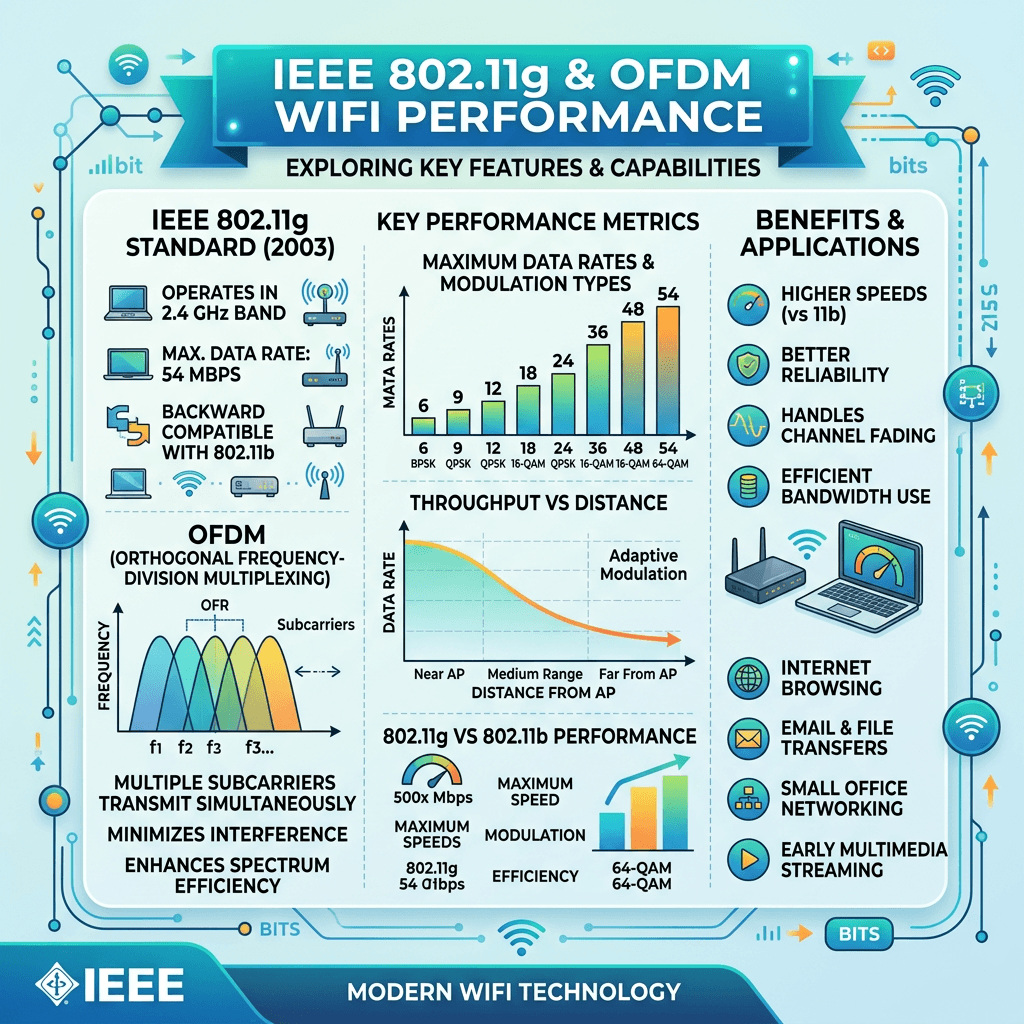
IEEE 802.11g is an older Wi-Fi standard that operates in the 2.4 GHz frequency band and supports a maximum theoretical data rate of 54 Mbps. One of its main improvements over 802.11b was the introduction of Orthogonal Frequency-Division Multiplexing (OFDM) for higher data rates.
However, saying that 802.11g simply “uses OFDM” is incomplete. The standard also supports legacy 802.11b transmission methods so that 802.11g devices can maintain backward compatibility with older equipment.
Understanding the modulation methods used by 802.11g helps explain both its higher theoretical speed and some of the performance limitations that occur when older wireless devices are connected to the same network.
What Modulation Does in Wi-Fi
In a wireless network, modulation is the process used to represent digital information on a radio signal so that it can travel between a transmitter and receiver.
Different Wi-Fi standards use different modulation and transmission techniques to achieve particular combinations of speed, range, reliability, and compatibility.
IEEE 802.11g was designed as a faster extension of 802.11b while continuing to operate in the 2.4 GHz band. It introduced OFDM to achieve higher data rates while retaining support for older 802.11b equipment.
What Modulation Does IEEE 802.11g Use?
IEEE 802.11g uses OFDM for data rates above 20 Mbps. It also supports CCK (Complementary Code Keying) and other legacy transmission methods at lower data rates to maintain compatibility with 802.11b devices.
The OFDM mode supports the following nominal data rates:
- 6 Mbps
- 9 Mbps
- 12 Mbps
- 18 Mbps
- 24 Mbps
- 36 Mbps
- 48 Mbps
- 54 Mbps
At the lower rates, 802.11g can use transmission methods inherited from 802.11b, including DSSS/CCK. The standard also included optional modes such as CCK/OFDM and PBCC.
This combination allowed 802.11g to provide significantly higher speeds than 802.11b without abandoning compatibility with existing 2.4 GHz wireless equipment.
How OFDM Works in 802.11g
OFDM stands for Orthogonal Frequency-Division Multiplexing.
Instead of sending all the information over a single carrier, OFDM divides the available channel into multiple closely spaced subcarriers. These subcarriers transmit portions of the data simultaneously.
The subcarriers are mathematically arranged to remain orthogonal, meaning they can overlap in frequency without interfering with one another under the intended receiver design.
The 802.11g OFDM implementation uses 52 subcarriers:
- 48 are used for data
- 4 are used as pilot subcarriers for synchronization and signal tracking
The system uses modulation schemes including BPSK, QPSK, 16-QAM, and 64-QAM depending on the selected data rate and signal conditions.
This design was one of the reasons 802.11g could reach a theoretical 54 Mbps while remaining within the 2.4 GHz band.
IEEE 802.11g vs. 802.11b
The most important difference between 802.11b and 802.11g is the way they achieve higher data rates.
| Feature | IEEE 802.11b | IEEE 802.11g |
|---|---|---|
| Frequency band | 2.4 GHz | 2.4 GHz |
| Maximum theoretical data rate | 11 Mbps | 54 Mbps |
| Higher-speed transmission | DSSS/CCK | OFDM |
| Backward compatibility | — | Compatible with 802.11b |
| Standard introduced | Earlier | 2003 |
IEEE 802.11g was specifically designed to provide higher speeds while retaining compatibility with 802.11b equipment.
This made 802.11g an important upgrade for wireless networks during its era.
Why 802.11g Can Be Slower Than 54 Mbps
The 54 Mbps figure is a theoretical link rate, not a guarantee of actual internet or file-transfer speed.
Actual throughput can be significantly lower because wireless communication has protocol overhead and is affected by factors such as:
- Distance from the access point
- Signal strength
- Radio interference
- Network congestion
- Number of connected devices
- Wireless channel conditions
- Legacy 802.11b devices
- Hardware and access-point implementation
For example, a device may show a 54 Mbps wireless connection while delivering substantially less usable throughput.
A legacy 802.11b device can also affect an 802.11g network because the network needs to accommodate the older transmission method and additional protection mechanisms. This can reduce the efficiency of the wireless network.
Why the 2.4 GHz Band Matters
IEEE 802.11g operates in the 2.4 GHz band, the same band used by 802.11b.
The 2.4 GHz band can provide useful coverage, but it is also commonly shared with other wireless technologies and devices. Interference can therefore affect performance.
In a busy environment, nearby wireless networks can compete for available airtime. Other sources of radio interference can also affect connection quality.
This means that improving Wi-Fi performance is not simply a matter of looking at the advertised Mbps rating of an access point. Channel conditions, device compatibility, placement, and network design can all affect the result.
Is IEEE 802.11g Still Relevant?
IEEE 802.11g was ratified in 2003 and is now an obsolete wireless standard for modern network deployments.
Newer Wi-Fi generations provide substantially higher performance and introduce technologies designed to improve capacity, efficiency, and operation in environments with many connected devices.
For a modern business network, continuing to rely on 802.11g-only equipment would generally not be a sensible approach when newer hardware is available.
However, understanding 802.11g remains useful when troubleshooting older computers, routers, wireless adapters, embedded equipment, or legacy networks.
It can also help explain why an older device connects successfully to a modern network but negotiates a much lower wireless rate than newer devices.
Troubleshooting an Older 802.11g Wi-Fi Connection
If an older wireless device is experiencing slow or unreliable connectivity, start by identifying the wireless standard supported by both the device and access point.
Check the following:
1. Check the connection speed
Look at the wireless adapter or operating system network information to determine the negotiated link rate.
Remember that the negotiated rate is not necessarily the same as the usable throughput available to applications.
2. Check for interference
Because 802.11g operates at 2.4 GHz, nearby wireless networks and other devices can contribute to interference.
Changing the wireless channel may help in some environments.
3. Check the device’s wireless capabilities
An older adapter may only support 802.11b/g, limiting the connection even when the router supports much newer standards.
4. Check for legacy devices
If an old 802.11b device is connected to the same wireless network, it can introduce additional overhead and reduce network efficiency.
5. Consider replacing outdated equipment
If the network still depends heavily on 802.11g hardware, upgrading the access point and client devices can provide a much larger improvement than trying to optimize an obsolete standard.
802.11g and Modern Wi-Fi Upgrades
Modern Wi-Fi networks are designed around significantly newer standards and hardware.
If a business is experiencing slow wireless connections, frequent disconnections, or poor coverage, the problem may not be the internet connection itself. The wireless infrastructure, access-point placement, channel configuration, client hardware, or network capacity may be contributing to the problem.
A proper network assessment can identify whether the problem is caused by the wireless environment, local equipment, or another part of the network.
For businesses that need assistance with network infrastructure and ongoing technology management, Archer IT Solutions provides Managed IT Services and Onsite IT Support.
Frequently Asked Questions
What modulation does IEEE 802.11g use?
IEEE 802.11g uses OFDM for its higher data rates, including rates above 20 Mbps. It also supports legacy DSSS/CCK transmission methods for compatibility with 802.11b devices.
What is the maximum speed of 802.11g?
The maximum theoretical data rate of IEEE 802.11g is 54 Mbps. Actual usable throughput is lower and depends on network conditions and protocol overhead.
Is 802.11g the same as 802.11b?
No. Both operate in the 2.4 GHz band, but 802.11g introduced OFDM to provide higher data rates while maintaining backward compatibility with 802.11b.
Why is my 802.11g connection slower than 54 Mbps?
The 54 Mbps figure represents a theoretical wireless data rate. Distance, interference, congestion, protocol overhead, hardware limitations, and legacy devices can all reduce actual throughput.
Should I still use an 802.11g router?
For a new network, 802.11g should generally not be the standard you choose. Modern Wi-Fi equipment offers substantially better performance and capacity. Older 802.11g equipment may still be useful for legacy devices, but it should not normally be the foundation of a modern business network.
Can Archer IT Solutions help with Wi-Fi problems?
Yes. Archer IT Solutions can help businesses troubleshoot network connectivity, evaluate infrastructure, and determine whether equipment or configuration changes are needed. You can contact Archer IT Solutions to discuss a network or IT support requirement.
Final Takeaway
IEEE 802.11g was an important step forward in Wi-Fi because it brought OFDM-based high-speed transmission to the 2.4 GHz band while maintaining compatibility with 802.11b devices.
Its maximum theoretical rate of 54 Mbps was a major improvement over 802.11b’s 11 Mbps, but actual performance depended on signal conditions, interference, network congestion, protocol overhead, and the devices connected to the network.
Today, 802.11g is primarily relevant when dealing with legacy equipment. For modern business networks, newer Wi-Fi standards provide a better foundation for performance, capacity, and reliability.
If an older wireless network is causing slow speeds or connectivity problems, Archer IT Solutions can help identify the underlying issue and determine whether configuration changes or an infrastructure upgrade is the better solution.


No responses yet