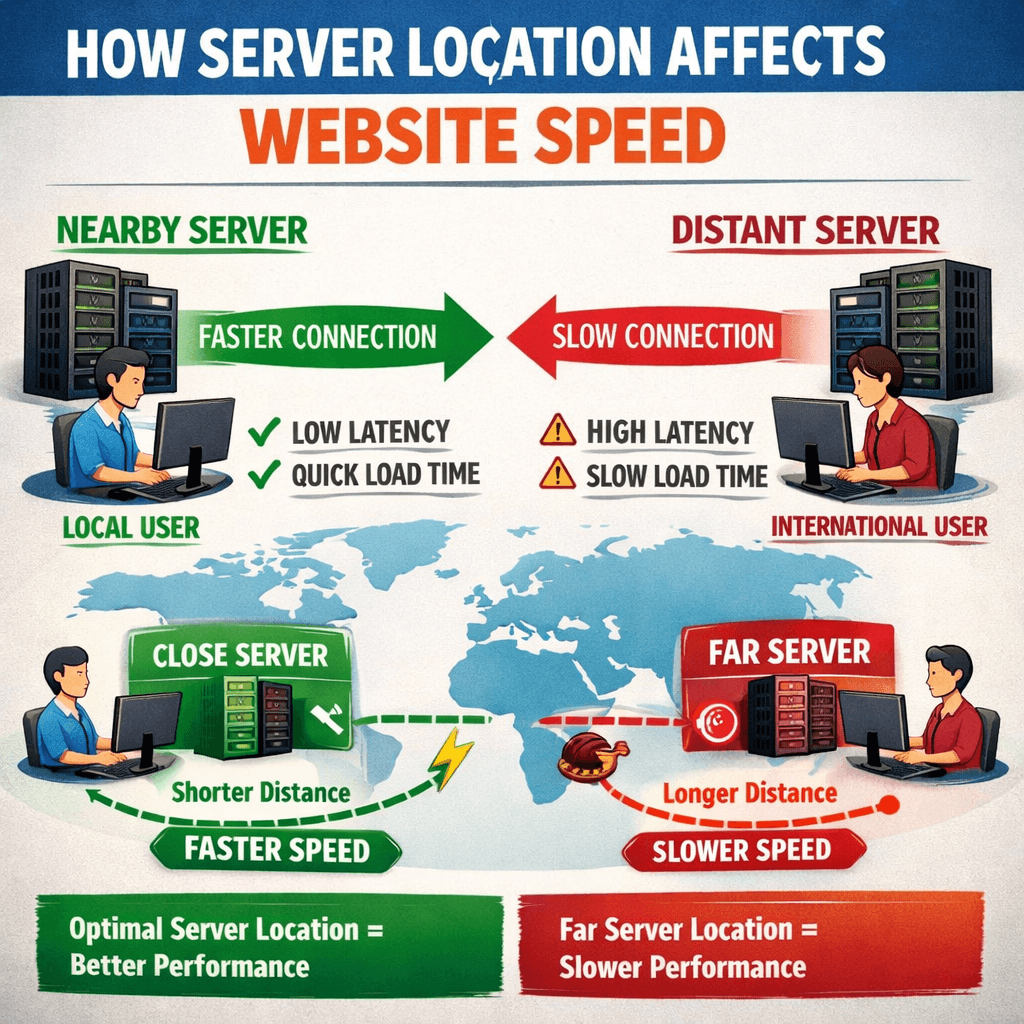
Server Location Guide to Boost Website Speed and Performance
⚡ Quick Summary
Choosing the right server location can dramatically improve your website’s loading time, user experience, and search rankings. This guide breaks down what server location means, why it matters, and how to pick the best one for your audience.
🧭 What You’ll Learn
- How server location affects website speed
- The link between proximity and performance
- Smart strategies for server placement
- Tips for global traffic optimization
- How Archer IT Solutions can supercharge your hosting setup
👉 $1.99/month Web Hosting: Fast, Secure, Local Hosting
💡 Quick Answer
Server location directly affects website speed because the closer your users are to your hosting server, the faster data travels between them. Choosing a server near your audience can cut latency and boost your website’s overall responsiveness.
Every second matters online. Studies show that even a one-second delay in page loading can drop conversions by 7%. Yet, many website owners overlook one of the simplest performance boosters — server location. In this article, we’ll explain how the location of your hosting server influences website speed and share a practical guide to help you make the smartest placement decisions.
How Server Location Impacts Website Loading Speed
Your server location determines how far data needs to travel from the hosting center to the visitor’s device. When the distance is long — for example, your website is hosted in Europe but most visitors are in Washington State — latency increases. This latency can cause slow page loading, buffering, and even dropped sessions. Simply put, the farther your server is from your users, the slower your site loads.
Moreover, search engines like Google consider page speed as a ranking factor. A poorly optimized server location not only hurts user experience but can also impact SEO visibility. That’s why businesses offering geographically targeted services — such as Mount Vernon IT support or Washington small business hosting — need local or regional servers that keep latency to a minimum.
Real-world data backs this up. According to Akamai’s State of Online Performance Report, websites hosted closer to their user base load up to 40% faster. This translates to happier users, longer session times, and more successful conversions — something every small business or online entrepreneur wants.
📊 Comparison Table: Local vs. Distant Servers
| Feature | Local Server | Distant Server |
|---|---|---|
| Load Time | Fast | Slow |
| Latency | Low | High |
| SEO Impact | Positive | Neutral/Negative |
| User Experience | Excellent | Poor |
| Cost Efficiency | Moderate | Potential extra CDN cost |
Boosting Website Performance with Smart Server Placement
Smart server placement starts with knowing where your visitors come from. Tools like Google Analytics reveal user geography so you can choose a server location matching your dominant audience. For example, if 70% of traffic comes from the U.S. West Coast, hosting in San Jose or Seattle ensures optimal speed and minimal latency.
Next, consider using Content Delivery Networks (CDNs). A CDN stores copies of your site on multiple servers worldwide, ensuring instant content delivery, no matter where your visitor lives. CDNs are especially useful for websites serving global audiences or eCommerce platforms that attract sales from different continents.
👉 Fast, Reliable Web Hosting — Starting at $1.99/month: Get Hosting Now
Finally, factor in data compliance and regional reliability. Hosting locally not only increases speed but can also ensure compliance with data protection laws — such as GDPR in Europe or stricter U.S. privacy standards. If your business offers localized IT services or eCommerce, selecting a regional host strengthens trust and legal peace of mind.
⚙️ Troubleshooting: Poor Speeds Despite Local Hosting
If your site loads slowly even with nearby hosting, try the following steps:
- Check DNS performance — Delayed DNS lookup can offset local benefits.
- Optimize your images and scripts — Heavy content reduces speed gains.
- Enable caching and compression — Reduce load on your local server.
- Consult an IT expert — Archer IT Solutions can audit your setup to pinpoint inefficiencies.
👉 Need help? Contact us now.
💼 Service Positioning: How Archer IT Solutions Helps
At Archer IT Solutions, we specialize in managed IT services, secure web hosting, and local server optimization. Whether you need web hosting for your small business in Washington or ongoing Mount Vernon IT support, we deliver fast, secure, and scalable solutions tailored to your audience.
We’ve helped hundreds of businesses overcome sluggish websites by migrating them to strategically located servers. For example, a local online retailer saw a 60% drop in bounce rate after relocating servers closer to their customer base.
✅ Testimonial: “Our website went from a 6-second load time to under 2 seconds overnight. Archer IT Solutions made the entire migration seamless!” — Jason L., Small Business Owner
🔐 Internal & External Resources
Internal Links:
External Links:
Server location might seem like a backend detail, but it’s one of the most powerful ways to boost performance, SEO, and conversions. By aligning your hosting with your users’ geography and integrating smart technologies like CDNs, you can deliver faster, smoother, more trusted digital experiences.
❓ FAQ Section
1. What’s the best server location for my site?
Choose the location closest to your primary user base to minimize latency and improve load times.
2. Will a CDN replace the need for local hosting?
Not fully — CDNs enhance performance globally but a well-placed origin server is still crucial.
3. Does server location affect SEO rankings?
Yes, faster loading sites usually rank higher, especially when targeting local audiences.
4. How can I check my server location?
Use tools like Whois lookup or Pingdom to identify where your website is hosted.
5. Who can help me optimize server location?
Contact Archer IT Solutions for tailored hosting and IT support.
🔁 Summary
- Server proximity = speed advantage
- Local hosting improves SEO and trust
- CDNs amplify global reach
- Archer IT Solutions makes setup easy and affordable
👉 Contact Archer IT Solutions Now
Get dedicated advice, powerful hosting, and expert Mount Vernon IT support today.
https://www.archer-its.com/contact-us/
🎁 Free Offers:
- Download our Website Speed Checklist
- Get your Small Business IT Setup Guide
Fast, Secure Website Hosting & IT Support for Small Businesses
Keep your website online, secure, and running at peak performance with reliable web hosting, proactive IT support, free SSL certificates, professional email, automatic backups, and expert technical assistance.
Whether you’re launching a new website or moving from another provider, Archer IT Solutions makes hosting simple, secure, and stress-free.
WHY CHOOSE ARCHER IT?
Everything You Need to Keep Your Website Running Smoothly
| ✔ 99.9% Uptime Guarantee ✔ Free SSL Certificates ✔ Professional Business Email ✔ One-Click WordPress Installation | ✔ Automatic Daily Backups ✔ Fast SSD Storage ✔ 24/7 Technical Support ✔ Website Migration Assistance |
|
🔥 Most Popular Standard Plan |
Domain Only | |
|---|---|---|
|
$9.99/month Limited-time offer | Secure your business name online | |
|
Affordable yearly pricing | |
Reseller Hosting (For Agencies & Developers)
| ||
|
Reseller 1 |
Reseller 2 |
Reseller 3 |
| $20/month | $37.50/month | $50/month |
|
|
|
|
✔ 99.9% uptime • ✔ Secure • ✔ Easy setup • ✔ Local support | ||
BUILT FOR GROWING BUSINESSES
Whether you’re creating your first website or managing multiple client websites, Archer IT Solutions provides dependable hosting that grows with your business.
Our hosting solutions deliver
- Lightning-fast performance
- Enterprise-grade security
- Reliable uptime
- Easy website management
- Local expert support
WHY BUSINESSES CHOOSE ARCHER IT HOSTING
Enterprise Security
Protect your website with free SSL certificates, malware protection, and secure servers.
Lightning Fast Performance
Optimized SSD servers deliver fast loading speeds for a better user experience.
Expert IT Support
Receive friendly, knowledgeable assistance whenever you need help.
Automatic Daily Backups
Your website is backed up regularly, making recovery simple if needed.
Professional Business Email
Build credibility with branded email addresses for your business.
One-Click WordPress Installation
Launch your WordPress website in minutes with quick and easy installation.
15-DAY MONEY-BACK GUARANTEE
Try Archer IT Hosting Risk-Free
We’re confident you’ll love our hosting services.
If you’re not completely satisfied within the first 15 days, we’ll provide a full refund.
No hidden fees.
No complicated process.
REAL PEOPLE. REAL SUPPORT.
Unlike many hosting providers, Archer IT Solutions believes customer support should be personal.
When you need help, you’ll speak with experienced IT professionals—not automated bots.
Our team can help with
- Website migration
- Email setup
- WordPress support
- Website troubleshooting
- Hosting management
FREQUENTLY ASKED QUESTIONS
What is web hosting?
Web hosting is the service that stores your website files and makes your website accessible on the internet.
Do you migrate existing websites?
Yes. We can migrate your existing website to Archer IT Solutions with minimal downtime.
Is SSL included?
Yes. Every hosting package includes a free SSL certificate to protect your website and visitors.
Can I install WordPress?
Absolutely. Our hosting plans include one-click WordPress installation for quick setup.
What happens if my website grows?
You can upgrade your hosting plan at any time as your business expands.
Do you provide IT support?
Yes. In addition to web hosting, Archer IT Solutions offers professional IT support services to help keep your systems running smoothly.
Ready to Build or Grow Your Online Presence?
Whether you need reliable web hosting, professional IT support, or a secure home for your business website, Archer IT Solutions has you covered.
Let us help you get online with confidence.


No responses yet