How to Reset Email Password Fast: A Safe Fix Guide
Forgotten passwords happen, but you do not need to panic. This email password guide shows you how to reset your email password quickly, safely, and without losing access to important messages. Whether you’re a beginner, a business owner, or handling multiple accounts, the goal is the same: get back in fast and protect your inbox from future lockouts.
Reset Your Email Password in Minutes, Safely
Summary Box
- Reset your password using the provider’s official recovery page
- Verify your identity through email, phone, or backup codes
- Create a stronger password and update saved logins
- Fix common login issues if the reset does not work
- Protect your inbox with security best practices
What You’ll Learn
- How to reset an email password step by step
- How to avoid scams and fake reset pages
- What to do if password recovery fails
- How to keep your inbox secure after the reset
👉 Get Help Now: https://www.archer-its.com/contact-us/
Quick Answer
To reset your email password safely, go to your email provider’s official sign-in page, choose Forgot password, verify your identity with a recovery method, and set a strong new password. Always avoid links in suspicious emails and update your password on all connected devices afterward.
Introduction
If you are locked out of your inbox, the fastest fix is usually a password reset. This email password guide walks you through the safest way to recover access without falling for phishing scams or making login problems worse. For businesses and busy users, a fast reset can save time, prevent missed messages, and reduce security risk.
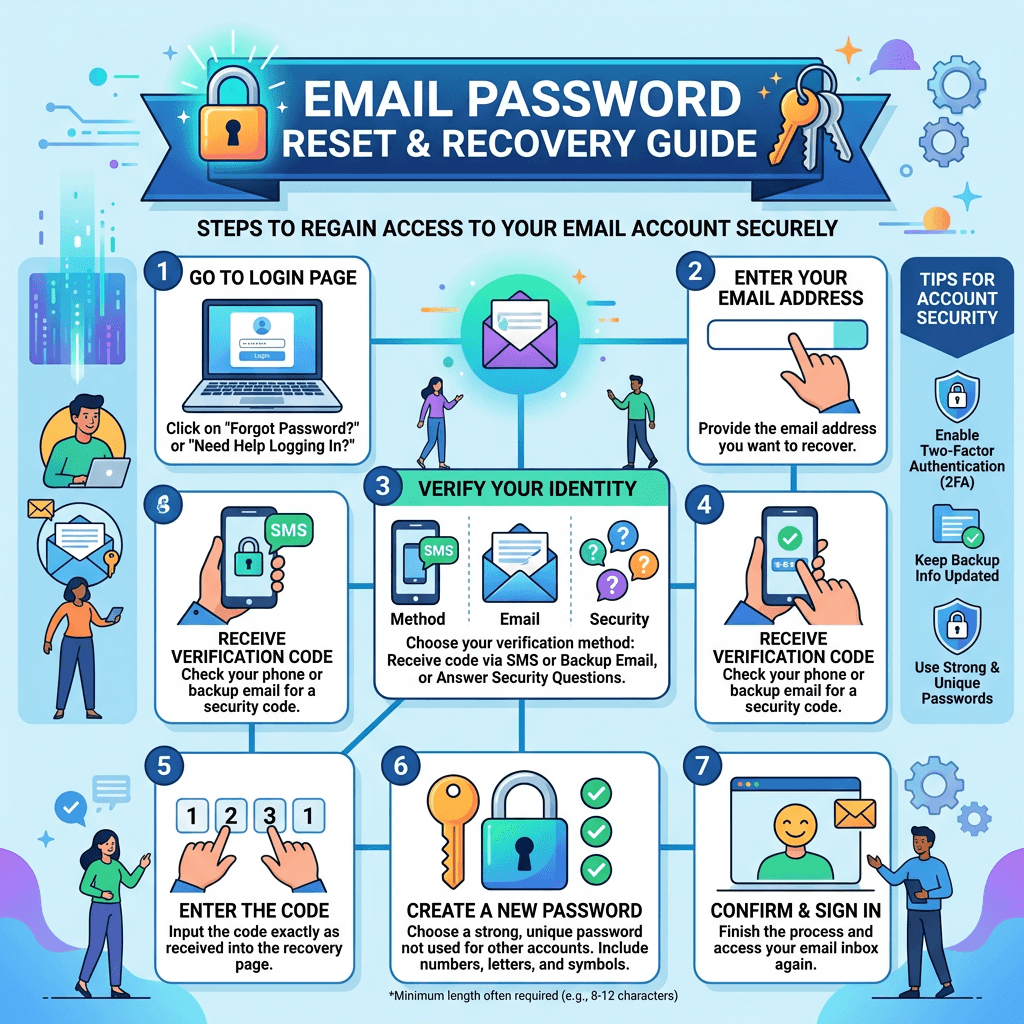
Step-by-Step Reset Process
- Open your email provider’s official login page.
- Click Forgot password or Need help signing in?
- Choose a recovery option, such as:
- Backup email
- Phone number
- Authenticator app
- Security questions
- Enter the code or confirm the request.
- Create a new password that is long and unique.
- Save the password securely in a password manager.
Safety Tips
- Type the website address yourself instead of clicking random links.
- Check that the page uses https://.
- Never share a reset code with anyone.
- If you use work email, notify your IT support team right away.
Comparison Table: Reset Methods
| Method | Speed | Security | Best For |
|---|---|---|---|
| Recovery email | Fast | Good | Personal accounts |
| SMS code | Fast | Good | Mobile users |
| Authenticator app | Fast | Very strong | Security-focused users |
| Security questions | Moderate | Lower | Older accounts |
Pros and Cons
Pros
- Quick account recovery
- Restores inbox access fast
- Improves security if you choose a strong password
Cons
- Recovery info may be outdated
- SMS access can fail if you changed numbers
- Fake reset emails can trick users
Internal Links
- Learn more about secure website setup in our complete guide to web hosting.
- If your business email depends on a stable site, explore our web hosting services.
- Need broader support? See our managed IT services.
External Resources
- Google Account recovery help: https://support.google.com/accounts/
- Microsoft account password reset: https://support.microsoft.com/
- Password best practices from CISA: https://www.cisa.gov/
Social Proof
“Archer IT Solutions helped our team recover access to three mailboxes in under an hour.”
— Daniel M., small business owner
Case study: We helped a local retail company fix repeated email lockouts by updating recovery settings and strengthening password policies.
Free Offers
- Free Website Speed Checklist
- Small Business IT Setup Guide
Troubleshooting Section
If the reset fails:
- Double-check your recovery email and phone number
- Try another device or browser
- Clear your cache and cookies
- Wait a few minutes if too many attempts were made
- Contact your provider or IT team if the account is still locked
Fix Login Issues and Protect Your Inbox Fast
Common Login Problems After a Reset
Sometimes the password changes, but the login still fails. This usually happens because the old password is saved on your phone, mail app, or browser. Update the password everywhere you access that inbox.
Other issues include:
- Caps Lock being on
- Wrong username or alias
- App passwords needed for mail clients
- Security alerts blocking the sign-in
Fast Fix Checklist
- Sign out of all devices
- Update password in email apps
- Re-enter account recovery details
- Confirm your time and date settings are correct
- Check for suspicious login alerts
How to Protect Your Inbox Fast
After the reset, secure the account immediately:
- Turn on two-factor authentication
- Use a password manager
- Remove unknown recovery methods
- Review forwarding rules
- Check recent sign-in activity
This matters even more for businesses using shared mailboxes or WordPress hosting-related accounts. If your email supports your website, your hosting, or your managed IT workflow, one weak password can create a bigger problem than a simple login issue.
Internal Links
- For stronger business continuity, review our server administration guide.
- If your organization needs hands-on assistance, visit our onsite IT support.
- For related business email and infrastructure concerns, explore our managed IT services.
External Resources
- Have I Been Pwned password check: https://haveibeenpwned.com/
- NIST password guidance: https://www.nist.gov/
- Mozilla account security tips: https://support.mozilla.org/
Troubleshooting: If You Still Cannot Log In
- Reset again using the official provider page.
- Try recovery from a trusted device and location.
- Use backup codes if you have them.
- Remove outdated app passwords from mail clients.
- Contact support if the account shows suspicious activity.
Visual Element: Security Checklist Graphic
Description: A phone and laptop checklist showing password update, 2FA, and sign-out actions
ALT text: Inbox security checklist after email password reset
Testimonials
“Clear, fast, and easy to follow. We fixed the login issue in minutes.”
— Sarah T., office manager
“Their guidance saved us from a phishing link that looked real.”
— Marcus L., consultant
FAQ
1. How do I reset my email password safely?
Use the official recovery page, verify your identity, and create a strong new password.
2. Why does my email still not work after I reset the password?
Your phone, browser, or email app may still have the old password saved.
3. Is an email password guide enough for business users?
It helps, but businesses should also use two-factor authentication and IT support.
4. What should I do if I suspect a fake reset email?
Do not click it. Go directly to the provider’s official site and reset from there.
Summary
Resetting your email password does not have to be stressful. Use the official recovery process, secure your account afterward, and fix any saved-login issues right away. If you want extra help protecting your inbox, Archer IT Solutions can support your email, hosting, and managed IT needs.
If you are locked out, short on time, or dealing with repeated login problems, the safest move is to act quickly and correctly. This email password guide gives you the fastest path back into your account while reducing the chance of scams, data loss, or future access issues. For dependable help with email, hosting, WordPress, and business IT, Contact Archer IT Solutions Now: https://www.archer-its.com/contact-us/


No responses yet