Wi-Fi Network Topology: Types, Examples, and How They Work
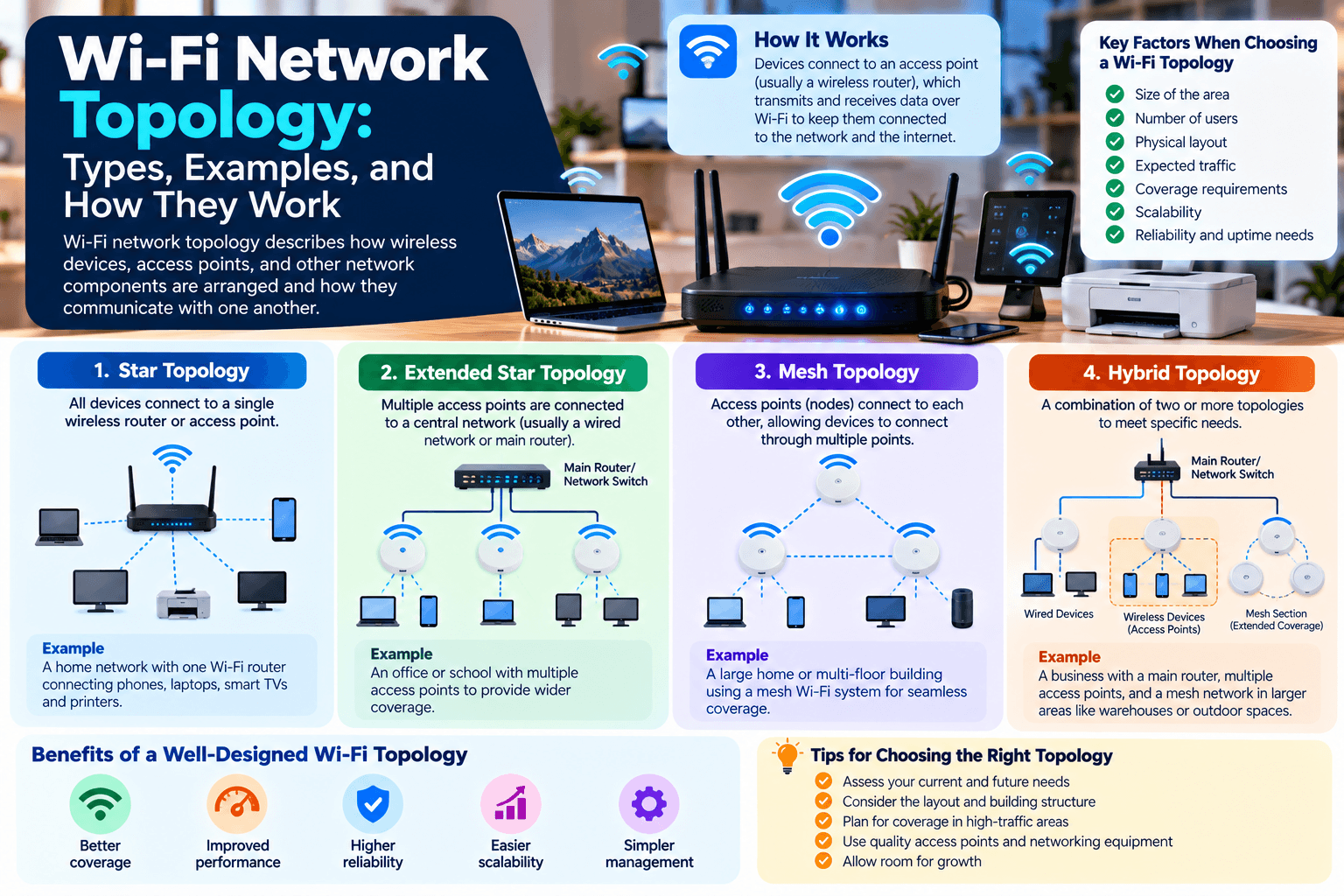
Wi-Fi network topology describes how wireless devices, access points, and other network components are arranged and how they communicate with one another.
Understanding Wi-Fi topology is important when designing a network because the structure you choose can affect coverage, performance, reliability, scalability, and management.
A small home network may only need one wireless router, while a large office, school, warehouse, or campus may require multiple access points and a more structured design.
The right topology depends on factors such as the size of the area, number of users, physical layout, expected traffic, coverage requirements, and whether continuous connectivity is important.
1. Star Topology
In a star topology, wireless devices connect to a central device, typically a wireless router or access point.
For example:
Laptop → Access Point ← Smartphone
Printer → Access Point ← Smart TV
The access point acts as the central communication point for the connected devices.
Advantages
- Relatively simple to install
- Easy to manage
- Straightforward to troubleshoot
- Suitable for small networks
- A problem with one client device does not normally disconnect other clients
Limitations
The central access point becomes an important dependency. If it fails, devices relying on it may lose wireless connectivity.
Coverage can also become a limitation if the area is too large for a single access point.
Star topology is common in homes, small offices, retail locations, and other environments where a single access point can provide sufficient coverage.
For a basic explanation of routers and their role in a network, see Archer IT Solutions’ guide to routers.
2. Mesh Topology
A mesh Wi-Fi system uses multiple nodes or access points that work together to provide wireless coverage across a larger area.
Instead of relying on one access point to cover the entire premises, multiple nodes are strategically positioned throughout the environment.
For example:
Internet/Router → Mesh Node → Mesh Node → Mesh Node
Depending on the system’s design, nodes may communicate with one another wirelessly or use Ethernet backhaul.
Mesh networking can be useful in:
- Large homes
- Hotels
- Warehouses
- Campuses
- Multi-floor buildings
- Larger office environments
Advantages
Wider coverage: Multiple nodes can provide coverage across areas that a single access point cannot adequately reach.
Reduced dead zones: Properly positioned nodes can help address areas where the wireless signal is weak.
Centralized management: Many modern mesh systems provide a single management interface for configuring the network.
Scalability: Additional nodes can sometimes be added as coverage requirements change.
Important Consideration
Mesh does not automatically mean that every node provides the same performance.
Wireless backhaul consumes wireless capacity, and the distance and signal quality between nodes can affect performance. Where possible, Ethernet backhaul can provide a more predictable connection between access points.
For practical guidance on wireless coverage, see Archer’s article about weak Wi-Fi and router placement.
3. Extended Star Topology
An extended star topology expands the basic star structure by connecting multiple network segments or access points through a central network infrastructure.
A simplified example might look like:
Central Network → Access Point 1
Central Network → Access Point 2
Central Network → Access Point 3
Central Network → Access Point 4
In a business environment, several wireless access points may be connected through Ethernet to switches and the wider network.
This approach is useful for larger environments because each access point can cover a particular area.
Advantages
- Supports larger networks
- Easier to organize coverage by location
- Centralized infrastructure can simplify administration
- Individual access points can be serviced without necessarily affecting every other access point
- Suitable for multi-floor buildings and larger offices
Limitations
The network still depends on the underlying wired infrastructure and central network components. A failure in a switch, uplink, or other central component can affect multiple access points.
This is one reason professional wireless deployments consider redundancy and network architecture rather than simply adding more access points.
4. Point-to-Point Topology
Point-to-point wireless networking creates a direct wireless link between two locations or network endpoints.
For example:
Office A ⇄ Wireless Bridge ⇄ Office B
This can be useful when two buildings need to communicate but installing physical cabling between them is impractical or expensive.
Common applications include:
- Connecting separate buildings
- Connecting remote offices
- Linking network infrastructure across a site
- Wireless backhaul
- Temporary network connections
A point-to-point link generally requires appropriate alignment, equipment, frequency planning, and a suitable wireless environment.
The achievable range and performance depend on factors such as equipment, antennas, frequency, environmental conditions, interference, and line of sight.
5. Point-to-Multipoint Topology
Point-to-multipoint networking uses one central wireless station to communicate with multiple remote endpoints.
A simplified structure looks like:
Central Access Point
↙ ↓ ↘
Client 1 Client 2 Client 3
This topology can be useful when one central location needs to communicate with multiple remote locations.
Examples include:
- Wireless internet service provider networks
- Outdoor wireless networks
- Connecting multiple buildings
- Some surveillance deployments
- Large outdoor sites
The central wireless device manages communication with multiple endpoints, making the architecture different from a dedicated point-to-point connection.
Performance depends on factors such as the number of connected clients, available spectrum, channel configuration, signal quality, antenna design, and traffic demand.
Wi-Fi Topology vs. Network Architecture
It is worth distinguishing between topology and the physical equipment used to create the network.
A Wi-Fi network may contain:
- Routers
- Wireless access points
- Ethernet switches
- Wireless controllers
- Firewalls
- Servers
- Client devices
- Wireless bridges
The topology describes how these components and endpoints are organized and communicate.
A network can also use more than one topology.
For example, a business might use an extended-star wired infrastructure to connect several access points while those access points provide wireless connectivity to client devices.
How to Choose a Wi-Fi Topology
There is no single topology that is appropriate for every environment.
Consider the following factors when designing a wireless network.
Network Size
A small apartment may only require one access point, while a multi-floor office could require several.
Number of Devices
The number of connected devices affects capacity requirements.
A network supporting five devices has very different requirements from one supporting hundreds of laptops, phones, cameras, and IoT devices.
Coverage Requirements
Consider the physical area that needs wireless coverage.
Walls, floors, building materials, equipment, and interference can all affect signal propagation.
Performance Requirements
Consider what users will actually do on the network.
Basic web browsing has different requirements from:
- Video conferencing
- Large file transfers
- Cloud applications
- VoIP
- Streaming
- Real-time applications
Reliability
If the network supports business-critical operations, consider what happens if an access point, switch, cable, or other component fails.
Redundancy may be more important than simply maximizing coverage.
Scalability
Think about future requirements.
A network that works for 20 users today may need to support substantially more users and devices in the future.
Designing with expansion in mind can make future upgrades easier.
Common Wi-Fi Topology Comparison
| Topology | Typical Use | Main Characteristic |
|---|---|---|
| Star | Homes and small offices | Devices connect to a central access point |
| Mesh | Large homes and larger wireless coverage areas | Multiple nodes cooperate to provide coverage |
| Extended Star | Offices, schools, multi-floor buildings | Multiple access points connect through central infrastructure |
| Point-to-Point | Building-to-building connections | Dedicated wireless link between two locations |
| Point-to-Multipoint | Outdoor and distributed networks | One central wireless station serves multiple endpoints |
These are general architectural descriptions. Actual network designs can combine several approaches depending on the environment.
Why Wi-Fi Topology Matters
Choosing an appropriate topology can help address several practical networking requirements.
Better Coverage
Multiple access points or mesh nodes can provide coverage across larger areas than a single wireless router.
Easier Management
A structured network makes it easier to identify where a connectivity problem originates.
Greater Scalability
A properly designed network can accommodate additional users and devices without requiring a complete redesign.
More Predictable Performance
Good access-point placement, appropriate channel planning, sufficient wired backhaul, and adequate capacity can contribute to better wireless performance.
Improved Reliability
Networks designed with appropriate redundancy can be less dependent on a single component.
Archer’s article on different types of wireless networks provides additional background on wireless networking.
Final Thoughts
Wi-Fi topology describes how wireless devices and network infrastructure are organized and how they communicate.
Star, mesh, extended star, point-to-point, and point-to-multipoint designs each address different networking requirements. A small home network may only need a central wireless router, while a larger business or distributed site may require multiple access points, structured infrastructure, or dedicated wireless links.
The best design depends on the physical environment, number of users, coverage area, performance requirements, reliability needs, and plans for future expansion.
If you are planning or troubleshooting a business wireless network, Archer IT Solutions provides IT and network support. You can also contact Archer IT Solutions to discuss your network requirements.


No responses yet