What Is a Router? A Simple Guide for Beginners
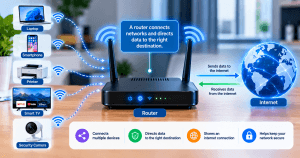
If you have ever wondered what a router is and what it actually does, the simplest answer is this: a router connects networks and directs data to the right destination. In a typical home or small-business network, it allows multiple devices to communicate with each other and share an internet connection.
Your laptop, smartphone, printer, smart TV, security camera, and other connected devices may all depend on a router to communicate with the local network and access the internet.
For beginners, understanding routers can make common networking problems easier to troubleshoot. For businesses, knowing how your router fits into the wider IT environment can help you make better decisions about connectivity, security, and network performance.
What Is a Router?
A router is a networking device that forwards data packets between different networks. It examines information such as the destination IP address and uses routing information to determine where the data should go.
Think of a router as a traffic dispatcher for network data. When your computer requests a website, for example, the router helps forward that traffic toward its destination. When the response comes back, the router helps deliver it to the appropriate device on your network.
According to Cloudflare’s explanation of routers, routers connect two or more IP networks or subnetworks and forward packets toward their intended destinations.
A typical home or small-office router may perform several functions at once, including:
- Connecting your local network to the internet
- Directing traffic between networks
- Allowing multiple devices to share an internet connection
- Providing wired Ethernet connections
- Providing Wi-Fi connectivity
- Assigning local IP addresses
- Providing firewall and other security features
- Supporting guest networks and access controls
- Managing certain types of network traffic
The exact features depend on the router model and how the network is configured.
How Does a Router Work?
When a device sends data across a network, that data is divided into packets. Each packet contains information that helps network equipment determine where it needs to go.
The router examines the relevant packet information and uses its routing table and configuration to decide where to forward the traffic.
For example, imagine you open a website on your laptop:
- Your laptop sends a request.
- The request reaches the router.
- The router determines where the traffic needs to go.
- The traffic is forwarded toward the destination.
- The response returns through the network.
- The router delivers the response to your laptop.
Routers can perform these decisions extremely quickly and repeatedly as devices communicate across the network. Cisco explains routing as the process of selecting paths for IP-packet traffic within or between networks.
A simple example
Suppose an office has:
- 10 employee computers
- 5 smartphones
- 2 network printers
- A smart TV
- Several other connected devices
The router helps manage communication between these devices and the wider internet. It does not simply “make the internet work”; it plays a central role in determining how traffic moves between networks.
Router vs. Modem: What Is the Difference?
One of the most common beginner questions is whether a router and a modem are the same thing.
They are not, although the distinction can become confusing because many internet providers supply a combined modem-router or gateway device.
Modem
A modem provides the connection between your premises and your internet service provider (ISP), depending on the type of internet service being used.
Router
A router connects networks and manages the flow of traffic between them. In a typical home setup, it allows multiple devices to use the available internet connection and communicate on the local network.
Modem-router combination
Some ISP-provided devices combine modem, router, Wi-Fi access point, and gateway functions in a single unit.
| Device | Primary function |
|---|---|
| Modem | Connects the premises to the ISP’s service |
| Router | Routes traffic between networks |
| Modem-router/gateway | Combines multiple networking functions in one device |
The exact arrangement varies depending on the ISP and type of internet service. Cisco’s router guide also distinguishes the functions of routers and modems while noting that modern devices can combine networking functions.
Router vs. Wi-Fi: Are They the Same Thing?
No.
Wi-Fi is a wireless networking technology. A router is a networking device.
A modern wireless router often combines router functionality with a wireless access point, which is why people commonly use “Wi-Fi” and “router” as if they mean the same thing.
For example:
- The router manages network traffic.
- The Wi-Fi access point allows compatible devices to connect wirelessly.
- Ethernet ports allow devices to connect using network cables.
Some larger business networks use separate routers, switches, and wireless access points rather than putting everything into one consumer-style device.
Cisco provides a useful overview of how routers, switches, and access points perform different roles within a network.
For more information about wireless networking, see Archer IT Solutions’ guide to the different types of wireless networks.
What Does a Router Do on a Home or Office Network?
A router can perform several important jobs.
1. Connects different networks
The fundamental role of a router is connecting networks and forwarding traffic between them.
In a home environment, this commonly means connecting the local network to the internet.
2. Allows multiple devices to share an internet connection
A router allows multiple devices to access the same internet connection rather than requiring every device to have a separate connection.
This is why your phone, computer, tablet, printer, and other devices can operate on the same network.
3. Creates or manages the local network
A router can provide the networking infrastructure that allows devices within your home or office to communicate.
For example, computers may communicate with network printers or other shared resources.
4. Provides Wi-Fi
Wireless routers commonly include wireless access-point functionality, allowing devices such as smartphones and laptops to connect without Ethernet cables.
5. Assigns local IP addresses
Many routers use DHCP to automatically assign local IP addresses to devices joining the network.
This saves users from having to configure an IP address manually for every device.
6. Provides security features
Depending on the model, a router may provide firewall functionality, access controls, guest networks, traffic filtering, and other security features.
These features are useful, but a router should not be treated as the only security layer protecting a business network.
For additional network security information, see Archer’s guide to understanding firewalls and protecting your network.
How a Simple Home Network Works
A basic network might look like this:
Internet service → ISP equipment/modem → Router → Wi-Fi or Ethernet → Your devices
For example:
- Your internet service provides connectivity.
- The modem or gateway receives the service from the ISP where applicable.
- The router manages traffic between the local network and other networks.
- Devices connect to the router through Wi-Fi or Ethernet.
- The router forwards traffic to the appropriate destination.
However, not every network uses a separate modem and router. Fibre, cable, fixed wireless, and other internet services can use different types of equipment.
What Is a Router’s Routing Table?
A routing table is information used by a router to determine where network traffic should be forwarded.
When a router receives a packet, it can examine the destination information and compare it with its available routes.
The router then determines the appropriate next step for forwarding the packet.
You generally do not need to understand routing tables to use a home router. However, they become important when troubleshooting more complex business networks.
If you want to go deeper into networking concepts, Archer’s article on how TCP/IP relates to the OSI networking model provides useful background.
Types of Routers
Routers come in different forms depending on the environment and networking requirements.
Wireless routers
These are common in homes and small offices. They typically combine routing with wireless access-point functionality.
Wired routers
Wired routers primarily use Ethernet connections rather than providing wireless access directly.
Business and enterprise routers
Business routers can provide more advanced networking, security, management, traffic-control, and connectivity capabilities than basic consumer equipment.
Virtual routers
A virtual router implements routing functions through software rather than relying solely on a dedicated physical device. These can be useful in cloud and enterprise environments.
Core and edge routers
Large networks and internet service providers may use specialized routers for different parts of their network architecture.
Most home users do not need to worry about core-router terminology. The important point is that routers can range from simple residential devices to highly specialized enterprise infrastructure.
Cisco’s overview of router types provides additional information about wireless, virtual, edge, and core routers.
Router Security: What Should You Check?
Because the router sits at an important point in your network, its security settings matter.
At minimum, review the following:
Change default administrator credentials
Do not leave easily guessable or manufacturer-default administrator credentials in place.
The U.S. Cybersecurity and Infrastructure Security Agency (CISA) has specifically recommended changing default router usernames and passwords because default credentials can be publicly known.
Use strong Wi-Fi security
Use a current security standard supported by your equipment and avoid outdated wireless security protocols where possible.
You can learn more in Archer’s guide to WEP and wireless security.
Keep router firmware updated
Router manufacturers release firmware updates that can address security vulnerabilities, improve stability, or add functionality.
Check your manufacturer’s update process and enable automatic updates when the device supports them and the feature is appropriate for your environment.
Review remote administration
Remote administration can be useful, but exposing a router’s management interface unnecessarily can increase security risk.
If you do not need remote administration, consider whether it should be disabled.
Use a guest network when appropriate
A guest network can help separate visitors and less-trusted devices from the primary network, depending on how the router implements network isolation.
Review connected devices
Periodically check the devices connected to your network. Unexpected devices should be investigated rather than ignored.
For broader guidance, Archer’s website security guide covers security principles that are also relevant to protecting digital systems more generally.
Router Placement Can Affect Wi-Fi Performance
A router can be perfectly functional while its Wi-Fi performance is poor because of its physical location.
Walls, floors, furniture, metal objects, distance, interference, and neighbouring wireless networks can all affect wireless performance.
For better coverage, consider placing the router:
- In a relatively central location
- Away from major obstructions
- At a reasonable height
- Away from sources of significant interference
- Near the area where strong coverage is most important
If you’re experiencing weak coverage, Archer’s guide on router placement and weak Wi-Fi provides additional troubleshooting ideas.
Remember that moving a router will not increase the internet speed provided by your ISP. It can, however, improve the wireless connection between your devices and the router.
Common Router Problems and Basic Troubleshooting
If your internet connection is unreliable, the router may be involved, but it is not automatically the cause.
Try these basic checks:
Restart the network equipment
Power cycling the modem, gateway, and router can sometimes resolve temporary connectivity problems.
Check the cables
Loose or damaged Ethernet cables can cause intermittent connections or reduced performance.
Test with Ethernet
If Wi-Fi is slow but a wired connection performs normally, the problem may be related to wireless coverage or interference rather than the internet service itself.
Check router placement
If only certain areas of the building have poor Wi-Fi, placement or coverage may be contributing to the problem.
Check for firmware updates
An outdated router can have security or stability problems.
Check the number of connected devices
A router that worked well with a small number of devices may struggle when the network grows significantly, depending on its hardware and configuration.
Check for interference
Neighbouring wireless networks and other sources of radio interference can affect Wi-Fi performance.
Check your internet service
If both wired and wireless connections are experiencing poor performance, the issue may be upstream of the router.
For more involved network problems, onsite and remote IT support from Archer IT Solutions can help identify whether the issue is related to the device, network configuration, connectivity, or another part of the IT environment.
When Should You Replace Your Router?
There is no universal age at which every router needs to be replaced. Instead, consider its capabilities, condition, security support, and the demands being placed on it.
A replacement may be worth considering if:
- The manufacturer no longer provides security updates
- The router cannot support your current internet service adequately
- It regularly disconnects or becomes unstable
- Its Wi-Fi coverage is inadequate
- It lacks security features your network now requires
- Your business has grown and the router cannot handle the additional devices or traffic
- You need features that your current router does not support
For businesses, the decision should consider more than advertised Wi-Fi speed. Connectivity, security, management, scalability, reliability, and compatibility with the rest of the network are all important.
Does a Better Router Make Your Internet Faster?
Not necessarily.
A router cannot increase the speed your ISP provides. However, replacing an inadequate router can improve the actual performance experienced by devices on your network.
For example, a newer or better-suited router may:
- Handle more connected devices effectively
- Support newer Wi-Fi standards
- Provide better wireless coverage
- Offer improved traffic management
- Provide stronger security controls
- Better match the speed of your internet connection
If your ISP connection is already the limiting factor, however, buying a faster router alone will not solve the problem.
Router vs. Switch: What Is the Difference?
Routers and switches are both important networking devices, but they perform different jobs.
A switch primarily connects devices within a network, such as computers, printers, and servers.
A router connects different networks and determines where traffic should be forwarded between them.
In a small business, you may have a router connected to one or more switches. The switches then provide additional wired network connections for computers, printers, servers, access points, and other equipment.
Cisco explains this distinction by describing switches as devices that connect devices within a network while routers connect networks to other networks.
How Routers Fit Into a Business IT Environment
For a small business, the router is only one component of the overall IT infrastructure.
A typical environment might include:
- Internet service
- Router or gateway
- Network switches
- Wireless access points
- Computers and mobile devices
- Printers
- Servers or cloud services
- Security tools
- Backup systems
- Business applications
If one component is poorly configured, the resulting problem may appear to be a “slow internet” issue even when the underlying cause is elsewhere.
For businesses that need ongoing assistance with their technology environment, Archer IT Solutions’ managed IT services can provide broader IT support beyond troubleshooting a single router.
If your concern is specifically your website or hosting environment, you can also explore Archer’s web hosting services and complete guide to web hosting.
Frequently Asked Questions
What is a router in simple words?
A router is a networking device that directs data between networks. In a typical home or office, it helps devices communicate with each other and access the internet.
Do I need a router if I have a modem?
It depends on your equipment and network requirements. A modem and router perform different functions, although many ISP-provided devices combine them into one gateway.
Is Wi-Fi the same as a router?
No. Wi-Fi is a wireless networking technology. A wireless router commonly combines routing and wireless access-point functions.
Can a router improve internet speed?
A router cannot increase the internet speed supplied by your ISP. However, an appropriate router can improve network performance if your existing equipment is inadequate for your connection, coverage requirements, or number of devices.
When should I replace my router?
Consider replacing a router when it is no longer receiving security updates, cannot adequately handle your connection or devices, has persistent reliability problems, or lacks features required by your network.
Can a router protect my network?
Routers can provide security features such as firewall functionality, access controls, and network segmentation. However, router security is only one part of a complete cybersecurity strategy.
Final Thoughts
A router is much more than the box that provides Wi-Fi.
At its core, a router connects networks and directs data toward the appropriate destination. In homes and small businesses, routers often combine routing, Wi-Fi, IP address assignment, firewall functionality, and other network-management features.
Understanding what your router does can make everyday troubleshooting easier and help you identify when a problem is caused by the router, wireless coverage, your ISP, or another part of the network.
If your business network is unreliable, difficult to manage, or no longer meets your needs, Archer IT Solutions can help assess the wider IT environment. You can learn more about Archer IT Solutions, explore onsite and remote support, or contact Archer IT Solutions to discuss your requirements.


No responses yet