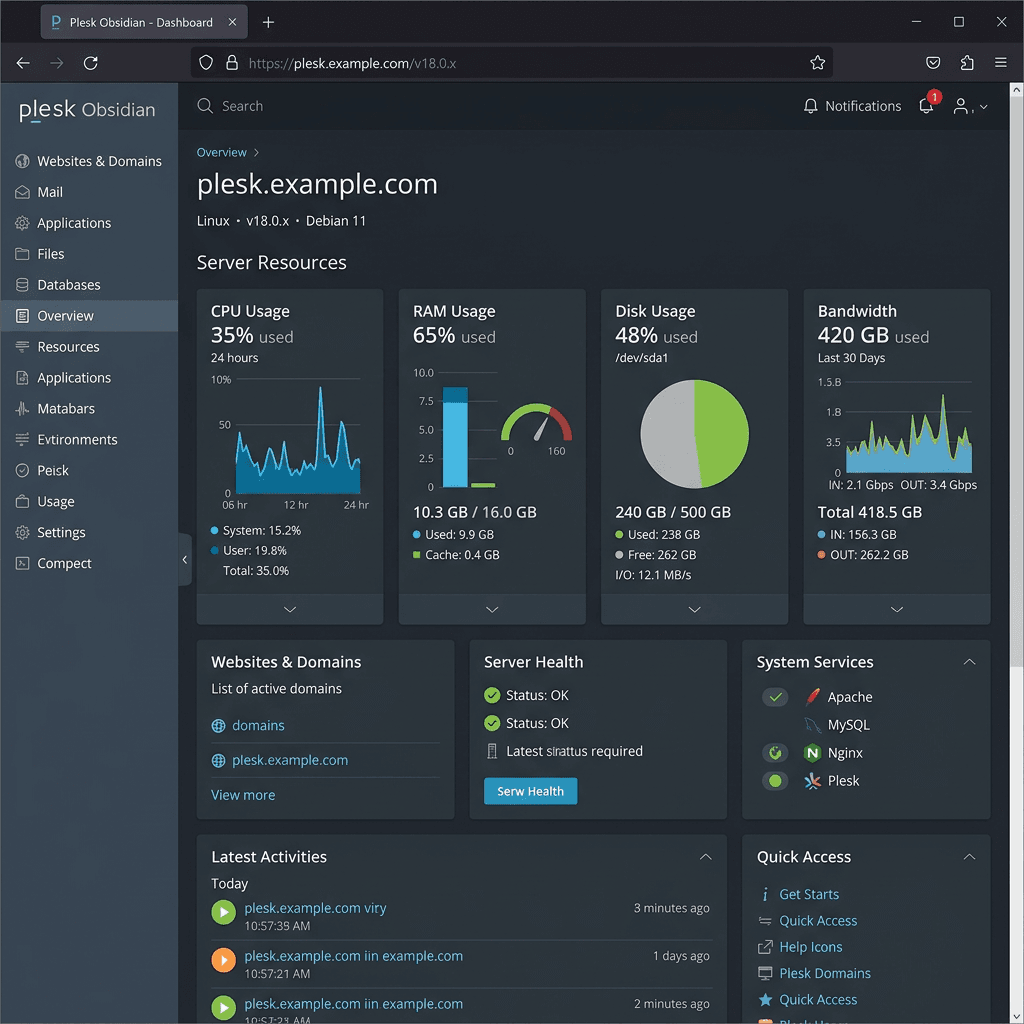
How to Limit Resource Usage on Plesk Hosting
Quick Summary Box
| Item | Details |
|---|---|
| Issue | Websites can use too much CPU, RAM, disk space, bandwidth, or email resources. |
| Why it matters | High usage can slow websites, cause downtime, or affect other accounts on the server. |
| Fast solution | Use Plesk service plans, subscriptions, PHP limits, bandwidth limits, mail limits, and monitoring tools. |
| Best for | Shared hosting, reseller hosting, WordPress hosting, and small business websites. |
What You’ll Learn
- Why resource limits matter on a Plesk server
- Which hosting limits you can control in Plesk
- How to set practical CPU, memory, disk, traffic, and email limits
- When to upgrade hosting or ask for support
Need help configuring your server? Contact Archer IT Solutions or Submit a Support Ticket for fast hosting support.
Featured Snippet Answer:
To limit resource usage on hosting with a Plesk server, create or edit a service plan in Plesk, set limits for disk space, bandwidth, mailboxes, databases, PHP memory, and process usage, then apply that plan to subscriptions. You can also monitor usage reports and adjust limits as websites grow.
If one website on your server starts using too much CPU, memory, bandwidth, or disk space, everyone can feel the slowdown. That is why setting limits on Plesk hosting is so important, especially for shared hosting, WordPress hosting, and reseller environments. The good news is that Plesk gives you several beginner-friendly tools to control resource usage before it becomes a bigger problem.
Why Limit Resource Usage on Plesk Hosting
Limiting resources on Plesk hosting helps keep your server stable, fast, and fair for every website hosted on it. Without limits, one busy WordPress site, broken plugin, large backup, spam script, or traffic spike can consume server resources and cause slow loading times or downtime for other users. For business websites, that can mean lost leads, missed sales, and frustrated visitors.
Resource limits are also useful for planning and pricing your hosting services. For example, a basic hosting plan may include limited disk space, monthly traffic, email storage, and databases, while a larger business plan may include more room to grow. This makes it easier to manage customers, avoid abuse, and offer clear hosting packages that match real usage.
Common resources to limit in Plesk include disk space, bandwidth, mailboxes, databases, domains, subdomains, FTP accounts, PHP memory, process limits, and scheduled tasks. If you notice symptoms like slow websites, high CPU alerts, full storage warnings, failed emails, or frequent 503 errors, resource limits and monitoring should be one of the first things you review. Helpful external references include Plesk documentation and Cloudflare Learning Center for performance and traffic guidance.
Easy Ways to Set Hosting Limits in Plesk
The easiest way to limit hosting resources in Plesk is by using Service Plans. In Plesk, go to Service Plans, create or edit a plan, then set limits for disk space, traffic, domains, mailboxes, databases, and other hosting features. After saving the plan, assign it to a subscription so the account follows those limits automatically.
You can also control website performance by adjusting PHP settings such as memory_limit, max_execution_time, upload_max_filesize, and post_max_size. For WordPress sites, this helps prevent heavy plugins, large uploads, or poorly optimized scripts from overwhelming the server. If your site has outgrown its current plan, Archer IT Solutions can help with Fast, Reliable Web Hosting — Starting at $1.99/month.
For better control, review Plesk’s Statistics, Resource Usage, and Tools & Settings areas regularly. Set practical limits, monitor real usage, and avoid setting values too low, because overly strict limits can break uploads, backups, contact forms, or plugin updates. If you are unsure what settings are best, link your team to your internal Web Hosting Services, Website Optimization, Managed IT Services, and Contact Archer IT Solutions pages so users know where to get help.
Simple Plesk Resource Limit Checklist
- Set disk space limits for each hosting plan
- Set monthly traffic or bandwidth limits
- Limit mailbox size and number of mail accounts
- Limit databases and database users
- Review PHP memory and execution time
- Monitor high-usage subscriptions
- Upgrade busy websites when needed
- Keep WordPress plugins, themes, and PHP versions updated
Example Hosting Limit Comparison
| Hosting Type | Best For | Resource Control |
|---|---|---|
| Shared Hosting | Small websites and startups | Basic plan-based limits |
| WordPress Hosting | WordPress business sites | PHP, caching, storage, and traffic controls |
| VPS Hosting | Growing or high-traffic websites | More CPU, RAM, and server-level control |
| Managed Hosting | Businesses needing support | Archer IT Solutions handles setup and monitoring |
Common Mistakes to Avoid
- Setting PHP memory too low for WordPress
- Allowing unlimited mailboxes on shared servers
- Ignoring disk usage from backups and logs
- Forgetting to monitor traffic spikes
- Not upgrading websites that have outgrown shared hosting
- Leaving outdated plugins active
FAQ
How do I limit resource usage on Plesk hosting?
Use Plesk Service Plans to set disk, bandwidth, mailbox, database, domain, and subscription limits. Then apply the plan to the hosting account.
Can I limit CPU and RAM usage in Plesk?
Basic Plesk plans control many hosting resources, but CPU and RAM control may depend on your server setup, CloudLinux, container limits, or VPS configuration.
Why is my Plesk website using too many resources?
Common causes include heavy WordPress plugins, malware, large backups, traffic spikes, spam email scripts, outdated PHP, or poorly optimized database queries.
What should I do if my site keeps hitting hosting limits?
Optimize the website first, remove unused plugins, enable caching, review logs, and consider upgrading to better hosting if the site has naturally grown.
Can Archer IT Solutions help with Plesk hosting limits?
Yes. Archer IT Solutions can help configure Plesk hosting, review resource usage, optimize websites, and recommend the right hosting plan.
Recommended Internal Links
- Web Hosting Services
- WordPress Hosting
- Website Optimization
- Managed IT Services
- Contact Archer IT Solutions
- Submit Support Ticket
Recommended External Links
Limiting resource usage on Plesk hosting keeps your server faster, safer, and more reliable. Start with service plans, set fair limits, monitor real usage, and adjust as websites grow. Need help setting up hosting limits or fixing a slow website? Contact Archer IT Solutions today, email support@archer-its.com, or request a free hosting consultation.
Fast, Secure Website Hosting & IT Support for Small Businesses
Keep your website online, secure, and running at peak performance with reliable web hosting, proactive IT support, free SSL certificates, professional email, automatic backups, and expert technical assistance.
Whether you’re launching a new website or moving from another provider, Archer IT Solutions makes hosting simple, secure, and stress-free.
WHY CHOOSE ARCHER IT?
Everything You Need to Keep Your Website Running Smoothly
| ✔ 99.9% Uptime Guarantee ✔ Free SSL Certificates ✔ Professional Business Email ✔ One-Click WordPress Installation | ✔ Automatic Daily Backups ✔ Fast SSD Storage ✔ 24/7 Technical Support ✔ Website Migration Assistance |
|
🔥 Most Popular Standard Plan |
Domain Only | |
|---|---|---|
|
$9.99/month Limited-time offer | Secure your business name online | |
|
Affordable yearly pricing | |
Reseller Hosting (For Agencies & Developers)
| ||
|
Reseller 1 |
Reseller 2 |
Reseller 3 |
| $20/month | $37.50/month | $50/month |
|
|
|
|
✔ 99.9% uptime • ✔ Secure • ✔ Easy setup • ✔ Local support | ||
BUILT FOR GROWING BUSINESSES
Whether you’re creating your first website or managing multiple client websites, Archer IT Solutions provides dependable hosting that grows with your business.
Our hosting solutions deliver
- Lightning-fast performance
- Enterprise-grade security
- Reliable uptime
- Easy website management
- Local expert support
WHY BUSINESSES CHOOSE ARCHER IT HOSTING
Enterprise Security
Protect your website with free SSL certificates, malware protection, and secure servers.
Lightning Fast Performance
Optimized SSD servers deliver fast loading speeds for a better user experience.
Expert IT Support
Receive friendly, knowledgeable assistance whenever you need help.
Automatic Daily Backups
Your website is backed up regularly, making recovery simple if needed.
Professional Business Email
Build credibility with branded email addresses for your business.
One-Click WordPress Installation
Launch your WordPress website in minutes with quick and easy installation.
15-DAY MONEY-BACK GUARANTEE
Try Archer IT Hosting Risk-Free
We’re confident you’ll love our hosting services.
If you’re not completely satisfied within the first 15 days, we’ll provide a full refund.
No hidden fees.
No complicated process.
REAL PEOPLE. REAL SUPPORT.
Unlike many hosting providers, Archer IT Solutions believes customer support should be personal.
When you need help, you’ll speak with experienced IT professionals—not automated bots.
Our team can help with
- Website migration
- Email setup
- WordPress support
- Website troubleshooting
- Hosting management
FREQUENTLY ASKED QUESTIONS
What is web hosting?
Web hosting is the service that stores your website files and makes your website accessible on the internet.
Do you migrate existing websites?
Yes. We can migrate your existing website to Archer IT Solutions with minimal downtime.
Is SSL included?
Yes. Every hosting package includes a free SSL certificate to protect your website and visitors.
Can I install WordPress?
Absolutely. Our hosting plans include one-click WordPress installation for quick setup.
What happens if my website grows?
You can upgrade your hosting plan at any time as your business expands.
Do you provide IT support?
Yes. In addition to web hosting, Archer IT Solutions offers professional IT support services to help keep your systems running smoothly.
Ready to Build or Grow Your Online Presence?
Whether you need reliable web hosting, professional IT support, or a secure home for your business website, Archer IT Solutions has you covered.
Let us help you get online with confidence.


No responses yet