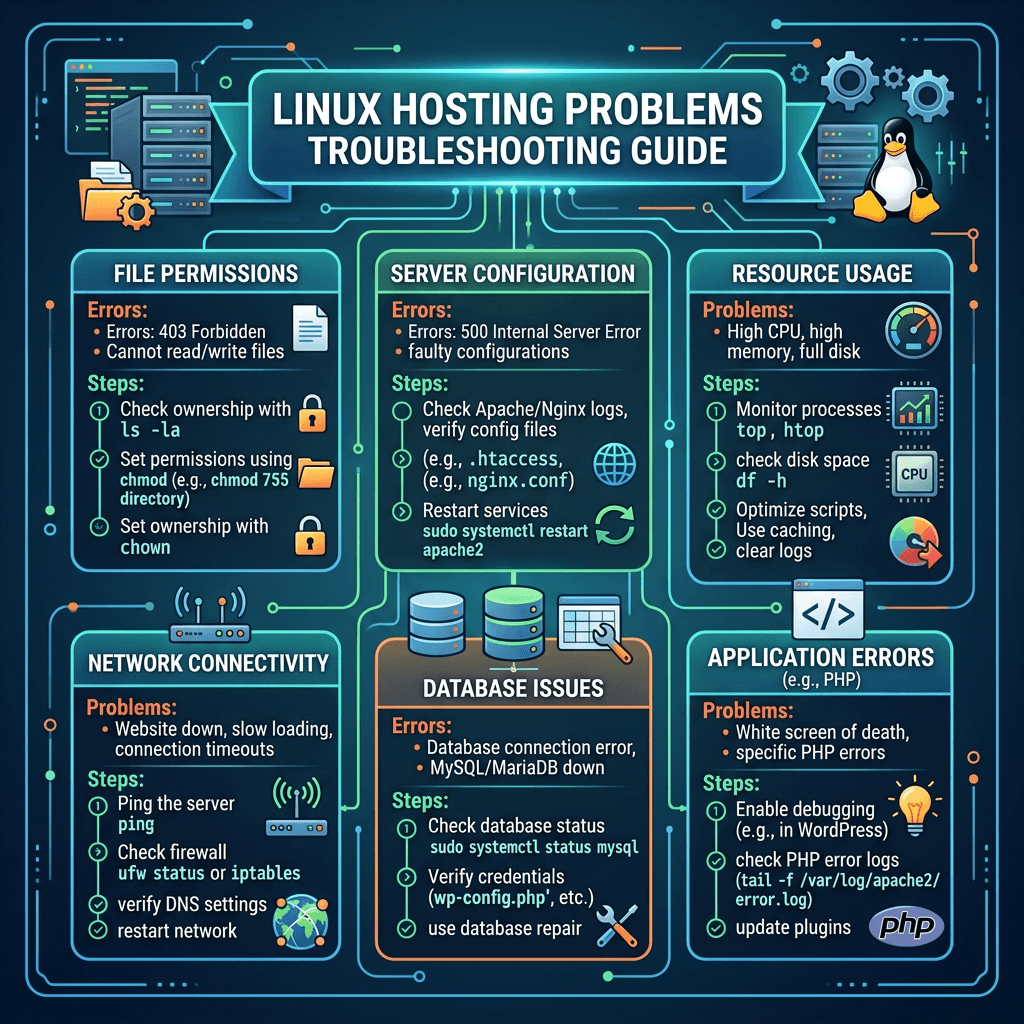
Linux Hosting Problems Fix Guide for Faster, Safer Sites
Summary Box
- Common Linux hosting problems often come down to speed, timeouts, file permissions, and PHP misconfiguration.
- Small issues in caching, resource limits, or ownership settings can break a website fast.
- Most problems can be diagnosed with logs, server settings, and a few practical checks.
- Managed hosting and expert support can prevent repeat issues.
What You’ll Learn
- Why slow websites and server timeouts happen on Linux hosting
- How to fix permission errors without breaking your site
- What broken PHP settings look like in real-world hosting
- When to troubleshoot yourself and when to get expert help
- How Archer IT Solutions can help keep your hosting stable
👉 Get Help Now: https://www.archer-its.com/contact-us/
👉 $1.99/month Web Hosting: https://www.archer-its.com/web-hosting/
Quick Answer:
Common Linux hosting problems include slow website speed, server timeout errors, incorrect file permissions, and broken PHP settings. These issues are usually caused by limited resources, bad configuration, outdated software, or ownership mistakes. The fix is to check logs, review server settings, optimize performance, and use reliable hosting support when needed.
If your website is loading slowly, showing random errors, or refusing to run scripts correctly, you are probably dealing with common Linux hosting problems. These issues frustrate business owners, confuse beginners, and cost sales when left unchecked. The good news is that most Linux hosting problems are fixable with the right steps, and the right hosting partner can make them far less likely in the first place.
Slow Website Speed and Server Timeout Issues
Slow performance is one of the most common Linux hosting problems users face. A site may load fine one day and become painfully slow the next, especially on shared hosting or poorly optimized servers. Visitors usually will not wait, and search engines also treat speed as a ranking factor, so this issue affects both traffic and conversions.
In many cases, the root cause is not Linux itself, but the way the hosting environment is configured. Common triggers include high CPU usage, low memory allocation, overloaded databases, missing caching, outdated PHP versions, and too many heavy plugins or scripts. If your site connects to external APIs or loads large images, that can make things even worse.
Timeout issues often appear as 504 Gateway Timeout, 503 Service Unavailable, or blank pages that never finish loading. These typically happen when a script takes too long, the server is overloaded, or the web server and PHP handler are not communicating efficiently. For website owners, this can look random, but there is almost always a technical reason behind it.
A practical first step is to test speed and identify where the delay happens. Tools like GTmetrix, Google PageSpeed Insights, and server logs can quickly point out whether the problem is front-end, database-related, or server-side. If your Time to First Byte is high, the issue is often on the hosting or application side rather than just images or design.
You should also review hosting resource limits. On Linux hosting, accounts may have CPU, RAM, entry process, and I/O restrictions. If your website repeatedly hits those limits, pages will slow down or timeout. This is especially common with WordPress sites using too many plugins, uncached dynamic pages, or traffic spikes without enough server headroom.
Another effective fix is optimization. That includes enabling caching, compressing images, reducing unnecessary plugins, cleaning up your database, upgrading PHP, and using a content delivery network when needed. If you run a business website, moving to a faster plan or managed environment is often cheaper than losing leads due to poor performance.
Quick Troubleshooting Steps for Speed and Timeout Problems
- Check server resource usage in your control panel
- Review error logs and access logs
- Update PHP to a supported version
- Enable caching for CMS platforms like WordPress
- Optimize images and scripts
- Disable heavy or outdated plugins
- Test database performance
- Upgrade hosting if you are regularly hitting limits
Pros and Cons of DIY Fixes vs Managed Help
| Option | Pros | Cons |
|---|---|---|
| DIY troubleshooting | Lower cost, immediate access, good for simple issues | Time-consuming, easy to misconfigure, may miss root cause |
| Managed hosting support | Faster diagnosis, less downtime, proactive maintenance | Higher monthly cost |
| Local IT support | Personalized help, useful for business sites | May depend on support availability |
Supporting Image
- Description: Screenshot-style illustration of a hosting dashboard showing CPU, RAM, and entry process spikes during a traffic surge.
- ALT text: Linux hosting resource usage causing slow website speed and timeout issues
For a broader look at hosting fundamentals, read Archer IT Solutions’ Complete Guide to Web Hosting. If your issues go beyond hosting and into server tuning, their server administration guide is also useful. Businesses that want fewer headaches can explore Archer’s web hosting services for affordable hosting built around reliability.
👉 Fast, Reliable Web Hosting — Starting at $1.99/month
https://www.archer-its.com/web-hosting/
Permission Errors and Broken PHP Settings
Another major category of Linux hosting problems involves permissions and PHP configuration. These errors often show up after a site migration, plugin install, manual file upload, or server update. You might see messages like “403 Forbidden,” “Permission denied,” “Failed to open stream,” or “Your PHP installation appears to be missing required extensions.”
Linux uses strict file and directory permissions, which is great for security but frustrating when something is set incorrectly. Files may have the wrong ownership, scripts may not be executable, or a web server process may not have permission to read or write required directories. A common example is when uploads stop working because the uploads folder is owned by the wrong user.
Broken PHP settings create a different but related problem. A website may fail because the PHP version is too old, memory limits are too low, key extensions are missing, or max_execution_time is too restrictive. In CMS platforms like WordPress, Joomla, or Laravel applications, even a small PHP mismatch can cause fatal errors, blank screens, or admin login failures.
The safest fix starts with identifying the exact error. Check your site’s error logs, PHP error logs, and application debug output. For file permissions, common defaults are 755 for directories and 644 for files, though some applications have special requirements. You should avoid setting everything to 777, because that creates a security risk and can expose your site to abuse.
For ownership issues, files should usually belong to the account user that runs the site. If files were uploaded by root or transferred incorrectly during migration, the website may not be able to access them properly. In those cases, correcting ownership through SSH or your hosting panel resolves the issue quickly. If you are unsure, this is a good place to ask support instead of guessing.
For PHP issues, verify the active PHP version, enabled extensions, and limits in your control panel or phpinfo() output. If a website requires mysqli, curl, mbstring, zip, or imagick, missing any one of them can break key functions. Updating to a supported PHP version and adjusting limits like memory and upload size often solves these problems immediately.
Common Permission and PHP Errors
- 403 Forbidden
- 500 Internal Server Error
- Failed to open stream
- Permission denied
- White screen of death
- Missing PHP extension errors
- Upload file size exceeded
- Maximum execution time exceeded
Step-by-Step Fixes
- Open the error log and identify the exact file or PHP issue
- Verify file permissions: usually
644for files and755for directories - Check file ownership after migration or manual uploads
- Confirm the correct PHP version for your application
- Enable required PHP extensions
- Increase memory limit, upload size, or execution time if needed
- Retest after each change instead of changing everything at once
Comparison Table: Permission vs PHP Problems
| Problem Type | Typical Symptoms | Common Cause | Best Fix |
|---|---|---|---|
| File permissions | 403 errors, upload failures, denied access | Wrong chmod settings | Reset file and folder permissions |
| File ownership | Site cannot write to cache or uploads | Wrong user/group after migration | Correct ownership |
| PHP version mismatch | Plugins fail, white screen, fatal errors | Unsupported old or new PHP version | Switch to compatible PHP version |
| Missing PHP extensions | Site features do not work | Required module not installed | Enable needed extensions |
| Low PHP limits | Timeouts, failed uploads, memory errors | Restrictive php.ini values | Increase limits |
Supporting Image
- Description: Illustration of Linux file permissions with folders marked 755 and files marked 644 beside a PHP settings panel.
- ALT text: Linux hosting permissions and PHP settings troubleshooting example
If you are running WordPress, Archer IT Solutions also offers related guidance and support through its service resources and hosting options. You can pair that with managed IT services or local IT support if your website issues connect to bigger business infrastructure problems. For educational reading, the official PHP documentation and Apache documentation are excellent external references.
FAQ
What are the most common Linux hosting problems?
The most common Linux hosting problems are slow loading times, timeout errors, broken file permissions, incorrect ownership, outdated PHP versions, and missing PHP extensions.
Why does my Linux-hosted website suddenly become slow?
This usually happens because of high server resource usage, poor caching, plugin bloat, database strain, or traffic spikes that exceed your hosting plan’s limits.
Can wrong permissions break a website?
Yes. Incorrect permissions can block files from loading, prevent uploads, and trigger 403 or 500 errors. They also create security problems if set too loosely.
How do I know if PHP settings are causing the issue?
Look for fatal errors, white screens, plugin failures, or upload problems. Check your PHP version, memory limit, execution time, and installed extensions.
Should I fix Linux hosting problems myself or hire help?
If the issue is simple, you may be able to fix it yourself. But if the site is for business, expert help is often faster, safer, and less expensive than prolonged downtime.
Free Resources and Proof
Free Offers
- Free Website Speed Checklist
- Small Business IT Setup Guide
To request help or ask for these resources, contact Archer IT Solutions:
https://www.archer-its.com/contact-us/
Social Proof
“Our website kept timing out during peak hours. Archer helped us clean up the issue and performance improved almost immediately.” — Mark T.
Case Study
We helped a small business fix recurring timeout errors and broken PHP settings after a migration. By correcting resource limits, updating PHP compatibility, and repairing ownership permissions, their site became stable again and support requests dropped significantly.
Final Takeaway
Linux hosting is powerful, flexible, and reliable, but it still comes with problems that many users will face sooner or later. Speed issues, timeout errors, permission mistakes, and broken PHP settings are some of the most common, and they can damage both user experience and business results if ignored.
The good news is that these problems are usually manageable when you take a structured approach. Check the logs, confirm your resource usage, review permissions carefully, and make sure your PHP environment matches your website’s needs. If you want fewer technical surprises, quality hosting and expert support make a huge difference.
If you are tired of chasing errors, Archer IT Solutions can help you thrive with dependable hosting, managed support, and practical guidance that keeps your website online and performing well.
The most common Linux hosting problems are not impossible to solve, but they do require the right mix of troubleshooting, server knowledge, and reliable support. If you want faster performance, fewer outages, and a hosting partner that helps your site grow instead of holding it back, Archer IT Solutions is ready to help.
👉 Start Your Hosting Today: https://www.archer-its.com/web-hosting/
👉 Request IT Support Now: https://www.archer-its.com/contact-us/
👉 Get a Free Consultation: https://www.archer-its.com/ticket/
Response within 6 hours
Support: support@archer-its.com
Sales: sales@archer-its.com
General: info@archer-its.com
👉 Contact Archer IT Solutions Now
https://www.archer-its.com/contact-us/
Fast, Secure Website Hosting & IT Support for Small Businesses
Keep your website online, secure, and running at peak performance with reliable web hosting, proactive IT support, free SSL certificates, professional email, automatic backups, and expert technical assistance.
Whether you’re launching a new website or moving from another provider, Archer IT Solutions makes hosting simple, secure, and stress-free.
WHY CHOOSE ARCHER IT?
Everything You Need to Keep Your Website Running Smoothly
| ✔ 99.9% Uptime Guarantee ✔ Free SSL Certificates ✔ Professional Business Email ✔ One-Click WordPress Installation | ✔ Automatic Daily Backups ✔ Fast SSD Storage ✔ 24/7 Technical Support ✔ Website Migration Assistance |
|
🔥 Most Popular Standard Plan |
Domain Only | |
|---|---|---|
|
$9.99/month Limited-time offer | Secure your business name online | |
|
Affordable yearly pricing | |
Reseller Hosting (For Agencies & Developers)
| ||
|
Reseller 1 |
Reseller 2 |
Reseller 3 |
| $20/month | $37.50/month | $50/month |
|
|
|
|
✔ 99.9% uptime • ✔ Secure • ✔ Easy setup • ✔ Local support | ||
BUILT FOR GROWING BUSINESSES
Whether you’re creating your first website or managing multiple client websites, Archer IT Solutions provides dependable hosting that grows with your business.
Our hosting solutions deliver
- Lightning-fast performance
- Enterprise-grade security
- Reliable uptime
- Easy website management
- Local expert support
WHY BUSINESSES CHOOSE ARCHER IT HOSTING
Enterprise Security
Protect your website with free SSL certificates, malware protection, and secure servers.
Lightning Fast Performance
Optimized SSD servers deliver fast loading speeds for a better user experience.
Expert IT Support
Receive friendly, knowledgeable assistance whenever you need help.
Automatic Daily Backups
Your website is backed up regularly, making recovery simple if needed.
Professional Business Email
Build credibility with branded email addresses for your business.
One-Click WordPress Installation
Launch your WordPress website in minutes with quick and easy installation.
15-DAY MONEY-BACK GUARANTEE
Try Archer IT Hosting Risk-Free
We’re confident you’ll love our hosting services.
If you’re not completely satisfied within the first 15 days, we’ll provide a full refund.
No hidden fees.
No complicated process.
REAL PEOPLE. REAL SUPPORT.
Unlike many hosting providers, Archer IT Solutions believes customer support should be personal.
When you need help, you’ll speak with experienced IT professionals—not automated bots.
Our team can help with
- Website migration
- Email setup
- WordPress support
- Website troubleshooting
- Hosting management
FREQUENTLY ASKED QUESTIONS
What is web hosting?
Web hosting is the service that stores your website files and makes your website accessible on the internet.
Do you migrate existing websites?
Yes. We can migrate your existing website to Archer IT Solutions with minimal downtime.
Is SSL included?
Yes. Every hosting package includes a free SSL certificate to protect your website and visitors.
Can I install WordPress?
Absolutely. Our hosting plans include one-click WordPress installation for quick setup.
What happens if my website grows?
You can upgrade your hosting plan at any time as your business expands.
Do you provide IT support?
Yes. In addition to web hosting, Archer IT Solutions offers professional IT support services to help keep your systems running smoothly.
Ready to Build or Grow Your Online Presence?
Whether you need reliable web hosting, professional IT support, or a secure home for your business website, Archer IT Solutions has you covered.
Let us help you get online with confidence.


No responses yet