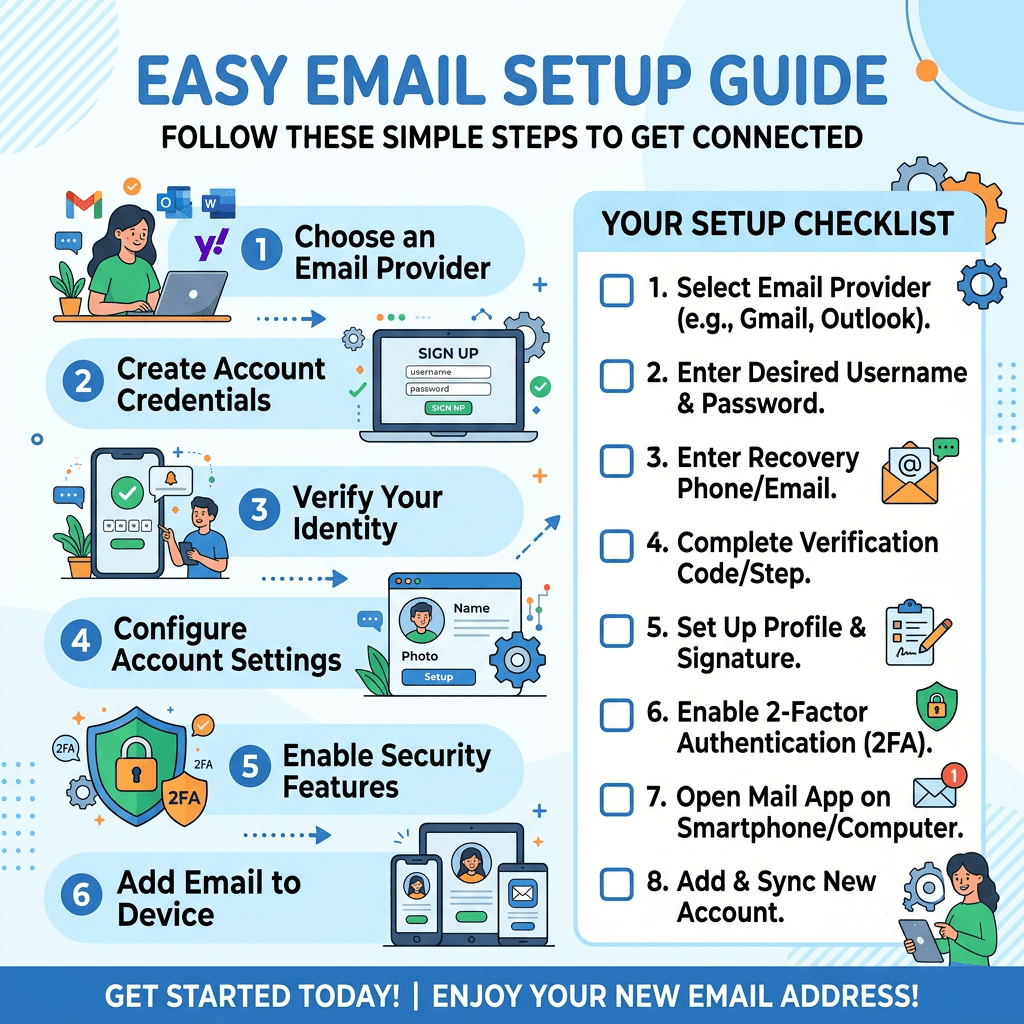
Step-by-step guide for setting up email with checklist and illustrations

Best Guide to Create an Email Account Step by Step

✅ Summary Box

What this article covers:

  • How to create your first email account
  • Choosing the right email provider
  • Setting up and verifying your account
  • Securing your email and managing it effectively

📘 What You’ll Learn

  • Step-by-step process for setting up an email
  • Tips for strong passwords and extra security
  • How to choose the right provider for personal or business use
  • Managing and organizing your inbox
  • Troubleshooting common email setup issues

👉 Get Help Now: https://www.archer-its.com/contact-us/


💡 Quick Answer

To create an email account, choose a provider (like Gmail, Outlook, or Yahoo), go to their sign-up page, fill out your details, set a strong password, and verify your account. You’ll then be ready to send and receive emails instantly.


Most people think creating an email account is too technical—but it’s actually quite simple if you follow the right steps. Whether you’re setting up your first account or starting fresh for business, learning how to create an email account gives you a powerful communication tool for work, clients, and everyday life. Let’s walk through a straightforward process that even non-tech users can follow with ease.


Step-by-Step Guide to Creating Your First Email Account

Creating an email account starts by selecting the right provider. Popular options include Gmail, Outlook, and Yahoo Mail—each offering different benefits for security, storage, and ease of use. Gmail is ideal for those using other Google services, while Outlook integrates well with Microsoft 365. Before signing up, consider how you’ll use the account—personal communication, business, or teamwork collaboration.

Once you’ve chosen your provider, visit its sign-up page. Typically, you’ll need to provide your name, username, password, and recovery details (like a phone number or secondary email). The key here is creating a unique username that represents you or your brand. After completing these fields, most providers will send a verification code to confirm your identity—check your messages and enter the code.

Once your account is verified, you can log in and start exploring your new inbox. Customize your settings—add a profile photo, define mail filters, and configure notifications. If you’re using this for business, consider linking your email to your company’s domain name (Archer IT Solutions can help you with that through their web hosting services). A branded email builds trust and strengthens your professional presence online.


Simple Tips to Secure and Manage Your New Email Safely

Security is critical when it comes to email. Always use a strong password containing a mix of letters, numbers, and special characters. Enable two-factor authentication (2FA) for extra protection—it helps prevent unauthorized access even if someone learns your password. Never reuse the same password across multiple platforms; tools like Bitwarden or LastPass can manage them safely.

Stay alert for phishing emails—messages that try to trick you into sharing personal data. If something feels suspicious, never click on links or attachments until you verify the sender. Most email providers have built-in spam filters, but adding a manual review rule can save you from future trouble. For businesses, Archer IT Solutions offers managed IT services (see here) that secure your digital systems and networks from intrusions.

To manage your inbox effectively, set up folders or labels for different topics—work, invoices, clients, personal, etc. You can also create filters to automatically sort or star important messages. For example, emails from your team could go straight into a “Priority” folder. This helps you stay organized and efficient every day.


🧾 Comparison Table: Popular Free Email Providers

FeatureGmailOutlookYahoo Mail
Storage Space15GB15GB1TB
InterfaceSimple & FastBusiness-ReadySocial-Integrated
Security2FA, EncryptionAdvanced Filters, SSLSpam Protection
Best ForPersonal & BusinessOffice 365 UsersBasic Use

👉 Fast, Reliable Web Hosting — Starting at $1.99/month
Build your brand credibility with a custom domain email like you@yourbusiness.com.
Explore hosting options.


🛠️ Troubleshooting: Common Email Setup Issues

Problem 1: Can’t verify account

  • Check your spam or SMS folder for the code.
  • Retry using an alternative recovery option.

Problem 2: Forgot password

  • Click “Forgot Password” on your provider’s login page.
  • Use your recovery email or phone to reset it.

Problem 3: Email not loading properly

  • Clear your browser cache or try a different browser.
  • Disable any third-party extensions blocking scripts.

If issues persist, the Archer IT Onsite Service team can help get your email and systems running again fast.


🌐 Helpful Resources


Setting up an email account doesn’t need to be complicated. With the right approach, you can create, secure, and organize your account in minutes—ready for personal or business growth. Whether it’s configuring a Gmail inbox or hosting with your own domain, a professional email setup opens countless doors to communication and credibility.


🔁 Summary

  • Choose the best provider (Gmail, Outlook, Yahoo).
  • Create a unique username and strong password.
  • Enable 2FA and security checks.
  • Organize your inbox for faster productivity.

👉 Need help? https://www.archer-its.com/contact-us/
📩 Email: support@archer-its.com | 📞 24-hour response guarantee


📣 Testimonials

“Archer IT Solutions made setting up our team emails seamless. Our domain-branded accounts built instant trust with clients.” — Sarah L., Small Business Owner

“We used Archer’s Managed IT Services to secure company inboxes. Zero spam and smooth performance!” — Daniel P., Operations Lead


👉 Contact Archer IT Solutions Now
Transform your online presence and secure your communication systems today.
https://www.archer-its.com/contact-us/


❓ FAQ

1. How long does it take to create an email account?
Usually less than 5 minutes—just follow the sign-up form and verification step.

2. Can I use my business name in my email address?
Yes. With Archer’s web hosting, you can create a professional domain email.

3. What’s the safest email provider?
Gmail and Outlook are among the most secure, offering advanced encryption and 2FA options.

4. How do I recover my password if I forget it?
Use your provider’s “forgot password” link and verify via phone or recovery email.

5. Does Archer IT Solutions help with email setup?
Yes! Visit https://www.archer-its.com/contact-us/ or email sales@archer-its.com for personalized setup support.

Fast, Reliable Web Hosting — Starting at $1.99/month

🔥 Most Popular
Standard Plan
Domain Only
$1.99/month
Limited-time offer
Secure your business name online
  • ⚡ Fast, reliable hosting
  • 🔒 Free SSL security
  • 📧 Professional email accounts
  • 🚀 1-click WordPress setup
  • 📈 Scalable for growing traffic

👉 Get Started Now

Affordable yearly pricing
Easy setup
Works with any hosting

Buy Domain

Reseller Hosting (For Agencies & Developers)

Start your own hosting business or manage client sites

Reseller 1Reseller 2Reseller 3
$20/month$37.50/month$50/month
  • 10 Domains
  • 100 GB Disk Space
  • 2TB Bandwidth
  • 100 Databases
  • 100 Mailboxes
  • WordPress Ready
  • 25 Domains
  • 300 GB Diskspace
  • 6TB of traffic
  • 300 Databases
  • 300 Mailboxes
  • WordPress options
  • 50 Domains
  • 600 GB Diskspace
  • 12TB of traffic
  • 600 Databases
  • 600 Mailboxes
  • WordPress options
✔ 99.9% uptime • ✔ Secure • ✔ Easy setup • ✔ Local support

Stop settling for slow, unreliable hosting. With Archer IT Solutions, get a website hosting plans that deliver speed, security, and 99.9% uptime guarantee. Grab your domain and hosting package in one seamless plan, optimized for WordPress users, small and medium size businesses, and personal websites. 

Enjoy affordable web hosting plans without compromises unlike the big guys. Complete with professional email, one-click CMS installs, and round-the-clock hosting support. Perfect for WordPress users.

Built for Real Businesses

Whether you’re launching your first blog or scaling a growing business, Archer IT gives you:

+ Speed that keeps visitors engaged
+ Reliability you can count on
+Tools that actually make sense

Launch your first personal blog or scale a growing small business site with hosting optimized for performance. Get the best web hosting for plus simple setup — all powered by secure Linux servers and easy Plesk control panel.

Why Choose Archer IT Hosting?

🔒 Free SSL Certificates (Security + SEO Boost)
📧 Professional Email Accounts Included
⚡ Fast Linux Servers (Optimized Performance)
🧩 One-Click WordPress, Joomla & Drupal Installs
💬 Real 24/7 Support — No Bots, Just Help
💾 Automatic Backups for Peace of Mind

Risk-Free Guarantee

Try it with confidence.
If it’s not right for you, get your money back within 15 days.

🔥 Don’t Wait — Launch Your Website Today

Stop overpaying for slow hosting.
Get everything you need in one simple plan.

Your website stays online with uptime, protected by a free SSL certificate, and supported by real people around the clock. And if it’s not right for you? Our 15-day money-back guarantee makes it a no-risk choice. Take your business or personal project online with hosting that’s secure, affordable, and built to perform.

💬 Real Support. No Runaround.

Unlike big hosting companies, you get:

  • Direct help from real people
  • No ticket delays
  • No upsell traps

CATEGORIES:

Hosting News

Tags:

No responses yet

    Leave a Reply

    Your email address will not be published. Required fields are marked *