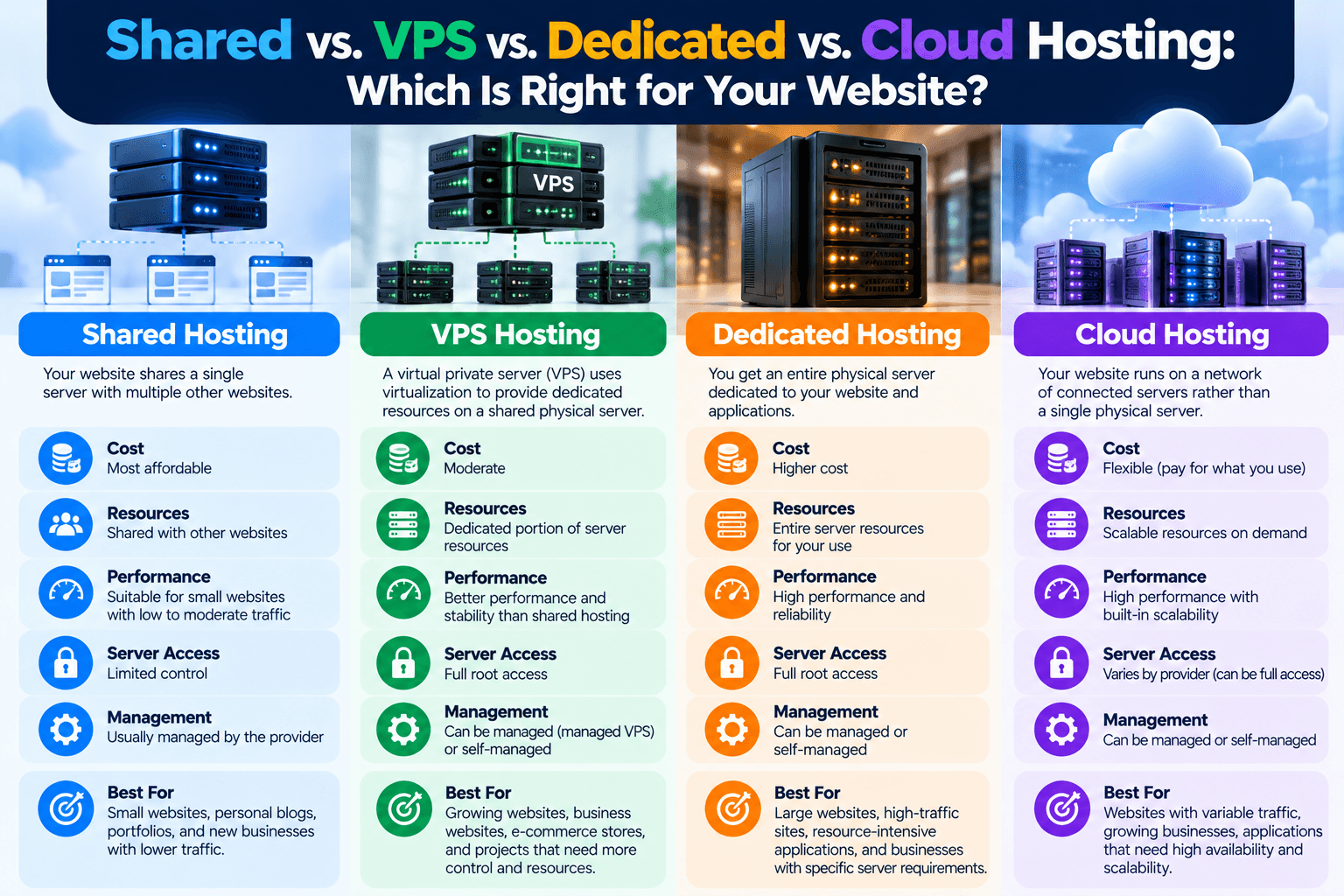
Shared vs. VPS vs. Dedicated vs. Cloud Hosting: Which Is Right for Your Website?
Choosing a hosting plan is an important decision when launching or growing a website. The hosting environment affects factors such as available resources, performance, scalability, server access, management requirements, and cost.
Four common hosting models are shared hosting, VPS hosting, dedicated hosting, and cloud hosting. Each works differently and is suited to different technical and business requirements.
Understanding the differences can help you choose a hosting environment that matches your website rather than paying for resources or complexity you do not need.
1. Shared Hosting
Shared hosting places multiple websites on the same physical server. The websites share the server’s available resources, although the exact resource allocation depends on the hosting provider and plan.
Advantages of Shared Hosting
Lower cost: Shared hosting is generally one of the more affordable hosting options, making it accessible to individuals, small businesses, and websites with modest requirements.
Easy to use: The hosting provider typically handles much of the underlying server administration, so you do not need to manage a physical server yourself.
Suitable for simpler websites: A small business website, portfolio, blog, or basic informational website may not require the resources or control provided by a VPS or dedicated server.
Disadvantages of Shared Hosting
Shared resources: Heavy activity on the server can potentially affect resource availability for other websites, depending on how the provider manages its infrastructure.
Limited server control: Shared hosting generally gives you less control over server-level configuration than VPS or dedicated hosting.
Potential performance limitations: Websites with growing traffic, resource-intensive applications, or demanding databases may eventually outgrow a shared hosting environment.
Shared hosting is therefore often appropriate when simplicity and affordability are more important than extensive server control.
For businesses looking for managed website hosting, Archer IT Solutions’ web hosting service provides hosting and related website support.
2. VPS Hosting
VPS stands for Virtual Private Server.
With VPS hosting, a physical server is divided into multiple virtual environments. Each VPS operates as a separate server environment, with its own allocated resources and operating system environment.
The exact level of resource isolation and management varies between providers and VPS plans, so it is important to check what a particular hosting package actually includes.
Advantages of VPS Hosting
More control: A VPS generally provides substantially more control over the server environment than shared hosting.
More resources: Resources are allocated to individual virtual server environments, making VPS hosting suitable for websites and applications that have outgrown basic shared hosting.
Customization: Depending on the plan, you may be able to configure software, server settings, security controls, and other components that are unavailable on shared hosting.
Scalability: VPS resources can often be increased as the website’s requirements grow.
Disadvantages of VPS Hosting
Higher cost: VPS hosting generally costs more than basic shared hosting.
More technical responsibility: An unmanaged VPS may require knowledge of operating systems, server configuration, security, updates, backups, and troubleshooting.
Management varies: Some providers offer managed VPS services while others expect the customer to handle most server administration.
VPS hosting can therefore be useful when a website needs more control and resources without moving immediately to an entire physical server.
For websites requiring more complex server administration, Archer’s server administration guide provides additional background on what server management involves.
3. Dedicated Hosting
With dedicated hosting, an entire physical server is allocated to one customer.
Instead of sharing the physical machine with other hosting customers, the customer has access to the server’s available hardware resources.
Advantages of Dedicated Hosting
Dedicated resources: The server’s CPU, memory, storage, and other hardware resources are not being shared with unrelated hosting customers.
Greater control: Dedicated hosting can provide extensive control over the server’s operating system, software, networking, and configuration.
High resource capacity: A dedicated server can be appropriate for demanding websites, applications, databases, or workloads that require substantial computing resources.
Customization: Organizations with specific technical requirements may have greater flexibility to configure a dedicated environment.
Disadvantages of Dedicated Hosting
Higher cost: Leasing an entire physical server is generally more expensive than sharing server infrastructure.
Greater management responsibility: Unless the server is managed by the hosting provider, the customer may be responsible for operating system updates, security, backups, monitoring, and server administration.
Resource planning: A dedicated server provides substantial capacity, but you still need to select hardware that matches your workload. Paying for an oversized server does not automatically make it the appropriate choice.
Dedicated hosting is generally more relevant to organizations with substantial or specialized hosting requirements rather than websites that only need basic hosting.
4. Cloud Hosting
Cloud hosting differs from the traditional model of associating a website with one physical server. Cloud infrastructure can use multiple interconnected servers and other infrastructure resources, depending on the provider’s architecture.
One of its key characteristics is the ability to provision and adjust computing resources through the provider’s infrastructure.
Advantages of Cloud Hosting
Scalability: Resources can often be increased or decreased as workload requirements change.
Flexibility: Cloud platforms can provide a wide range of infrastructure services and configurations.
Redundancy: Depending on how the cloud environment is designed, workloads can be distributed across multiple infrastructure components, potentially reducing dependence on a single physical machine.
Suitable for changing workloads: Websites and applications with unpredictable or rapidly changing demand may benefit from infrastructure that can scale more easily.
Disadvantages of Cloud Hosting
Greater complexity: Cloud infrastructure can involve more configuration and technical concepts than a basic shared hosting plan.
Variable costs: Some cloud services charge according to resources consumed. If usage increases unexpectedly, costs can increase as well.
Management requirements: Depending on the service, you may be responsible for configuring security, backups, operating systems, applications, and other infrastructure components.
Cloud hosting should therefore not be selected simply because it is called “cloud.” The specific architecture, pricing model, management responsibilities, and resources matter.
Shared vs. VPS vs. Dedicated vs. Cloud Hosting
| Feature | Shared | VPS | Dedicated | Cloud |
|---|---|---|---|---|
| Physical resources | Shared | Virtualized | Dedicated to one customer | Distributed across cloud infrastructure |
| Cost | Generally lower | Moderate | Generally higher | Varies by usage and provider |
| Server control | Limited | Greater | Extensive | Varies |
| Scalability | Usually limited | Often scalable | Hardware-dependent | Typically highly scalable |
| Technical expertise | Low | Moderate to high | Moderate to high | Moderate to high |
| Resource isolation | Limited | Greater than shared | High | Depends on architecture |
| Best suited to | Smaller/simple websites | Growing websites and applications | Resource-intensive workloads | Variable or scalable workloads |
The table provides a general comparison. Hosting providers structure their plans differently, so the specifications of the individual plan are more important than the hosting label alone.
How to Choose the Right Hosting Type
Instead of choosing hosting based only on price or the type of technology being advertised, consider your actual requirements.
1. What Type of Website Are You Running?
A basic informational website has different requirements from:
- An online store
- A membership platform
- A booking system
- A web application
- A high-traffic publication
- A database-intensive application
Start with what the website needs to do.
2. How Much Traffic Do You Expect?
Traffic is only one part of the equation, but it can affect resource requirements.
Consider both your current traffic and expected growth. A website that is consistently reaching its hosting limits may need a different environment.
3. How Much Control Do You Need?
If you only need to manage your website through a hosting control panel, shared hosting may provide sufficient functionality.
If you need server-level configuration, custom software, or specific security settings, a VPS or dedicated environment may be more appropriate.
4. Who Will Manage the Server?
This is an important question that is sometimes overlooked.
Ask whether you or your hosting provider will be responsible for:
- Operating system updates
- Security patches
- Backups
- Server monitoring
- Firewall configuration
- Performance optimization
- Troubleshooting
A technically capable organization may be comfortable with an unmanaged server. A small business without in-house IT expertise may prefer managed services.
Archer’s managed IT services can be relevant for businesses that need ongoing technical support beyond basic website hosting.
5. What Is Your Budget?
Do not look only at the advertised monthly hosting price.
Consider the total cost, including:
- Hosting
- Server management
- Backups
- Security
- Additional storage
- Software licenses
- Support
- Migration
- Scaling
- Technical administration
A cheaper hosting plan may become more expensive if you need to purchase several additional services to make it suitable for your requirements.
6. What Are Your Security Requirements?
Security requirements vary depending on what your website handles.
An informational website may have relatively simple requirements, while a website handling customer accounts, financial transactions, or sensitive business information may require more extensive controls.
Review the provider’s approach to:
- Network security
- Account isolation
- Backups
- Access controls
- SSL/TLS
- Monitoring
- Vulnerability management
- Incident response
Don’t Choose Hosting Based on the Hosting Label Alone
“Shared,” “VPS,” “dedicated,” and “cloud” describe different infrastructure models, but the label alone does not tell you everything about the service.
Two providers can offer VPS hosting with very different:
- CPU allocations
- Memory
- Storage
- Network capacity
- Backup policies
- Support
- Security controls
- Management options
- Scaling capabilities
Before purchasing a hosting plan, compare the actual specifications and responsibilities attached to it.
When Should You Upgrade Your Hosting?
Moving to a more powerful hosting environment may be worth investigating when you consistently experience problems such as:
- Slow server response
- Resource limits
- Frequent downtime
- Database performance issues
- Traffic-related instability
- Insufficient storage
- Increasing application requirements
- Need for greater server control
However, upgrading is not always the first solution.
Performance problems can also come from poorly optimized images, inefficient plugins, database issues, application code, configuration problems, or other factors.
Diagnosing the underlying cause before changing hosting can prevent unnecessary costs.
Final Thoughts
Shared, VPS, dedicated, and cloud hosting each provide different combinations of resources, control, scalability, management requirements, and cost.
Shared hosting can be suitable for websites with modest requirements. VPS hosting provides a more isolated and customizable environment. Dedicated hosting provides an entire physical server for one customer. Cloud hosting can provide flexible infrastructure and scalability across a provider’s cloud environment.
The right choice depends on your website’s technical requirements, expected workload, budget, security needs, and the amount of server management you are prepared to handle.
If you are unsure which hosting environment fits your website, Archer IT Solutions provides web hosting and IT support services. You can also contact Archer IT Solutions to discuss your hosting requirements.


No responses yet