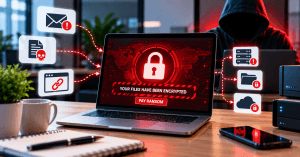
Ransomware Guide: What It Is and How to Stay Protected
Ransomware is one of the most disruptive forms of cybercrime facing businesses today. A successful attack can prevent employees from accessing important files, interrupt business operations, expose sensitive information, and create significant recovery costs.
This guide explains what ransomware is, how it spreads, who it targets, and the practical steps businesses can take to reduce their risk. It also covers what to do if ransomware has already affected a device or network.
Understanding Ransomware and How It Works
Ransomware is a type of malicious software designed to prevent users from accessing their files or systems. In many attacks, the malware encrypts files and demands payment in exchange for a decryption key. Some modern ransomware attacks also involve stealing sensitive information and threatening to publish it if the victim refuses to pay.
Ransomware can enter a system through several common security weaknesses. Phishing emails and malicious attachments are frequent entry points, but attackers may also exploit outdated software, compromised credentials, insecure remote-access services, and vulnerable network devices.
Once ransomware gains access to a system, it may spread across connected devices and network shares. This can turn what initially appears to be a single infected computer into a much larger business disruption.
The consequences can extend beyond inaccessible files. Businesses may experience lost productivity, interrupted services, reputational damage, customer concerns, and expensive recovery efforts.
For organizations that rely heavily on computers, servers, and cloud applications, proactive security is essential. Archer IT Solutions provides managed IT services designed to help businesses monitor systems, strengthen security, maintain reliable backups, and respond to potential threats.
How Ransomware Spreads
Ransomware attackers often rely on a combination of technical vulnerabilities and human error. Understanding the most common entry points can help businesses identify where additional protection may be needed.
Phishing Emails
A phishing message may appear to come from a legitimate company, colleague, supplier, or customer. It may contain a malicious attachment or direct the recipient to a fake login page designed to steal credentials.
Malicious Downloads
Ransomware can be disguised as software, documents, browser extensions, or other downloads. Downloading files from untrusted websites or unknown sources increases the risk of infection.
Outdated Software
Unpatched operating systems, applications, servers, and network devices may contain security vulnerabilities that attackers can exploit.
Compromised Accounts
Weak, reused, or stolen passwords can allow attackers to gain access to business accounts and systems. Once inside, an attacker may use legitimate credentials to move through the network.
Remote Access Vulnerabilities
Poorly secured remote-access tools and services can provide attackers with another route into a business network. Strong authentication and proper access controls are particularly important for organizations with remote employees.
Who Is Most at Risk From Ransomware?
Ransomware can affect organizations of virtually any size. Small businesses are particularly attractive targets because they may have valuable customer and financial information but fewer cybersecurity resources than larger organizations.
Healthcare providers, financial organizations, professional services firms, educational institutions, retailers, and government organizations can also be attractive targets because they often depend on continuous access to critical information.
However, ransomware isn’t limited to businesses. Individuals can also lose access to personal photographs, documents, financial records, and other important files.
The most important factor is not simply the size of an organization. Businesses become more vulnerable when they have outdated systems, weak passwords, inadequate backups, poor access controls, or insufficient employee security awareness.
Practical Ways to Protect Your Business From Ransomware
The strongest ransomware defense combines several layers of protection rather than relying on a single security product.
Maintain Regular Backups
Regular backups are one of the most important defenses against ransomware. Backups should be performed consistently and should include critical business files, databases, configurations, and other essential information.
Where possible, maintain backups that are isolated from the main network. If ransomware can access your backup files, it may encrypt or delete them as well.
Businesses should also test their backups periodically. Having a backup is not enough—you need to know that the data can actually be restored when required.
Keep Software and Systems Updated
Install security updates and patches for operating systems, applications, servers, and network equipment. Updates often address vulnerabilities that attackers could otherwise exploit.
Businesses should establish a consistent patch-management process rather than relying on employees to update systems manually.
Use Strong Authentication
Strong, unique passwords reduce the likelihood of unauthorized access. Multi-factor authentication (MFA) provides another layer of protection by requiring an additional verification method.
MFA should be enabled wherever it is supported, particularly for email, cloud services, administrative accounts, and remote-access systems.
Train Employees
Employees are an important part of your cybersecurity defenses. Regular training can help staff recognize suspicious emails, unexpected attachments, fake login pages, and unusual requests for payments or credentials.
Security awareness should be ongoing rather than a one-time training exercise.
Limit User Access
Employees should only have access to the files, applications, and systems required for their roles. Limiting unnecessary administrative privileges can reduce the damage an attacker can cause if an account is compromised.
Monitor Your Network
Proactive monitoring can help identify unusual activity before it develops into a major incident. Managed IT services can help businesses monitor systems, maintain security controls, and respond to potential threats.
For businesses that need ongoing technical oversight, Archer IT Solutions’ Managed IT Services can provide additional support for network management, security, monitoring, and system maintenance.
Ransomware Prevention Methods Compared
| Prevention Method | How It Helps | Recommended For |
|---|---|---|
| Regular Backups | Provides a way to recover important data after an attack | Every business |
| Security Software | Detects and blocks malicious activity | Businesses of all sizes |
| Employee Training | Reduces successful phishing and social engineering attacks | Organizations with employees |
| Multi-Factor Authentication | Protects accounts even if passwords are compromised | Businesses using cloud and remote-access services |
| Software Updates | Fixes known security vulnerabilities | Every business |
| Managed IT Services | Provides ongoing monitoring, maintenance, and security support | Businesses without a dedicated IT team |
What to Do If You Suspect a Ransomware Attack
If ransomware is detected, acting quickly can help limit the damage.
1. Disconnect the Affected Device
Disconnect the infected computer from the network as quickly as possible. This may help prevent ransomware from spreading to other systems and network storage.
2. Contact Your IT Provider
Notify your IT team or managed service provider immediately. Avoid making unnecessary changes to the affected system before the incident has been assessed.
3. Do Not Immediately Pay the Ransom
Paying the ransom does not guarantee that your files will be recovered. It can also encourage further criminal activity. Organizations should instead work with qualified cybersecurity and incident-response professionals to assess their options.
4. Preserve Evidence
Avoid deleting suspicious files or wiping affected devices unless instructed by a qualified professional. Information from the affected systems may help determine how the attack occurred and how far it spread.
5. Assess and Remove the Threat
Security professionals can investigate the affected systems, identify compromised accounts and devices, and determine whether the ransomware has been contained.
6. Restore From Clean Backups
If reliable backups are available, affected systems can be restored after the threat has been contained and the underlying security weaknesses have been addressed.
For additional support with servers and infrastructure, see Archer IT Solutions’ Complete Guide to Server Administration.
Ransomware and Business Continuity
Ransomware protection should not stop at preventing an attack. Businesses also need a recovery plan that explains what happens if critical systems become unavailable.
A business continuity strategy should identify essential systems, critical data, backup locations, recovery procedures, responsible personnel, and communication processes.
Regular recovery testing is equally important. A backup that has never been tested may not work as expected when a real incident occurs.
With the right combination of backups, security controls, employee awareness, monitoring, and recovery planning, businesses can significantly reduce the operational impact of ransomware.
How Archer IT Solutions Can Help
Ransomware protection requires more than installing antivirus software. Businesses need a coordinated approach that addresses security, backups, systems, employees, and ongoing monitoring.
Archer IT Solutions can help businesses strengthen their IT environment through Managed IT Services, Onsite IT Support, network management, system maintenance, and related IT solutions.
Whether you’re looking to improve your existing security strategy, establish reliable backups, or respond to an incident, professional IT support can help reduce risk and improve your ability to recover.
Frequently Asked Questions
1. What is ransomware?
Ransomware is malicious software that prevents users from accessing their files or systems, often by encrypting data and demanding payment for its recovery.
2. How can I prevent a ransomware attack?
Use regular and tested backups, keep software updated, enable MFA, use strong passwords, train employees to recognize phishing, and monitor your network for suspicious activity.
3. Should I pay a ransomware demand?
Paying does not guarantee that your data will be recovered and may encourage further attacks. Organizations should consult cybersecurity and incident-response professionals before making decisions.
4. Can ransomware affect small businesses?
Yes. Small businesses can be attractive targets because they may hold valuable information while having fewer cybersecurity resources.
5. What should I do if ransomware infects my computer?
Disconnect the affected device from the network, contact your IT or cybersecurity provider, avoid making unnecessary changes, and follow a professional incident-response and recovery process.
Summary
Ransomware can cause serious disruption to businesses by encrypting data, interrupting operations, and potentially exposing sensitive information.
The most effective defense is a layered approach that combines regular backups, security updates, strong authentication, employee training, access controls, monitoring, and a clear recovery plan.
Preparing before an attack occurs can make the difference between a short disruption and a major business crisis.
Need help protecting your business from ransomware?
Contact Archer IT Solutions for professional IT support, security, monitoring, and business continuity solutions.


No responses yet