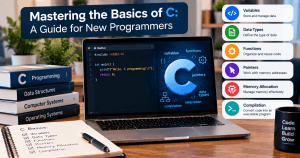
Mastering the Basics of C: A Guide for New Programmers
C is one of the foundational programming languages in computer science. It is used in areas such as operating systems, embedded systems, device drivers, networking software, compilers, and other performance-sensitive applications.
For beginners, learning C can be valuable because it provides a closer look at how programs interact with memory and computer hardware. Concepts such as variables, pointers, memory allocation, data types, and compilation can help new programmers develop a stronger understanding of how software works.
This guide introduces the fundamental concepts of C and explains how beginners can approach the language without becoming overwhelmed by its lower-level features.
What Is C Programming?
C is a general-purpose procedural programming language originally developed in the 1970s. It emphasizes structured programming and gives developers considerable control over memory and system resources.
C is sometimes described as a low-level or middle-level language because it provides both high-level programming constructs and relatively direct access to memory and hardware-related operations.
The language is still relevant for applications where performance, portability, and resource control are important.
Some areas where C is commonly used include:
- Operating systems
- Embedded systems
- Firmware
- Device drivers
- Networking software
- Compilers
- Databases
- System utilities
- High-performance applications
Understanding the Basic Structure of a C Program
A simple C program might look like this:
#include <stdio.h>

int main(void)
{
    printf("Hello, world!\n");
    return 0;
}
Although the program is small, it introduces several important concepts.
#include <stdio.h>
The #include directive tells the preprocessor to include declarations from a header file.
stdio.h is the standard input/output header and provides the declaration for functions such as printf().
main()
The main() function is the entry point for a hosted C program.
A beginner will encounter main() in most complete C programs because program execution begins there.
printf()
printf() displays formatted output.
In the example above, it prints:
Hello, world!return 0
The return statement ends the main() function and returns a status value to the operating environment.
A return value of 0 conventionally indicates successful execution.
C Syntax Basics
C has a relatively compact syntax, but small mistakes can prevent a program from compiling.
Statements
Many C statements end with a semicolon.
For example:
int age = 25;
printf("%d", age);
Forgetting a semicolon can result in a compiler error.
Braces
Curly braces {} define blocks of code.
For example:
if (age >= 18)
{
    printf("Adult");
}
Braces are especially important when working with functions, conditional statements, and loops.
Comments
Comments allow programmers to document code without affecting program execution.
A single-line comment begins with //:
// Display the user's ageMulti-line comments use /* and */:
/*
This program demonstrates
basic C syntax.
*/
Variables and Data Types
Variables store values that a program can use and manipulate.
C requires programmers to specify the type of data a variable will contain.
Common data types include:
int— integerschar— individual charactersfloat— single-precision floating-point numbersdouble— double-precision floating-point numbersvoid— absence of a value
For example:
int age = 30;
char grade = 'A';
float price = 19.99f;
Understanding data types is important because they affect how values are represented and how much memory may be required.
Operators in C
Operators allow programmers to perform calculations and comparisons.
Arithmetic Operators
Common arithmetic operators include:
+   Addition
-   Subtraction
*   Multiplication
/   Division
%   Remainder
For example:
int total = 10 + 5;The % operator returns the remainder of an integer division.
int remainder = 10 % 3;The result is 1.
Comparison Operators
Comparison operators allow programs to evaluate relationships between values.
Examples include:
==   Equal to
!=   Not equal to
>    Greater than
<    Less than
>=   Greater than or equal to
<=   Less than or equal to
These are frequently used with conditional statements.
Conditional Statements
Programs often need to make decisions based on conditions.
The if statement allows code to execute when a condition is true.
if (age >= 18)
{
    printf("You are an adult.");
}
An else statement can provide an alternative:
if (age >= 18)
{
    printf("Adult");
}
else
{
    printf("Minor");
}
For multiple possible conditions, programmers can use else if.
C also provides the switch statement for handling multiple cases.
Loops in C
Loops allow a program to repeat instructions.
for Loop
A for loop is useful when the number or structure of iterations is known.
for (int i = 0; i < 5; i++)
{
    printf("%d\n", i);
}
while Loop
A while loop continues while its condition remains true.
while (count < 5)
{
    count++;
}
do...while Loop
A do...while loop executes its body at least once before checking the condition.
do
{
    count++;
}
while (count < 5);
Learning when to use each type of loop is an important part of becoming comfortable with C.
Functions
Functions allow programmers to divide a program into smaller, reusable sections.
For example:
int add(int a, int b)
{
    return a + b;
}
The function can then be called from another part of the program:
int result = add(5, 3);Functions can make programs easier to understand, test, and maintain.
Instead of placing all program logic inside main(), beginners should gradually learn to divide larger programs into logical functions.
Arrays
An array stores multiple values of the same type in a contiguous sequence of memory.
For example:
int numbers[5] = {10, 20, 30, 40, 50};Individual elements can be accessed using an index:
printf("%d", numbers[0]);C arrays use zero-based indexing, meaning the first element has index 0.
Arrays are important because they introduce concepts that become particularly useful when learning pointers and memory management.
Understanding Pointers
Pointers are one of the most important—and sometimes most difficult—concepts for beginners learning C.
A pointer is a variable that stores a memory address.
For example:
int age = 25;
int *ptr = &age;
Here:
agestores the value25.&ageobtains the memory address ofage.ptrstores that address.*ptrcan be used to access the value stored at that address.
Pointers are powerful because they allow programs to work directly with memory addresses and are widely used with arrays, strings, dynamic memory, structures, and system-level programming.
However, incorrect pointer use can lead to serious problems such as invalid memory access and program crashes.
Memory Management in C
Unlike languages with automatic garbage collection, C allows programmers to explicitly allocate and release dynamic memory.
Functions such as malloc(), calloc(), realloc(), and free() are provided for dynamic memory management through the appropriate standard library facilities.
For example:
int *numbers = malloc(5 * sizeof(int));After dynamically allocated memory is no longer needed, it should be released:
free(numbers);Beginners should take particular care when learning dynamic memory because failing to manage allocated memory correctly can result in memory leaks, dangling pointers, or invalid memory access.
Strings in C
C does not have a dedicated built-in string data type.
Instead, strings are generally represented as arrays of characters terminated by a null character, '\0'.
For example:
char name[] = "Bisola";The character array contains the letters of the name followed by a null terminator.
The C standard library provides functions for working with strings, including functions for copying, comparing, and determining their length.
Because strings are represented using character arrays, programmers need to pay close attention to array size and memory boundaries.
How C Code Becomes an Executable Program
One of the useful things beginners learn from C is that source code must be translated before it can normally be executed.
A simplified compilation process looks like this:
Source code → Preprocessor → Compiler → Object code → Linker → Executable
Preprocessing
The preprocessor handles directives such as:
#include <stdio.h>Compilation
The compiler translates C source code into lower-level code and checks the program for various errors.
Linking
The linker combines the required object files and libraries to produce the final executable.
The exact build process can vary depending on the compiler, operating system, and development environment.
Choosing a C Compiler
To write and run C programs, beginners need a compiler and a suitable development environment.
Common C compilers include:
- GCC
- Clang
- Microsoft Visual C++
- Other compiler implementations available for specific platforms
GCC, for example, is widely used and available on many operating systems.
The GNU Compiler Collection documentation provides information about GCC and its supported languages and tools.
An integrated development environment (IDE) or code editor can also make development easier by providing features such as syntax highlighting, debugging, code navigation, and build configuration.
Common Problems Beginners Encounter
Learning C often involves encountering compiler errors and unexpected program behavior.
Some common problems include:
Missing Semicolons
int age = 25The missing semicolon can prevent successful compilation.
Incorrect Braces
Mismatched braces can change the structure of a program or generate compiler errors.
Using an Uninitialized Variable
Using a variable before assigning it an appropriate value can result in unpredictable behavior.
Array Bounds Errors
C does not automatically prevent programs from accessing memory outside an array’s valid range.
Pointer Errors
Incorrect pointer operations can result in invalid memory access.
Memory Leaks
Dynamically allocated memory that is not released when it is no longer needed can remain allocated unnecessarily.
Understanding compiler warnings and learning how to use a debugger are important skills for diagnosing these problems.
How to Learn C Effectively
C can seem difficult at first because it exposes concepts that many modern languages handle automatically.
A structured learning approach can make the process easier.
Start with:
- Basic syntax
- Variables and data types
- Operators
- Conditional statements
- Loops
- Functions
- Arrays and strings
- Pointers
- Structures
- File handling
- Dynamic memory
- Debugging
Do not try to master pointers and dynamic memory on the first day.
Instead, build a foundation with simple programs and gradually introduce more advanced concepts.
Build Small Projects
Reading about C is useful, but writing programs is where most of the learning takes place.
Beginners can start with projects such as:
- A basic calculator
- Number guessing game
- Temperature converter
- Simple student record system
- Unit converter
- Text-based menu application
- Basic file-processing program
Small projects allow you to practice multiple concepts together without immediately dealing with the complexity of a large application.
Why Learning C Is Still Valuable
C remains relevant because many important software systems depend on concepts closely associated with the language.
Learning C can help programmers understand:
- Memory representation
- Pointers
- Data structures
- Compilation
- Stack and heap concepts
- Operating-system interaction
- Resource management
- Low-level debugging
These concepts can make it easier to understand what happens beneath higher-level programming abstractions.
C is also closely related historically and conceptually to languages such as C++, although knowledge of C does not automatically mean that a programmer knows C++.
Final Thoughts
Learning C can be challenging, but it provides a strong foundation in fundamental programming concepts.
Beginners should focus first on understanding syntax, variables, data types, conditions, loops, and functions. Once these concepts become comfortable, topics such as arrays, strings, pointers, structures, and dynamic memory can be introduced progressively.
The goal should not be to memorize every C function or language feature. Instead, focus on understanding how programs are structured, how data is represented, how memory is used, and how the compiler turns source code into an executable program.
With regular practice and small projects, C becomes much easier to understand and provides valuable knowledge that can be applied across many areas of software development.
Further Resources


No responses yet