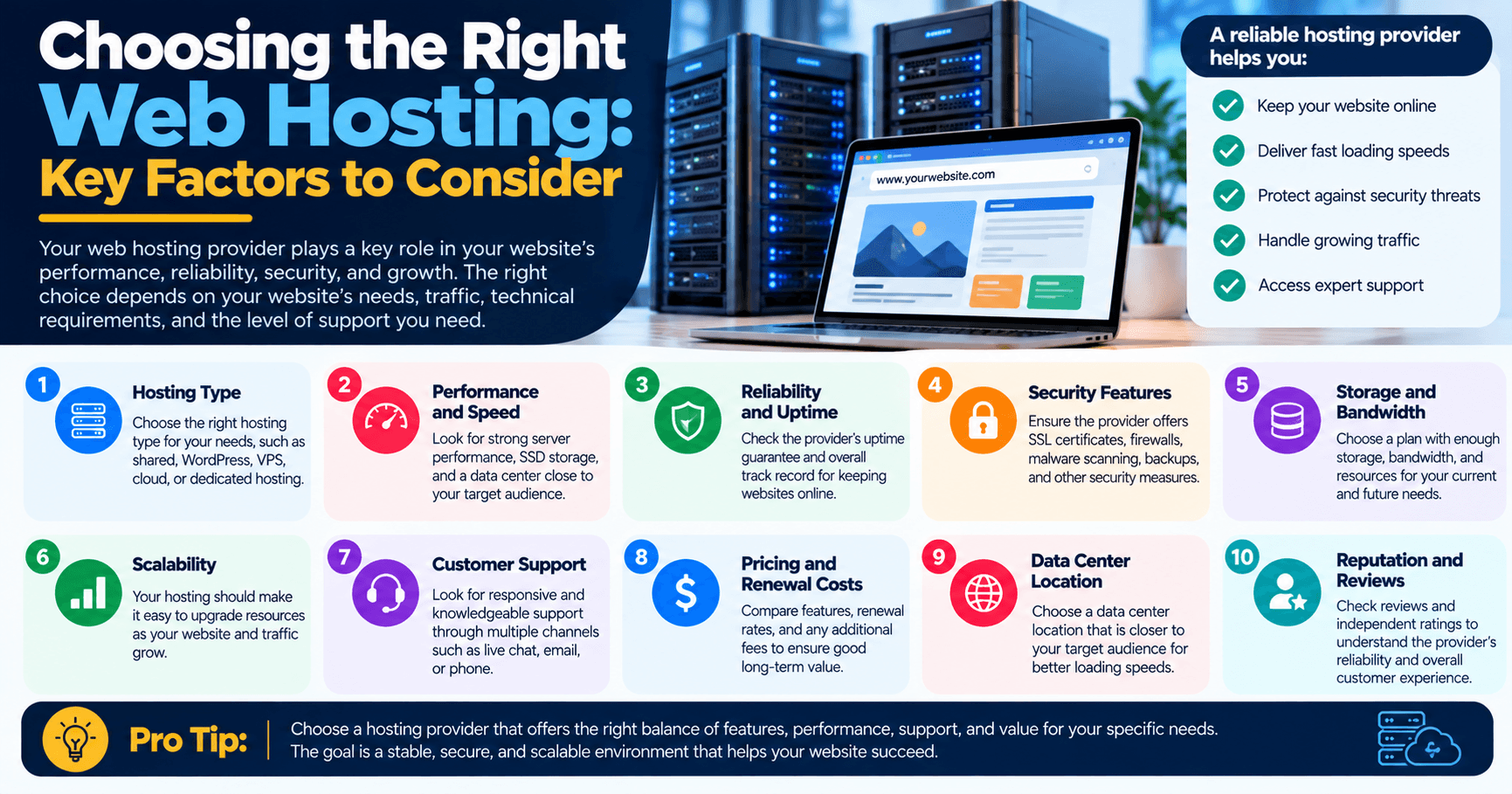
Choosing the Right Web Hosting: Key Factors to Consider
Choosing a web hosting provider is an important decision when building or managing a website. Your hosting environment affects your website’s performance, reliability, security, available resources, and ability to grow.
However, the “best” hosting isn’t necessarily the provider with the most storage, the highest advertised uptime, or the lowest introductory price. The right choice depends on what your website does, how much traffic it receives, what technical resources it requires, and the level of support you need.
Here are the key factors to consider before choosing a web hosting service.
1. Start With Your Website’s Requirements
Before comparing hosting providers, determine what your website actually needs.
Consider:
- What type of website are you running?
- How much traffic do you expect?
- Are you using WordPress or another CMS?
- How much storage do you need?
- Will you host large images, videos, or downloadable files?
- Will you run an online store?
- Do you need business email?
- Will multiple people manage the website?
- Do you expect significant growth?
A small brochure-style business website may have modest hosting requirements, while an e-commerce website or high-traffic application may need substantially more resources.
Understanding these requirements first makes it easier to eliminate hosting plans that aren’t appropriate for your website.
For a broader explanation of hosting options and how web hosting works, see Archer IT Solutions’ complete guide to web hosting.
2. Understand the Different Types of Hosting
Hosting providers typically offer several types of hosting. Each has different characteristics, costs, and resource levels.
Shared Hosting
With shared hosting, multiple websites use resources on the same server.
Advantages:
- Generally affordable
- Easy to manage
- Suitable for many small websites
- Usually requires less technical administration
Limitations:
- Resources are shared
- Performance can be affected by resource-intensive websites on the same server
- Less control than VPS or dedicated hosting
Shared hosting can be a practical option for smaller websites that don’t require extensive server resources.
VPS Hosting
A Virtual Private Server provides a more isolated hosting environment with allocated resources and greater control than traditional shared hosting.
It can be suitable for businesses whose websites have outgrown basic shared hosting or require more control over the server environment.
However, VPS hosting can require more technical knowledge depending on whether the server is managed or unmanaged.
Dedicated Hosting
With dedicated hosting, an entire physical server is allocated to one customer.
This provides greater control and access to dedicated hardware resources, making it appropriate for certain high-resource applications and websites.
The additional control and resources generally come with higher costs and greater administrative responsibilities.
Cloud Hosting
Cloud hosting distributes infrastructure across a cloud environment rather than relying on a single traditional server arrangement.
One of its potential advantages is flexibility. Resources can often be adjusted as requirements change, although the exact scalability available depends on the provider and hosting architecture.
The important point is not to choose a hosting type simply because it sounds more advanced. Choose the environment that matches your website’s technical and business requirements.
3. Look at Performance and Reliability
Website speed matters to both visitors and businesses.
A slow website can make it harder for visitors to navigate the site and complete important actions such as submitting a form, making a purchase, or contacting your business.
When comparing hosting providers, investigate:
- Server resources
- Storage technology
- Network infrastructure
- Caching options
- Resource limits
- Database performance
- Content delivery options
- Server monitoring
- Historical reliability
Don’t rely solely on a provider’s marketing claims. Look at what resources are actually included in the plan.
You can also use Google PageSpeed Insights to evaluate your website’s performance and identify areas that may need improvement.
4. Don’t Focus Only on the “99.9% Uptime” Claim
Many hosting companies advertise uptime percentages such as 99.9%.
While uptime is important, you should look beyond the headline number.
Ask:
- How is uptime measured?
- What does the provider consider downtime?
- Are scheduled maintenance periods excluded?
- Is there an SLA?
- What compensation or remedy is available if service levels aren’t met?
A hosting provider should be transparent about its service commitments rather than relying only on an impressive percentage in its marketing.
5. Consider Security Features
Your hosting environment is part of your website’s overall security.
Depending on the hosting plan and provider, security features may include:
- SSL/TLS certificates
- Firewall protection
- Malware monitoring
- DDoS mitigation
- Account isolation
- Secure server configuration
- Software and security updates
- Access controls
- Backup systems
However, don’t assume that purchasing hosting automatically makes your website secure.
Website security also depends on how the website itself is configured and maintained. For example, WordPress websites require attention to plugins, themes, administrator accounts, updates, and other components.
For businesses that need broader technology and security support, Archer’s managed IT services can provide support beyond the hosting environment.
6. Check the Backup and Recovery Policy
Backups are one of the most important questions to ask a hosting provider.
Find out:
- How frequently backups are performed
- How many backup copies are retained
- Where backups are stored
- Whether backups are automatic
- How restoration works
- Whether restoring a backup costs extra
- Whether backups include both website files and databases
Most importantly, understand whether backups are stored independently from the primary website environment.
A backup that cannot be restored when you need it isn’t much use, so recovery procedures should be understood and, where possible, tested.
7. Evaluate Customer Support
Even a well-maintained website can experience technical problems.
When something goes wrong, you need to know how quickly you can get assistance and whether the support team can actually resolve the problem.
Consider:
- Support hours
- Phone support
- Email or ticket support
- Live chat
- Emergency support
- Average response times
- Technical expertise
- Escalation procedures
Don’t just ask whether support is available 24/7. Ask what 24/7 support actually means.
A provider may offer 24/7 ticket submission without providing 24/7 access to technicians capable of handling complex problems.
8. Think About Scalability
Your hosting requirements can change as your website grows.
You may eventually need:
- More storage
- More processing resources
- Higher traffic capacity
- Additional databases
- More email accounts
- Better performance
- A different hosting environment
Choose a provider that makes it reasonably straightforward to upgrade.
You don’t necessarily need a high-end hosting plan on day one. What matters is having a clear path to increase resources when your website’s requirements justify it.
9. Compare the Total Cost, Not Just the Introductory Price
Hosting prices can be difficult to compare because providers may structure their plans differently.
When comparing costs, check:
- Initial price
- Renewal price
- Setup fees
- Domain costs
- SSL costs
- Backup costs
- Email costs
- Migration fees
- Additional storage charges
- Additional resource charges
- Support or management fees
A plan that appears cheaper initially may become more expensive when you add features that another provider includes.
Look at the total cost of ownership, not just the promotional price displayed on the hosting page.
You can also review Archer’s web hosting services to understand the type of hosting and website support the company provides.
10. Check the Hosting Control Panel
A good hosting environment should make routine management reasonably straightforward.
Depending on the provider, you may have access to a control panel such as cPanel, Plesk, or another hosting management interface.
Useful functionality can include:
- Domain management
- Email account management
- File management
- Database management
- SSL configuration
- Backup management
- Software installation
- Resource monitoring
If you’re not technically experienced, a complicated hosting environment can create unnecessary work. Consider how much control you actually need versus how much you want the hosting provider to manage for you.
11. Check WordPress Compatibility If You’re Using WordPress
If your website runs WordPress, make sure the hosting environment supports the software properly.
Consider:
- Supported PHP versions
- Database compatibility
- WordPress installation options
- Automatic updates
- Backup tools
- Caching
- Security features
- Staging capabilities
- WordPress-specific technical support
WordPress also provides guidance for choosing appropriate hosting and maintaining website performance. You can review its official hosting information before making a decision.
12. Consider Website Migration
If you’re moving an existing website from another hosting provider, find out whether the new provider assists with migration.
A migration may involve:
- Website files
- Databases
- Domains
- DNS records
- Email accounts
- SSL certificates
- WordPress configuration
- Application settings
A migration service can be particularly useful if you’re not comfortable handling these technical steps yourself.
13. Check Server and Data Location Requirements
Where your website’s infrastructure is located can be relevant for performance, regulatory requirements, and business operations.
However, don’t assume that choosing the geographically closest server automatically makes a website fast.
Website performance depends on multiple factors, including:
- Server performance
- Network quality
- Website optimization
- Caching
- Content delivery networks
- Database performance
- Image sizes
- Code and application efficiency
If your business has specific data-residency or regulatory requirements, confirm where data is stored and processed before choosing a provider.
14. Read Reviews Carefully
Reviews can provide useful insight into a hosting provider’s customer service and reliability, but don’t rely on reviews alone.
Look for patterns involving:
- Support quality
- Downtime
- Migration experiences
- Billing
- Renewal pricing
- Performance
- Account limitations
- How the provider handles technical problems
Try to distinguish reviews about the specific hosting plan you’re considering from complaints about unrelated products or services.
15. Consider the Level of Management You Need
One of the most important questions is how much technical responsibility you want to handle yourself.
With a more self-managed hosting environment, you may be responsible for tasks such as:
- Server configuration
- Updates
- Security
- Backups
- Monitoring
- Troubleshooting
A managed hosting or managed IT arrangement can reduce the amount of technical administration your business has to handle internally.
For businesses that need help with their wider technology environment, Archer IT Solutions provides IT support alongside website and hosting services.
A Simple Web Hosting Checklist
Before choosing a provider, make sure you can answer these questions:
| Question | Why it matters |
|---|---|
| How much storage do I need? | Prevents you from choosing an unsuitable plan |
| How much traffic do I expect? | Helps determine resource requirements |
| What type of hosting is appropriate? | Avoids paying for resources you don’t need |
| What security features are included? | Helps protect your website |
| How are backups handled? | Determines how prepared you are for data loss |
| What support is available? | Important when technical problems occur |
| What are the renewal costs? | Gives you a realistic long-term cost |
| Can I upgrade easily? | Allows the hosting environment to grow with your business |
| Can the provider migrate my website? | Makes moving hosts easier |
| What exactly does the SLA cover? | Clarifies the provider’s commitments |
Choosing Hosting Based on Your Website
There is no single hosting plan that is best for every website.
A small portfolio or brochure website may be perfectly comfortable on shared hosting. A growing business website may need additional resources, while a high-traffic application or resource-intensive e-commerce platform may require a more powerful environment.
The goal is to match the hosting environment to your current requirements, expected growth, technical capabilities, budget, and support needs.
If you are looking for website hosting and related technical support, explore Archer IT Solutions’ web hosting services. If you need help determining what your website requires, contact Archer IT Solutions to discuss your requirements.


No responses yet