Technicians working in a server room with load balanced IIS cluster showing active servers and traffic load chart

Windows Hosting Guide: How It Handles High Traffic Sites

Summary Box

  • How Windows hosting supports high traffic websites
  • Why IIS and load balancing matter at scale
  • What helps during sudden traffic spikes
  • When to upgrade to managed hosting support
  • How Archer IT Solutions can help you grow

What You’ll Learn

  • How IIS improves Windows hosting performance
  • How load balancing keeps websites online
  • How Windows hosting scales during busy periods
  • Common traffic bottlenecks and how to reduce them
  • What to look for in a reliable hosting provider

👉 Get Help Now: https://www.archer-its.com/contact-us/
👉 $1.99/month Web Hosting: https://www.archer-its.com/web-hosting/

Quick Answer:
Windows hosting supports high traffic websites by using IIS optimization, load balancing, caching, resource scaling, and strong server management. When configured correctly, it can handle large visitor volumes, keep applications responsive, and reduce downtime during traffic spikes.

If your website slows down the moment traffic increases, you are not alone. Many business owners worry that a growing audience will cause crashes, lost sales, and frustrated users. The good news is that Windows hosting can support high traffic websites very well when the environment is built for scale, speed, and stability.

Load Balancing and IIS Performance at Scale

Windows hosting often relies on Internet Information Services (IIS) as the main web server platform. IIS is designed to handle web applications efficiently, especially for websites built with ASP.NET, .NET Core, MSSQL, and other Microsoft technologies. For businesses already in the Microsoft ecosystem, this creates a smooth path to better performance without changing platforms.

One of the biggest strengths of IIS is that it can be tuned for speed and stability. Application pools, request queues, output caching, compression, and connection limits can all be adjusted to handle more users at once. That means a well-managed Windows hosting environment can process traffic more efficiently instead of letting one sudden surge overwhelm the server.

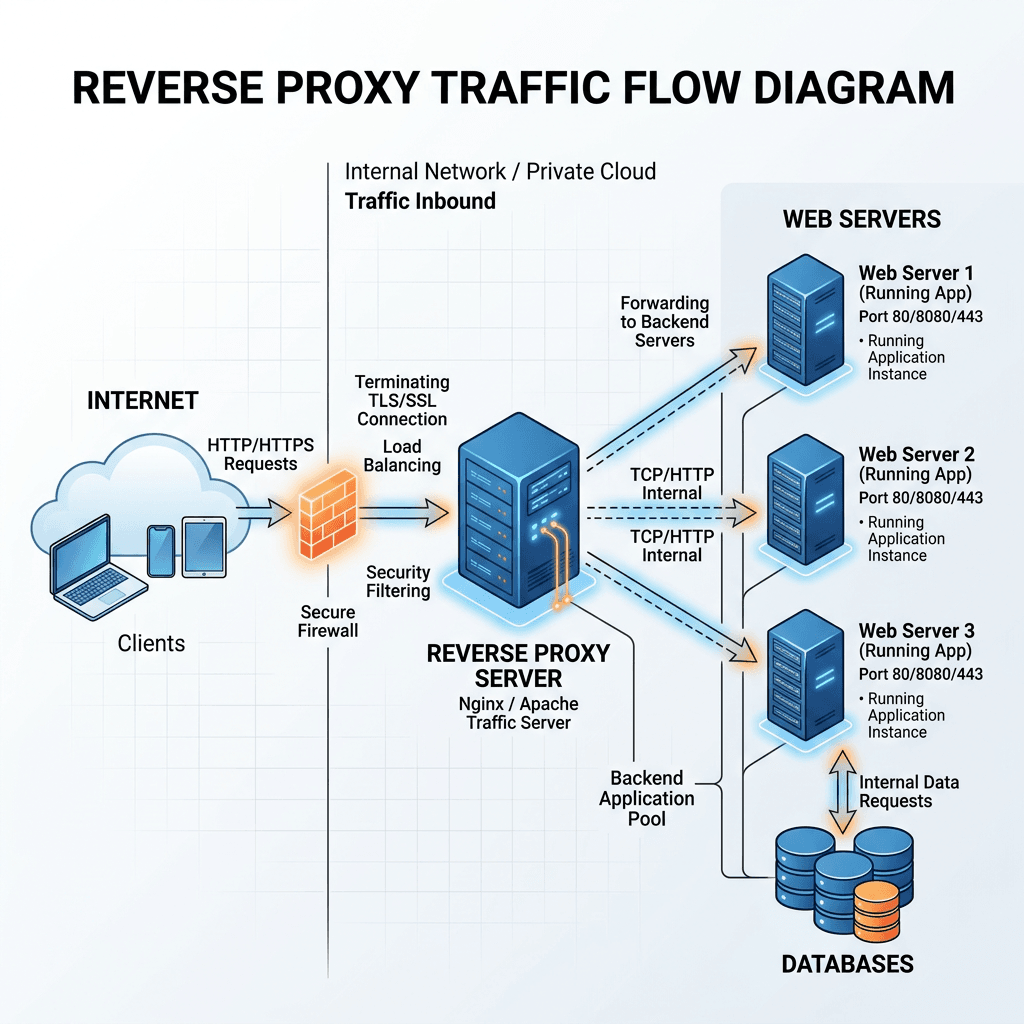
When traffic grows beyond a single server’s limits, load balancing becomes critical. A load balancer spreads incoming requests across multiple servers so no one machine takes all the pressure. This helps high traffic websites stay available, improves page load consistency, and lowers the risk of downtime during peak periods.

Why load balancing matters

A single server can become a bottleneck fast. Even a powerful machine has limits on CPU, RAM, disk access, and concurrent connections. Load balancing solves this by distributing demand across multiple nodes.

Key benefits include:

  • Better uptime
  • Faster response times
  • Easier maintenance
  • Reduced risk of server overload
  • More room for business growth

IIS performance features that help at scale

Windows hosting environments can be optimized with several IIS features. These are especially useful for ecommerce sites, portals, booking systems, and business websites with unpredictable usage.

Common IIS performance tools:

  • Application pools: isolate apps and improve stability
  • Output caching: serves repeated content faster
  • Dynamic compression: reduces file size sent to users
  • Request filtering: blocks harmful or excessive requests
  • Web garden/web farm setups: support broader scaling

Pros and Cons of Windows hosting for busy websites

ProsCons
Strong support for ASP.NET and MSSQLCan cost more than basic shared hosting
Excellent IIS management toolsPoor setup can still cause slowdowns
Easy integration with Microsoft servicesScaling needs planning, not guesswork
Good fit for enterprise and SMB appsSome hosts offer limited optimization

To better understand your hosting options, see Archer’s complete guide to web hosting and web hosting services.

Scaling Windows Hosting for Traffic Spikes

Traffic spikes are different from steady growth. A site may run fine most of the month, then suddenly receive a flood of users from an email campaign, product launch, holiday sale, or viral post. In these moments, Windows hosting needs more than raw power. It needs a plan for rapid scaling, smart caching, and active management.

There are two main ways to scale: vertical scaling and horizontal scaling. Vertical scaling means adding more CPU, RAM, or storage to one server. Horizontal scaling means adding more servers and distributing traffic between them. For high traffic websites, horizontal scaling is often the stronger long-term strategy because it avoids putting everything on a single machine.

Database performance also matters during spikes. Many websites slow down not because the web server fails, but because the database gets hammered with too many requests. Windows hosting can support database optimization, connection pooling, query tuning, and dedicated database resources to keep backend performance from dragging down the entire site.

👉 Fast, Reliable Web Hosting — Starting at $1.99/month
https://www.archer-its.com/web-hosting/

Common ways Windows hosting handles traffic spikes

A solid Windows hosting setup usually combines several layers of protection and performance. This is what helps websites survive sudden demand instead of failing under pressure.

Typical scaling tools include:

  • Load-balanced web servers
  • CDN support for static content
  • Server-side and application caching
  • Dedicated resources instead of overcrowded shared plans
  • Database tuning and monitoring
  • Managed security and firewall rules

Troubleshooting slow performance during traffic surges

If your site struggles during busy periods, these are the first things to check:

  1. Review CPU and memory usage
    Look for spikes that match traffic increases.

  2. Check IIS logs and failed request tracing
    This helps identify timeouts, heavy endpoints, or repeated errors.

  3. Test database response time
    Slow queries often create site-wide lag.

  4. Enable or improve caching
    Static and repeated content should not be generated every time.

  5. Move to a scalable hosting plan
    Basic hosting may not be enough once traffic grows.

If you need infrastructure help, Archer also offers managed IT services and local IT support. For broader backend planning, visit the server administration guide.

Example: what scaling looks like in real life

Imagine an online store running on Windows hosting with IIS and MSSQL. On a normal day, one server might be enough. But during a holiday promotion, traffic triples in a few hours. Without scaling, shoppers hit slow pages, failed carts, and checkout errors.

With the right setup, the load balancer directs visitors across multiple servers, cached product pages load faster, and the database runs on optimized resources. Instead of losing sales, the business handles the demand smoothly. That is the difference between cheap hosting and hosting built to grow with you.

Recommended resources

External educational resources:

Embedded video

Free offers

  • Free Website Speed Checklist
  • Small Business IT Setup Guide

To request help, contact Archer IT Solutions at:

  • Sales: sales@archer-its.com
  • Support: support@archer-its.com
  • General: info@archer-its.com

“Our site used to crawl during promotions. After upgrading our hosting setup, it stayed fast and stable when traffic jumped.” — Mark T.

Case study:
We helped a growing business fix slow load times and recurring outages by moving them to a more reliable hosting setup with better resource allocation and support planning.

Does Windows hosting support high traffic websites?

Yes. Windows hosting can handle high traffic when it includes proper IIS tuning, load balancing, caching, and enough server resources.

Is Windows hosting good for ASP.NET applications?

Absolutely. Windows hosting is one of the best choices for ASP.NET and Microsoft-based applications because of native compatibility with IIS and related tools.

What causes a Windows-hosted site to slow down?

Common causes include limited server resources, poor database performance, lack of caching, and no load balancing during high demand.

When should I upgrade my Windows hosting plan?

Upgrade when you notice repeated slowdowns, downtime during promotions, increasing visitor numbers, or application resource limits.

Can Archer IT Solutions help with Windows hosting?

Yes. Archer IT Solutions offers hosting, managed IT, and support services that can help businesses build a faster, more reliable website environment.

High traffic does not have to break your website. With the right Windows hosting setup, your site can stay fast, stable, and ready for growth. IIS optimization, load balancing, caching, and proactive support all play a role in keeping performance strong when demand rises. If you want hosting that is easier to manage and built to scale, Archer IT Solutions can help you move forward with confidence.

  • Windows hosting can support large traffic volumes
  • IIS offers powerful performance and management features
  • Load balancing reduces overload and improves uptime
  • Scaling strategies help websites survive traffic spikes
  • Managed support makes growth easier and less risky

👉 Start Your Hosting Today: https://www.archer-its.com/web-hosting/
👉 Request IT Support Now: https://www.archer-its.com/contact-us/
👉 Get a Free Consultation: https://www.archer-its.com/ticket/

👉 Contact Archer IT Solutions Now
https://www.archer-its.com/contact-us/

Fast, Reliable Web Hosting — Starting at $1.99/month

🔥 Most Popular
Standard Plan
Domain Only
$1.99/month
Limited-time offer
Secure your business name online
  • ⚡ Fast, reliable hosting
  • 🔒 Free SSL security
  • 📧 Professional email accounts
  • 🚀 1-click WordPress setup
  • 📈 Scalable for growing traffic

👉 Get Started Now

Affordable yearly pricing
Easy setup
Works with any hosting

Buy Domain

Reseller Hosting (For Agencies & Developers)

Start your own hosting business or manage client sites

Reseller 1Reseller 2Reseller 3
$20/month$37.50/month$50/month
  • 10 Domains
  • 100 GB Disk Space
  • 2TB Bandwidth
  • 100 Databases
  • 100 Mailboxes
  • WordPress Ready
  • 25 Domains
  • 300 GB Diskspace
  • 6TB of traffic
  • 300 Databases
  • 300 Mailboxes
  • WordPress options
  • 50 Domains
  • 600 GB Diskspace
  • 12TB of traffic
  • 600 Databases
  • 600 Mailboxes
  • WordPress options
✔ 99.9% uptime • ✔ Secure • ✔ Easy setup • ✔ Local support

Stop settling for slow, unreliable hosting. With Archer IT Solutions, get a website hosting plans that deliver speed, security, and 99.9% uptime guarantee. Grab your domain and hosting package in one seamless plan, optimized for WordPress users, small and medium size businesses, and personal websites. 

Enjoy affordable web hosting plans without compromises unlike the big guys. Complete with professional email, one-click CMS installs, and round-the-clock hosting support. Perfect for WordPress users.

Built for Real Businesses

Whether you’re launching your first blog or scaling a growing business, Archer IT gives you:

+ Speed that keeps visitors engaged
+ Reliability you can count on
+Tools that actually make sense

Launch your first personal blog or scale a growing small business site with hosting optimized for performance. Get the best web hosting for plus simple setup — all powered by secure Linux servers and easy Plesk control panel.

Why Choose Archer IT Hosting?

🔒 Free SSL Certificates (Security + SEO Boost)
📧 Professional Email Accounts Included
⚡ Fast Linux Servers (Optimized Performance)
🧩 One-Click WordPress, Joomla & Drupal Installs
💬 Real 24/7 Support — No Bots, Just Help
💾 Automatic Backups for Peace of Mind

Risk-Free Guarantee

Try it with confidence.
If it’s not right for you, get your money back within 15 days.

🔥 Don’t Wait — Launch Your Website Today

Stop overpaying for slow hosting.
Get everything you need in one simple plan.

Your website stays online with uptime, protected by a free SSL certificate, and supported by real people around the clock. And if it’s not right for you? Our 15-day money-back guarantee makes it a no-risk choice. Take your business or personal project online with hosting that’s secure, affordable, and built to perform.

💬 Real Support. No Runaround.

Unlike big hosting companies, you get:

  • Direct help from real people
  • No ticket delays
  • No upsell traps

CATEGORIES:

Hosting News

Tags:

No responses yet

    Leave a Reply

    Your email address will not be published. Required fields are marked *