What Is WordPress? Simple Guide for Beginners
Quick Answer
WordPress is a popular website platform that lets beginners build blogs, business websites, online stores, and more without needing advanced coding skills. It works through themes, plugins, and a dashboard where you can manage pages, posts, design, and settings. For small businesses, it offers flexibility, affordability, and room to grow.
If you are asking what is WordPress, you are probably trying to find the easiest way to build a website without making the process too technical or expensive. That is exactly why WordPress is so widely used. It gives beginners and business owners a practical way to create a professional website, update content easily, and scale over time.
For small businesses, WordPress solves a very real problem. Many owners want a site that looks professional, ranks in search engines, and can be managed without hiring a developer for every small change. With the right setup and dependable WordPress hosting, WordPress makes that possible.
At Archer IT Solutions, we often speak with businesses that want a website that is simple to manage but powerful enough to support future growth. WordPress is usually one of the best answers because it combines ease of use with strong customization options. In this guide, we will break down how it works, why beginners choose it, and what to consider before getting started.
What Is WordPress and How Does It Work?
WordPress is a content management system, often called a CMS. In simple terms, it is software that helps you build and manage a website from a visual dashboard instead of writing everything from scratch in code. You can create pages, publish blog posts, upload images, change designs, and add features using tools that are beginner-friendly.
It works by giving your website a core foundation, then allowing you to expand it with themes and plugins. A theme controls how your site looks, while plugins add functionality such as contact forms, backups, SEO tools, booking systems, and online store features. This makes WordPress flexible enough for many kinds of websites, from local business pages to full ecommerce stores.
To use WordPress, you normally need a domain name and WordPress hosting. Hosting stores your website files and makes them accessible online. Once WordPress is installed, you log into the admin dashboard, choose a theme, create content, and customize your website. If you want a stronger technical setup behind the scenes, you can also review The Complete Guide to Server Administration for a broader look at website infrastructure and performance support.
How WordPress Works in Simple Terms
- You buy a domain name
- You choose a hosting provider
- You install WordPress
- You select a theme for design
- You add plugins for features
- You create pages and blog posts
- You launch and manage your site from the dashboard
WordPress Pros and Cons
Pros
- Easy for beginners to learn
- Highly customizable
- Large library of themes and plugins
- Great for blogs, business websites, and ecommerce
- SEO-friendly when set up correctly
Cons
- Needs updates and maintenance
- Too many plugins can slow a site down
- Security depends on proper setup
- Some advanced customization may still need a developer
Comparison Table: WordPress vs Website Builder
| Feature | WordPress | Basic Website Builder |
|---|---|---|
| Ease of setup | Moderate | Very easy |
| Customization | High | Limited |
| Ownership and control | Strong | Platform-dependent |
| Plugin options | Extensive | Limited |
| Best for growth | Excellent | Fair |
| Ongoing flexibility | High | Medium |
For businesses planning ahead, WordPress often wins because it grows with you. A simple website builder may be easier at first, but WordPress usually offers more value over time.
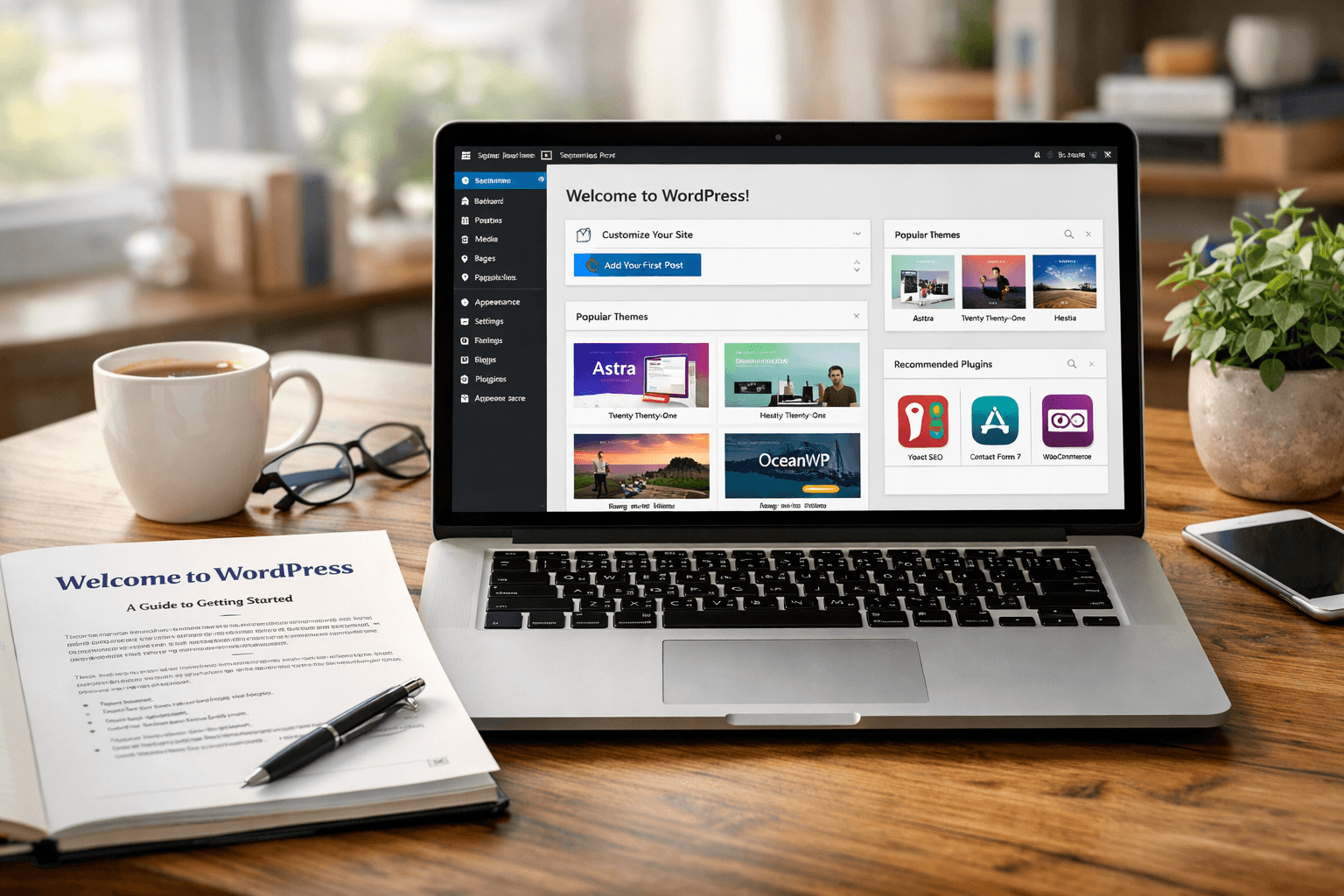
Image suggestion: Screenshot of a WordPress dashboard with menu labels visible
Alt text: Beginner view of the WordPress dashboard showing pages posts and settings
Embedded YouTube suggestion:
WordPress Tutorial for Beginners
Helpful External Resources
Why Beginners Choose WordPress for Websites
Beginners choose WordPress because it gives them control without forcing them to become web developers. The dashboard is organized in a way that makes common tasks straightforward. You can add a page, edit text, upload photos, and publish updates with only a short learning curve. That is especially useful for small businesses that need to move quickly.
Another major reason is cost-effectiveness. WordPress itself is free, and businesses only need to pay for hosting, a domain, and any premium tools they decide to use. Compared to paying for a fully custom site from the beginning, WordPress is usually more affordable. For many businesses, pairing the platform with professional web design services can create a polished result without overspending.
WordPress is also popular because it supports growth. A business might start with a simple homepage, contact page, and blog. Later, it can add booking forms, ecommerce tools, memberships, or advanced SEO features. That scalability makes WordPress appealing for owners who do not want to rebuild their website from scratch a year later.
Common Reasons Beginners Pick WordPress
- It is beginner-friendly
- It supports business growth
- It works well for blogs and websites
- It has thousands of themes and plugins
- It can be optimized for search engines
- It works with professional WordPress hosting
- It is widely supported by designers and developers
Troubleshooting: Common Beginner Issues
If you are new to WordPress, a few issues come up often. One common problem is choosing too many plugins too early. This can clutter the dashboard and slow the website down. Start with only the essentials, such as security, backups, SEO, and contact forms.
Another issue is poor hosting. Cheap or low-quality hosting can cause slow loading times, downtime, and update problems. That is why choosing dependable WordPress hosting matters. Better hosting improves speed, security, and overall reliability, which helps your business make a better first impression online.
Beginners also sometimes struggle with design consistency. They may install a theme, then make random edits that create an uneven look. A smarter approach is to plan the site structure first, keep branding consistent, and use a professional guide when needed. If you want help making your site faster and more reliable, you can also explore our contact page to speak with the Archer IT Solutions team.
Soft CTA: If you are building your first site and want a smoother setup, reliable hosting and expert guidance can save hours of frustration. Explore Archer IT Solutions’ website support and hosting options to get started with confidence.
Beginner Example
Imagine a small landscaping company that needs a homepage, service pages, photo gallery, customer reviews, and a contact form. WordPress can handle all of that with a clean theme and a few core plugins. As the business grows, it can add online quote requests, blog content, and location-specific pages without changing platforms.
Image suggestion: Illustration of a small business website built on WordPress across desktop and mobile
Alt text: Responsive WordPress website example for a small business on desktop and mobile screens
FAQ
What is WordPress used for?
WordPress is used to build and manage websites such as blogs, business sites, portfolios, online stores, and service pages. It is flexible enough for beginners and scalable enough for growing companies.
Is WordPress free?
WordPress software is free, but you usually pay for hosting, a domain name, and optional premium themes or plugins. This makes it affordable for most small businesses starting online.
Do I need coding skills to use WordPress?
No, most beginners can use WordPress without coding. You can manage content, install themes, and add plugins through the dashboard. Coding may help with advanced customization, but it is not required to get started.
Is WordPress good for small businesses?
Yes, WordPress is one of the best options for small businesses because it is cost-effective, flexible, and easy to update. It also supports SEO, lead generation, and future growth.
Where can I learn more before launching?
You can review helpful setup resources like The Complete Guide to Web Hosting and the Archer IT Solutions About Us page to understand how the right technology partner can support your website goals.
WordPress remains one of the smartest choices for beginners because it balances simplicity, flexibility, and long-term value. If you have been wondering what is WordPress, the short answer is this: it is a practical website platform that helps businesses create a professional online presence without unnecessary complexity.
For small businesses and first-time website owners, that matters. You need a website that is easy to manage, built to grow, and supported by reliable WordPress hosting. With the right setup, WordPress can become more than just a website platform. It can become a marketing tool, a lead generator, and a foundation for future growth.
If you are ready to build or improve your website, Archer IT Solutions can help. Visit our WordPress hosting page, learn more about our web design services, or contact us today. If you already need technical help, submit a request through our support ticket page.
[submit “Submit”]
1
[_site_title] “[your-subject]”
[_site_title]
[_site_admin_email]
From: [your-name] [your-email]
Subject: [your-subject]
Message Body:
[your-message]
—
This is a notification that a contact form was submitted on your website ([_site_title] [_site_url]).
Reply-To: [your-email]
1
1
[_site_title] “[your-subject]”
[_site_title]
[your-email]
Message Body:
[your-message]
—
This email is a receipt for your contact form submission on our website ([_site_title] [_site_url]) in which your email address was used. If that was not you, please ignore this message.
Reply-To: [_site_admin_email]
1
1
Thank you for your message. It has been sent.
There was an error trying to send your message. Please try again later.
One or more fields have an error. Please check and try again.
There was an error trying to send your message. Please try again later.
You must accept the terms and conditions before sending your message.
Please fill out this field.
This field has a too long input.
This field has a too short input.
There was an unknown error uploading the file.
You are not allowed to upload files of this type.
The uploaded file is too large.
There was an error uploading the file.
Please enter an email address.
Please enter a URL.
Please enter a telephone number.
Please enter a date in YYYY-MM-DD format.
This field has a too early date.
This field has a too late date.
Please enter a number.
This field has a too small number.
This field has a too large number.
The answer to the quiz is incorrect.

No responses yet