Sitemap Easy Guide: Help Google Find Your Pages Faster
A sitemap is a file that helps search engines discover the important URLs on your website. For website owners, bloggers, and businesses relying on organic search traffic, having a properly configured sitemap can make it easier for search engines to discover new and updated content.
However, a sitemap is not a guarantee that every URL will be crawled, indexed, or ranked. It is one part of a broader technical SEO and website structure strategy.
What Is a Sitemap?
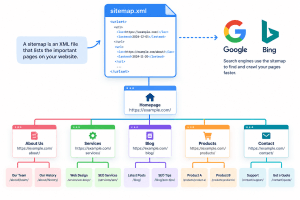
An example of how an XML sitemap helps search engines discover important website URLs
A sitemap is a file that provides search engines with information about the URLs you want them to know about on your website. The most common type is an XML sitemap, which is designed primarily for search engines.
For example, a sitemap might contain URLs such as:
example.com/example.com/services/example.com/blog/example.com/blog/what-is-web-hosting/
Sitemaps are particularly useful for websites with many pages, frequently updated content, new websites, or pages that may be difficult for search engines to discover through normal internal links.
Google explains that a sitemap tells it which pages on a site it should know about. Google also notes that smaller websites with around 500 pages or fewer may not necessarily need a sitemap if every important page can already be reached through internal links.
This makes a sitemap an important part of technical SEO, but it should work alongside a well-organized website structure.
For more information about how your website infrastructure affects performance, see Archer IT Solutions’ Complete Guide to Web Hosting.
How Does a Sitemap Help Google Discover Your Pages?
Search engines discover pages primarily by following links between URLs. A sitemap provides another way to communicate the URLs that are important to your website.
This can be particularly helpful when:
- Your website has recently launched.
- You have published many new blog posts.
- Your website contains hundreds or thousands of URLs.
- Some important pages have relatively few internal links.
- You regularly update existing content.
- You are experiencing indexing or crawl-discovery problems.
Submitting a sitemap through Google Search Console allows you to monitor whether Google can read the sitemap and whether it has encountered processing errors.
However, submitting a sitemap does not automatically mean Google will index every URL inside it. Indexing depends on other factors, including whether the page is accessible to Google, whether it is blocked from crawling, whether it contains a noindex directive, whether it is considered a duplicate, and whether Google determines that the page should be indexed.
That distinction is important if you are dealing with pages that are currently excluded from Google’s index.
Sitemap vs. Internal Linking: Why You Need Both
A sitemap should not replace internal linking.
Internal links connect related pages throughout your website and help users and search engines understand the relationship between your content. Your most important pages should be accessible through your site’s navigation and internal links rather than existing only inside an XML sitemap.
For example, a blog post about website navigation could naturally link to your Web Design Services, while an article about SEO could link to your Complete Guide to Server Administration where server configuration is relevant.
Your sitemap then provides an additional source of URL discovery.
This is also why having a logical website structure matters. If a valuable service page is buried several clicks deep and has almost no internal links pointing to it, simply placing the URL in a sitemap does not solve the underlying structural problem.
For related guidance, see our article on Effective Link-Building Strategies for SEO Success.
XML Sitemap vs. HTML Sitemap
The term “sitemap” can refer to two different things.
XML Sitemap
An XML sitemap is primarily intended for search engines. It contains URLs and can include additional information such as when pages were last modified.
Most WordPress websites generate XML sitemaps automatically through WordPress itself or an SEO plugin.
HTML Sitemap
An HTML sitemap is a webpage containing links to important sections or pages of your website. It is primarily designed to help visitors navigate your site, although the links can also provide another route for search-engine crawlers to discover content.
The two serve different purposes, so they should not be treated as interchangeable.
How to Submit a Sitemap to Google
If your website has an XML sitemap, you can submit it through Google Search Console.
A typical sitemap URL may look like:
https://example.com/sitemap.xml
Google’s Search Console Sitemaps report allows site owners to submit a sitemap and monitor its processing status and any errors Google encounters.
You can use the official Google Search Console to manage your property’s search visibility and sitemap submissions.
Google also provides detailed documentation on Sitemaps for website owners who want to understand sitemap formats, requirements, and best practices.
If you have recently published or substantially updated an individual page, Google’s URL Inspection tool can also be used to request a crawl. Google specifically recommends using a sitemap when you need to communicate multiple URLs rather than requesting individual crawls one page at a time.
Don’t Forget Bing Webmaster Tools
Google isn’t the only search engine that can use your sitemap.
Bing Webmaster Tools allows website owners to submit XML sitemaps and monitor their processing status. Bing explains that sitemaps can help it discover URLs that might otherwise be difficult for its crawlers to find.
You can submit your sitemap through Bing Webmaster Tools.
Bing also supports referencing the sitemap from your robots.txt file using a directive such as:
Sitemap: https://example.com/sitemap.xml
This gives crawlers another way to discover the sitemap.
Sitemap Problems That Can Affect Indexing
If Google is not indexing your pages, don’t assume that the sitemap is the only problem.
Check these areas first.
1. Your Sitemap Contains Incorrect URLs
Your sitemap should contain the URLs you actually want search engines to discover.
Avoid filling it with:
- Redirected URLs
- Broken URLs
- URLs returning errors
- Duplicate versions of pages
- Pages you deliberately don’t want indexed
2. Important Pages Have a Noindex Directive
A page containing a noindex instruction tells search engines not to include that page in their index.
If an important service page has accidentally been marked noindex, submitting its URL in a sitemap won’t override that instruction.
3. Robots.txt Is Blocking Crawling
Your robots.txt file can prevent crawlers from accessing specific areas of your website. Bing’s documentation also explains that a sitemap can be referenced within robots.txt, while crawl restrictions can affect what search-engine bots can access.
4. Your Website Has Weak Internal Links
If an important page is not linked from other relevant pages, it can be harder for search engines and visitors to discover.
This is where a strong navigation and internal-linking strategy becomes important. Your website navigation guide can help you think about how important pages should be connected.
5. Your Sitemap Contains Too Many Unimportant URLs
A sitemap should help communicate the important parts of your website rather than simply becoming a dump of every URL your CMS has generated.
Review your sitemap periodically, particularly after restructuring your website, deleting content, or changing your WordPress SEO settings.
Sitemap Troubleshooting Checklist
If your website has indexing problems, work through this checklist:
- Confirm that the sitemap exists.
- Open the sitemap URL in your browser and make sure it can be accessed.
- Check that the sitemap contains the correct URLs.
- Make sure important pages are not marked
noindex. - Check that important URLs aren’t blocked by
robots.txt. - Make sure important pages have internal links.
- Check for broken links and redirects.
- Submit the sitemap through Google Search Console.
- Monitor the Sitemaps report for errors.
- Check individual URLs using URL Inspection when necessary.
- Submit the sitemap through Bing Webmaster Tools.
- Review your website’s technical SEO if pages continue to remain unindexed.
If your website has performance or infrastructure problems alongside indexing issues, Archer IT Solutions Web Hosting provides hosting options for websites and businesses.
Sitemaps Are Only One Part of Technical SEO
It is tempting to think that creating a sitemap will solve indexing problems by itself. It won’t.
Search visibility depends on several connected elements, including:
- Crawlability
- Internal linking
- Website architecture
- Page accessibility
- Technical SEO
- Content quality
- Canonicalization
noindexdirectives- Server performance
- Mobile usability
Your website’s technical foundation matters because search engines need to be able to access and process your content efficiently.
For businesses managing more complex infrastructure, Archer IT Solutions also provides Managed IT Services.
And if you’re working on your website’s overall visual and technical experience, their Web Design Services can support website development and optimization.
Frequently Asked Questions
Does every website need a sitemap?
No. Google says smaller sites where all important pages can be reached through internal links may not need a sitemap. However, sitemaps can still be useful for larger, newer, frequently updated, or more complex websites.
Does a sitemap guarantee indexing?
No. A sitemap helps search engines discover URLs, but it does not guarantee that Google will crawl, index, or rank every URL submitted.
How often should I update my sitemap?
If your sitemap is generated automatically by your CMS or SEO plugin, it will generally update as you publish or modify content. You should still periodically check that it is accessible and contains the URLs you expect.
Where can I find my WordPress sitemap?
The exact location depends on your WordPress setup and SEO plugin. Common sitemap URLs include /sitemap.xml or an SEO-plugin-generated sitemap index.
Why are my pages still not indexed after submitting a sitemap?
There can be several reasons. Check for noindex directives, robots.txt restrictions, canonical issues, duplicate content, weak internal linking, crawl problems, and other technical SEO issues. Google recommends using Search Console’s reports and URL Inspection to diagnose individual URLs and sitemap processing.
Final Thoughts
A sitemap gives search engines a structured way to discover important URLs on your website. But for effective SEO, it should be combined with strong internal linking, clear website navigation, accessible pages, and a technically sound website.
If your website has pages that are excluded from Google, start by checking the sitemap—but don’t stop there. Investigate the individual URL, internal links, indexing directives, crawlability, canonical settings, and technical configuration to identify the actual cause.
For businesses that need help with website hosting, technical support, or website development, visit Archer IT Solutions or contact the Archer IT Solutions team.
FAST, SECURE WEB HOSTING FOR YOU
Reliable Hosting for Your Business
Fast, secure and reliable hosting solutions designed to keep your website online, protected and ready to grow.
Standard Hosting
Fast, reliable hosting with the essential tools your business website needs.
- Fast, reliable hosting
- Free SSL security
- Professional email accounts
- 1-click WordPress setup
- Scalable for growing traffic
Domain Only
Register your domain with simple setup and flexible hosting options.
- Affordable yearly pricing
- Easy setup
- Works with any hosting
- Simple domain management
Reseller Hosting
Start your own hosting business or manage multiple client websites with flexible reseller hosting plans.
Reseller 1
- 10 Domains
- 100 GB Disk Space
- 2TB Bandwidth
- 100 Databases
- 100 Mailboxes
- WordPress Ready
Reseller 2
- 25 Domains
- 300 GB Disk Space
- 6TB Traffic
- 300 Databases
- 300 Mailboxes
- WordPress Ready
Reseller 3
- 50 Domains
- 600 GB Disk Space
- 12TB Traffic
- 600 Databases
- 600 Mailboxes
- WordPress Ready
Reliable web hosting with SSL, professional email, backups, and responsive technical support. Get the performance and support you need to keep your business website online and running smoothly.
Launching a new website or moving from another provider? Archer IT Solutions makes hosting simple, secure, and easy to manage.
WHY CHOOSE ARCHER IT?
Everything You Need to Keep Your Website Running Smoothly
⚡ 99.9% Uptime Guarantee
Keep your website available and accessible with reliable hosting infrastructure.
🔒 Free SSL Certificates
Protect your website and visitors with SSL security included with your hosting.
📧 Professional Business Email
Create professional email addresses using your own business domain.
⚙️ One-Click WordPress Installation
Get your WordPress website up and running quickly with easy installation.
💾 Automatic Daily Backups
Help protect your website data with regular automated backups.
🚀 Fast SSD Storage
Fast storage helps your website load efficiently and provides a smoother experience for visitors.
🛠️ 24/7 Technical Support
Get technical assistance when you need help with your hosting.
🔄 Website Migration Assistance
Move your existing website to Archer IT with assistance from the support team.
HOSTING THAT GROWS WITH YOUR BUSINESS
Whether you’re launching your first website or managing multiple client websites, Archer IT Solutions provides reliable hosting designed to support your business as it grows.
Our hosting solutions provide:
⚡ Fast Performance
🔒 Reliable Security
✓ Dependable Uptime
⚙️ Easy Website Management
🛠️ Local Expert Support
WHY BUSINESSES CHOOSE ARCHER IT HOSTING
Enterprise Security
Protect your website with free SSL certificates, malware protection, and secure hosting infrastructure.
Fast Performance
Optimized SSD storage helps your website load quickly and provides a smoother experience for visitors.
Expert IT Support
Get friendly, knowledgeable assistance when you need help with your hosting or website.
Automatic Daily Backups
Regular backups help protect your website data and make recovery easier when needed.
Professional Business Email
Create professional email addresses using your business domain to build trust with customers.
One-Click WordPress Installation
Get your WordPress website up and running quickly with easy installation.
15-DAY MONEY-BACK GUARANTEE
Try Archer IT Hosting Risk-Free
We’re confident in the reliability of our hosting services. If you’re not completely satisfied within your first 15 days, you can request a full refund.
No hidden fees.
No complicated process.
REAL PEOPLE. REAL SUPPORT.
When you need help, you can reach experienced IT professionals who understand your website and hosting needs.
Our team can assist with website migration, email setup, WordPress support, website troubleshooting, and hosting management.
Our team can help with
- Website migration
- Email setup
- WordPress support
- Website troubleshooting
- Hosting management
FREQUENTLY ASKED QUESTIONS
Find answers to common questions about Archer IT hosting, website migration, WordPress, security, and technical support.
What is web hosting?
Web hosting is a service that stores your website files and makes your website accessible on the internet.
Can you migrate my existing website?
Yes. Archer IT Solutions can help migrate your existing website to Archer hosting with minimal downtime.
Is SSL included?
Yes. Every hosting package includes a free SSL certificate to help protect your website and visitors.
Can I install WordPress?
Yes. Our hosting plans include one-click WordPress installation for quick and easy setup.
What happens if my website grows?
You can upgrade your hosting plan as your business and website requirements grow.
Do you provide IT support?
Yes. In addition to web hosting, Archer IT Solutions provides professional IT support to help keep your systems and technology running smoothly.
READY TO GET YOUR WEBSITE ONLINE?
Give your business a reliable foundation with professional web hosting and responsive IT support from Archer IT Solutions. Let us help you get online with confidence.


No responses yet