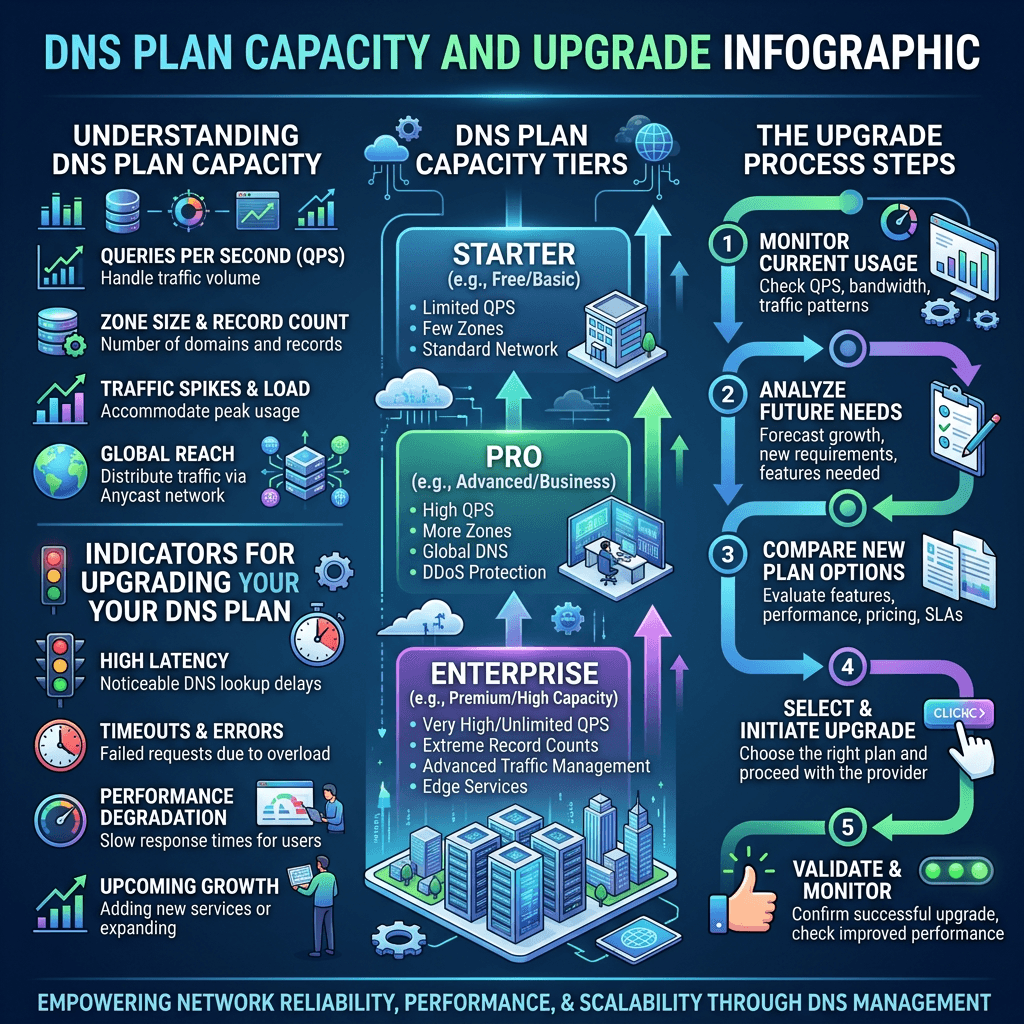
DNS Plan Capacity Guide: How Much Traffic Can It Handle?
Summary Box
- What a normal DNS plan can usually handle
- The real limits behind DNS traffic spikes
- How to tell when your DNS setup is too small
- When to move to managed DNS or stronger hosting support
What You’ll Learn
- How much traffic a typical DNS management plan can support
- Which DNS limits matter most in the real world
- Why query volume is only part of the story
- How Archer IT Solutions can help you avoid DNS bottlenecks
👉 Get Help Now: https://www.archer-its.com/contact-us/
Quick Answer:
A typical DNS management plan can handle anywhere from modest small-business traffic to very high query volumes, depending on provider limits, DNS record complexity, caching behavior, DDoS protection, and global network capacity. In practice, most small to mid-sized websites never hit raw DNS limits first—but poor DNS infrastructure can still cause slow lookups, outages, or failed traffic spikes.
If you are wondering how much traffic a DNS plan capacity really covers, you are asking the right question. A DNS plan may look fine on paper, but real-world performance depends on more than just visitor count. Spikes, global users, poor caching, and weak provider infrastructure can all turn a “good enough” DNS setup into a problem fast. For website owners and growing businesses, understanding these limits helps prevent downtime, slow connections, and lost sales.
What a Typical DNS Plan Can Handle in Practice
Most typical DNS plans can comfortably handle the needs of personal websites, local business sites, blogs, portfolios, and many small ecommerce stores. That is because DNS is lightweight compared to web hosting itself. A single user visit does not always mean a fresh DNS query, since browsers, operating systems, and recursive resolvers often cache results for a while.
In practical terms, many small and medium websites can run without issue on standard DNS management plans for a long time. Even if your site gets thousands or tens of thousands of visits per day, DNS may not be the first thing to fail. Usually, the bigger issues appear when DNS is poorly distributed, not protected against attacks, or restricted by strict provider query thresholds.
That said, “how much traffic” is not the same as “how many website visits.” DNS traffic depends on record TTL settings, how often records are looked up, whether users come from many regions, and whether your domain supports services like email, CDN routing, and subdomains. A normal plan may be enough for a brochure site, but a fast-growing business may need more resilient DNS before it notices a hosting problem.
DNS Plan Capacity in Real-World Website Scenarios
A small business website with a few hundred to a few thousand daily visitors will usually sit well within the range of a normal DNS plan. If records are stable and TTL values are sensible, most lookups are absorbed by caching layers. This means your DNS provider may process far fewer fresh requests than your analytics dashboard suggests.
For an online store, campaign landing page, or app dashboard, DNS plan capacity becomes more important during launch events or promotions. Sudden bursts from ads, social traffic, or email campaigns can create lookup surges, especially if TTL settings are low. In these cases, a plan that looked affordable can become a hidden risk if it lacks strong global routing or burst tolerance.
Developers and growing companies should also remember that DNS is tied to much more than the main website. API endpoints, mail records, verification records, staging subdomains, and third-party integrations all add activity and complexity. If your business depends on reliable uptime, it often makes sense to review your DNS setup alongside your infrastructure and web hosting strategy.
Pros and Cons of a Standard DNS Plan
Pros
- Affordable for most small websites
- Easy to manage
- Usually enough for normal business traffic
- Fine for low-complexity DNS setups
Cons
- May have hidden query limits
- Often weaker during traffic spikes
- Limited analytics, failover, or redundancy
- Can struggle under attacks or global demand
| DNS Plan Type | Best For | Traffic Handling | Main Limitation |
|---|---|---|---|
| Basic DNS | Personal sites | Low to moderate | Fewer advanced protections |
| Standard Managed DNS | SMB websites | Moderate to high | Provider-specific caps |
| Premium/Enterprise DNS | Ecommerce, apps, high uptime needs | High to very high | Higher cost |
Key Limits That Affect DNS Traffic Capacity
The first major limit is the provider’s actual DNS network strength. Two plans may both claim “managed DNS,” but one may run on a large anycast global network while another uses a much smaller footprint. A stronger network handles geographic demand better, reduces lookup latency, and is more resilient during regional outages or unusual traffic loads.
The second limit is query volume policy. Some providers set monthly query caps, soft throttles, or hidden fair-use thresholds. Others allow significant traffic but charge overages or restrict advanced routing features to higher plans. If you are comparing providers, read the fine print carefully. A cheap plan may be enough now, but not once your traffic becomes less predictable.
The third limit is protection against abuse. DNS is often targeted in DDoS attacks, and even a site with moderate visitor traffic can experience DNS stress during malicious activity. Good DNS providers invest in filtering, rate handling, redundancy, and health-based routing. Without those protections, your visible website traffic may be low while your DNS service still fails under pressure.
Technical Factors That Change DNS Load
TTL values play a huge role in DNS plan capacity. Lower TTLs mean records expire from caches more quickly, which increases fresh lookup volume. That can be useful during migrations or failover planning, but it creates more DNS traffic over time. High TTLs reduce query load, though they also make changes slower to propagate.
Record complexity matters too. A simple domain with a few A, MX, and CNAME records is easier to serve than a setup with many subdomains, third-party verifications, geo-routing rules, and traffic policies. The more complex your DNS architecture becomes, the more important plan quality and management support become.
User distribution changes the equation as well. A site serving one city behaves differently from a site serving customers across countries and devices. Global lookups place more demand on your DNS provider’s network edge. If your business relies on broad reach, it may be worth pairing DNS planning with managed IT services or local IT support to avoid weak points.
Troubleshooting DNS Capacity Problems
If your website feels slow or unavailable during traffic increases, start by checking whether DNS lookup times are rising. Use tools from providers like Cloudflare Learning Center or Amazon Route 53 documentation to understand response timing and behavior. Then review whether low TTL values are causing unnecessary repeated lookups.
Next, look at your provider’s limits and analytics. Check for query caps, throttling alerts, or unusual spikes tied to bots, monitoring systems, or integrations. Sometimes the problem is not your normal users at all. It may be an overly aggressive health check, misconfigured service, or attack pattern pushing your DNS plan harder than expected.
Finally, decide whether the fix is optimization or upgrade. You may only need cleaner records, better TTL settings, or CDN integration. But if uptime matters and your DNS provider lacks strong failover or global resilience, upgrading is often cheaper than losing customer trust. For broader planning, Archer IT Solutions can help connect DNS, hosting, WordPress, and infrastructure decisions into one simpler strategy.
👉 Fast, Reliable Web Hosting — Starting at $1.99/month
https://www.archer-its.com/web-hosting/
FAQ
How much DNS traffic can a normal plan handle?
A normal DNS plan can often handle small to mid-sized website demand easily, especially with proper caching. The exact limit depends on the provider, TTL settings, network size, and whether there are attacks or traffic bursts.
Is DNS traffic the same as website traffic?
No. Website traffic and DNS traffic are related, but they are not identical. Caching means many visits do not create new DNS lookups every time.
When should I upgrade my DNS plan capacity?
Upgrade when you see slow lookups, outages during spikes, strict query caps, weak failover, or a growing need for global reliability. Businesses running ecommerce, APIs, or multiple services should review DNS earlier rather than later.
Can bad DNS hurt SEO and conversions?
Yes. If DNS is slow or unreliable, users may experience delays reaching your site. Search engines and customers both expect fast, stable access.
Does Archer IT Solutions help with DNS and hosting?
Yes. Archer IT Solutions can help with hosting, managed IT, support, and website infrastructure planning so your domain, DNS, and hosting work together more reliably.
“We were not sure whether our DNS setup was part of our website slowdown. Archer IT Solutions helped us simplify the problem and gave us a clear path forward.” — Melissa R.
Case study: We helped a small business fix inconsistent website availability by reviewing DNS settings, tightening hosting alignment, and improving infrastructure reliability before a major campaign launch.
- Free Website Speed Checklist
- Small Business IT Setup Guide
To request either resource, reach out here:
https://www.archer-its.com/contact-us/
A typical DNS plan capacity is enough for many websites, but raw visitor numbers only tell part of the story. Caching, TTL settings, provider network quality, record complexity, and attack protection all shape what your DNS plan can really handle. If your site is growing, running campaigns, or supporting business-critical services, now is the time to make sure DNS is not the weak link. Archer IT Solutions can help you choose stronger hosting, improve reliability, and build a setup that scales with confidence.
👉 Need help? https://www.archer-its.com/contact-us/
👉 Contact Archer IT Solutions Now
https://www.archer-its.com/contact-us/
For support tickets: https://www.archer-its.com/ticket/
Email: support@archer-its.com | sales@archer-its.com | info@archer-its.com
Fast, Reliable Web Hosting — Starting at $1.99/month
| 🔥 Most Popular Standard Plan | Domain Only | |
| $1.99/month Limited-time offer | Secure your business name online | |
| Affordable yearly pricing Easy setup Works with any hosting | |
Reseller Hosting (For Agencies & Developers)Start your own hosting business or manage client sites | ||
| Reseller 1 | Reseller 2 | Reseller 3 |
| $20/month | $37.50/month | $50/month |
|
|
|
| ✔ 99.9% uptime • ✔ Secure • ✔ Easy setup • ✔ Local support | ||
Stop settling for slow, unreliable hosting. With Archer IT Solutions, get a website hosting plans that deliver speed, security, and 99.9% uptime guarantee. Grab your domain and hosting package in one seamless plan, optimized for WordPress users, small and medium size businesses, and personal websites.
Enjoy affordable web hosting plans without compromises unlike the big guys. Complete with professional email, one-click CMS installs, and round-the-clock hosting support. Perfect for WordPress users.
Built for Real Businesses
Whether you’re launching your first blog or scaling a growing business, Archer IT gives you:
+ Speed that keeps visitors engaged
+ Reliability you can count on
+Tools that actually make sense
Launch your first personal blog or scale a growing small business site with hosting optimized for performance. Get the best web hosting for plus simple setup — all powered by secure Linux servers and easy Plesk control panel.
Why Choose Archer IT Hosting?
🔒 Free SSL Certificates (Security + SEO Boost)
📧 Professional Email Accounts Included
⚡ Fast Linux Servers (Optimized Performance)
🧩 One-Click WordPress, Joomla & Drupal Installs
💬 Real 24/7 Support — No Bots, Just Help
💾 Automatic Backups for Peace of Mind
Risk-Free Guarantee
Try it with confidence.
If it’s not right for you, get your money back within 15 days.🔥 Don’t Wait — Launch Your Website Today
Stop overpaying for slow hosting.
Get everything you need in one simple plan.
Your website stays online with uptime, protected by a free SSL certificate, and supported by real people around the clock. And if it’s not right for you? Our 15-day money-back guarantee makes it a no-risk choice. Take your business or personal project online with hosting that’s secure, affordable, and built to perform.
💬 Real Support. No Runaround.
Unlike big hosting companies, you get:
- Direct help from real people
- No ticket delays
- No upsell traps

No responses yet