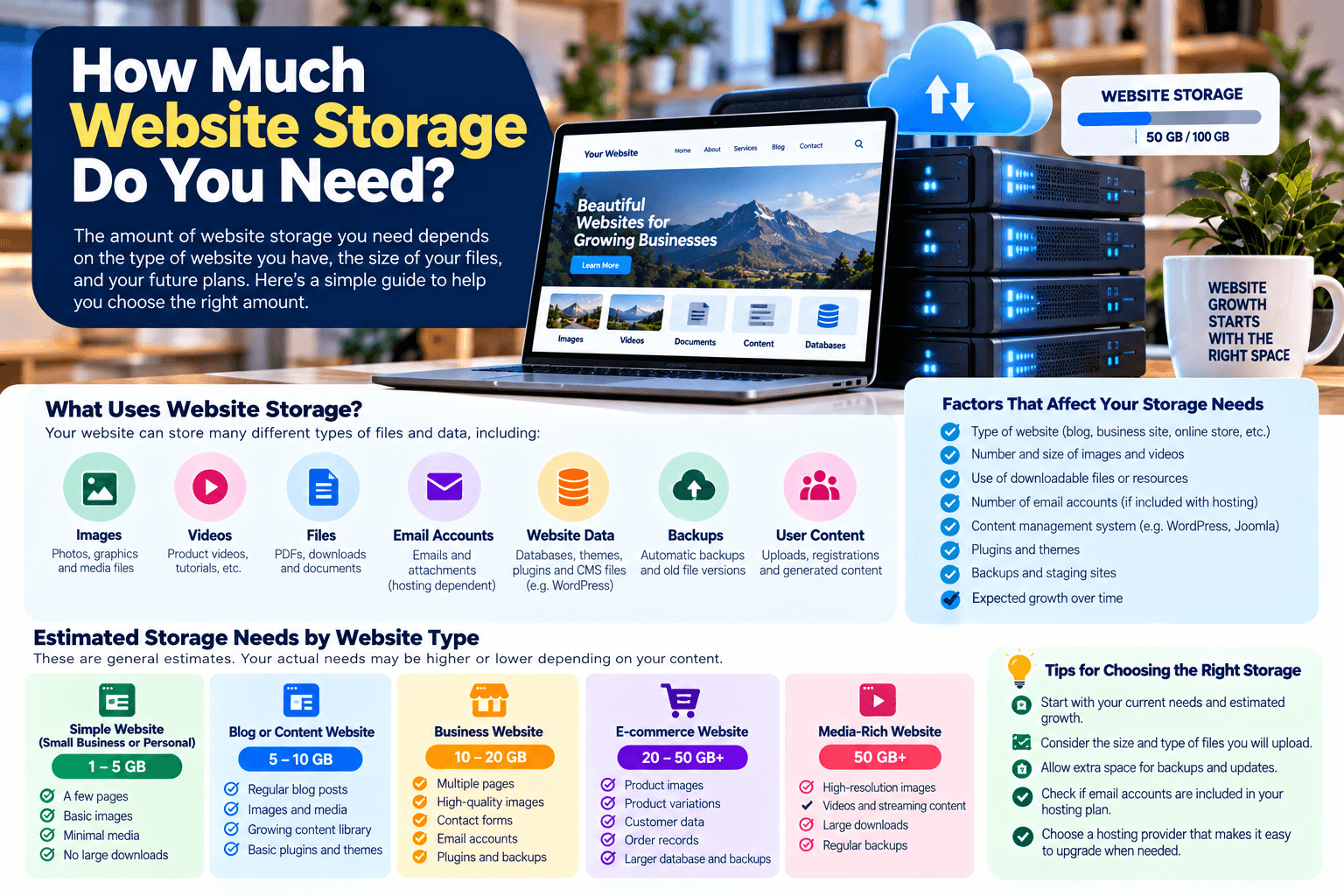
How Much Website Storage Do You Need?
One of the decisions you’ll need to make when choosing web hosting is how much storage space your website requires.
For a small website, you may only need a few gigabytes of storage. However, the amount can increase significantly if your website contains large images, videos, downloadable files, email accounts, backups, or a large content management system.
Choosing too little storage can create problems as your website grows, while paying for substantially more space than you need may be unnecessary. The right approach is to estimate your current requirements and allow reasonable room for growth.
What Uses Website Storage?
Website storage isn’t used only by your web pages. Depending on your hosting setup, your storage allocation may be shared by several types of data.
Common examples include:
- Website files
- Images and other media
- WordPress core files
- Themes and plugins
- Databases
- Product catalogues
- Downloadable documents
- Email accounts
- Logs and temporary files
- Website backups
This is why two websites with a similar number of pages can have very different storage requirements.
If you’re unfamiliar with how hosting storage works, Archer IT Solutions’ complete guide to web hosting provides additional background on hosting and the resources websites rely on.
How Much Storage Does a Basic Website Need?
There isn’t one storage requirement that applies to every website, but the following ranges can provide a useful starting point.
| Website type | Approximate starting storage |
|---|---|
| Simple static website | 500 MB–1 GB |
| Small business website | 1–3 GB |
| Small WordPress website | 2–5 GB |
| Media-heavy website | 5–10+ GB |
| Website with substantial downloads or media | 10 GB+ |
These are general estimates rather than strict requirements. Your actual needs depend on the size of your files, database, media library, email usage, and other services included in your hosting account.
1. Static Websites
A simple static website containing mostly HTML, CSS, JavaScript, text, and optimized images can require relatively little storage.
For example, a small portfolio or brochure-style business website may fit comfortably within 500 MB to 1 GB.
However, image optimization matters. A website with hundreds of large, uncompressed photographs can consume considerably more space than one using properly optimized images.
2. WordPress and Other CMS Websites
Websites built with a content management system such as WordPress generally require more storage than a very simple static site.
The storage may include:
- WordPress core files
- Themes
- Plugins
- Images
- Documents
- Database content
- Cached files
- Additional website assets
For a small WordPress website, 2–5 GB can be a reasonable starting point, provided the site’s media library and other stored data remain relatively modest.
WordPress itself also recommends paying attention to performance and optimization as part of maintaining a healthy website. You can review the WordPress performance and optimization documentation for more information.
3. Image-Heavy Websites
Images can become one of the largest consumers of website storage.
A photography portfolio, restaurant website, real estate website, event website, or online store may contain hundreds or thousands of images.
Uploading photographs directly from a modern phone or camera without optimization can result in unnecessarily large files.
To reduce storage requirements:
- Resize images to the dimensions actually needed.
- Compress images before uploading.
- Use modern image formats where appropriate.
- Avoid keeping multiple unnecessary copies of the same image.
- Review your media library periodically.
Image optimization can also improve page-loading performance, so it can benefit both storage management and the visitor experience.
4. Video and Audio Require Significantly More Space
Video and high-quality audio files can consume considerably more storage than ordinary web pages and images.
If your website hosts a large amount of video, uploading all of those files directly to your web server may not be the most practical approach.
For many websites, it can make more sense to use an appropriate video or media hosting platform and embed the content on the website.
If your website is regularly dealing with large media files, consider both storage capacity and bandwidth requirements, rather than looking at storage alone.
5. Don’t Forget Your Database
Dynamic websites such as WordPress use databases to store information.
Depending on the website, the database may contain:
- Posts and pages
- User information
- Product information
- Settings
- Comments
- Orders
- Plugin data
- Other application information
For a small website, the database may remain relatively small. But an online store, membership website, or website with years of accumulated content can have significantly greater database requirements.
6. Email Can Consume Hosting Storage
If your hosting package includes email accounts, don’t overlook their storage requirements.
Messages and attachments can accumulate over time, particularly when employees keep large files in their inboxes.
If multiple employees use email accounts hosted on the same server, the combined email storage can become significant.
Consider:
- How many email accounts you need
- How much storage each account receives
- How long employees retain emails
- Whether large attachments are being stored
- Whether email and website storage share the same hosting allocation
Your hosting provider can clarify how storage is divided within your particular plan.
7. Backups Need Additional Storage
Backups are essential, but they also require space.
For example, if your website is 3 GB and you keep several complete backups on the same hosting account, your total storage usage can become considerably higher than the size of the live website itself.
For this reason, don’t simply calculate:
Website size = storage requirement
Instead, consider:
Website + database + email + media + backups + growth = practical storage requirement
It’s also important not to rely exclusively on backups stored on the same server as your website. If the server experiences a serious problem, both the website and its local backups could potentially be affected.
For broader IT support and infrastructure management, you can learn more about Archer IT Solutions’ managed IT services.
8. Leave Room for Future Growth
Choosing a hosting plan based solely on today’s storage usage can leave you with little room to grow.
Think about what you expect to add over the next year or two:
- More blog posts
- More product images
- New website pages
- Additional documents
- More customer accounts
- More email users
- New plugins or applications
- Additional website functionality
You don’t necessarily need to buy the largest hosting package available. Instead, choose a plan that provides enough headroom and allows you to upgrade when your requirements increase.
How to Check How Much Storage Your Website Currently Uses
If your website already exists, checking your current usage is more accurate than estimating from scratch.
Depending on your hosting provider, you may be able to see storage usage through your hosting control panel.
For a WordPress website, you can also examine the size of:
- The WordPress installation
- The uploads/media directory
- Plugins and themes
- The database
- Backup files
- Other files stored on the server
If your website is using significantly more space than expected, investigate what is consuming it before simply purchasing additional storage.
Large backups, unused media, old files, logs, and duplicated website files can sometimes account for substantial amounts of storage.
What Happens If You Run Out of Storage?
When a hosting account reaches its storage limit, you may experience problems adding files or creating new content. Depending on the hosting environment and what is consuming the space, other website or email functions may also be affected.
Instead of waiting until the account is full:
- Monitor storage usage.
- Remove unnecessary files safely.
- Review old backups.
- Optimize large media files.
- Check whether email is consuming significant space.
- Upgrade the hosting plan if the website has genuinely outgrown its current resources.
Do not delete website files, plugins, database tables, or backups simply because they appear large. Confirm what they are used for before removing them.
So, How Much Storage Should You Choose?
For many basic websites, 2–5 GB can be a practical starting point. A simple static website may require considerably less, while an image-heavy, e-commerce, membership, or media-rich website may require substantially more.
The important thing is to choose based on your actual website rather than selecting a storage number simply because it sounds large.
If you’re planning a new website, Archer IT Solutions’ web hosting services can be a starting point for discussing your hosting requirements.
For website development or a new business website, you can also explore Archer’s web design services.
If you’re unsure which hosting resources your website needs, contact Archer IT Solutions to discuss your requirements.
Final Considerations
Website storage is only one part of choosing a hosting environment. You should also consider performance, bandwidth, security, backups, reliability, technical support, scalability, and the specific requirements of your website.
Rather than choosing the cheapest or largest plan available, estimate what your website actually needs today and select a hosting solution that gives you enough room to grow.


Comments are closed