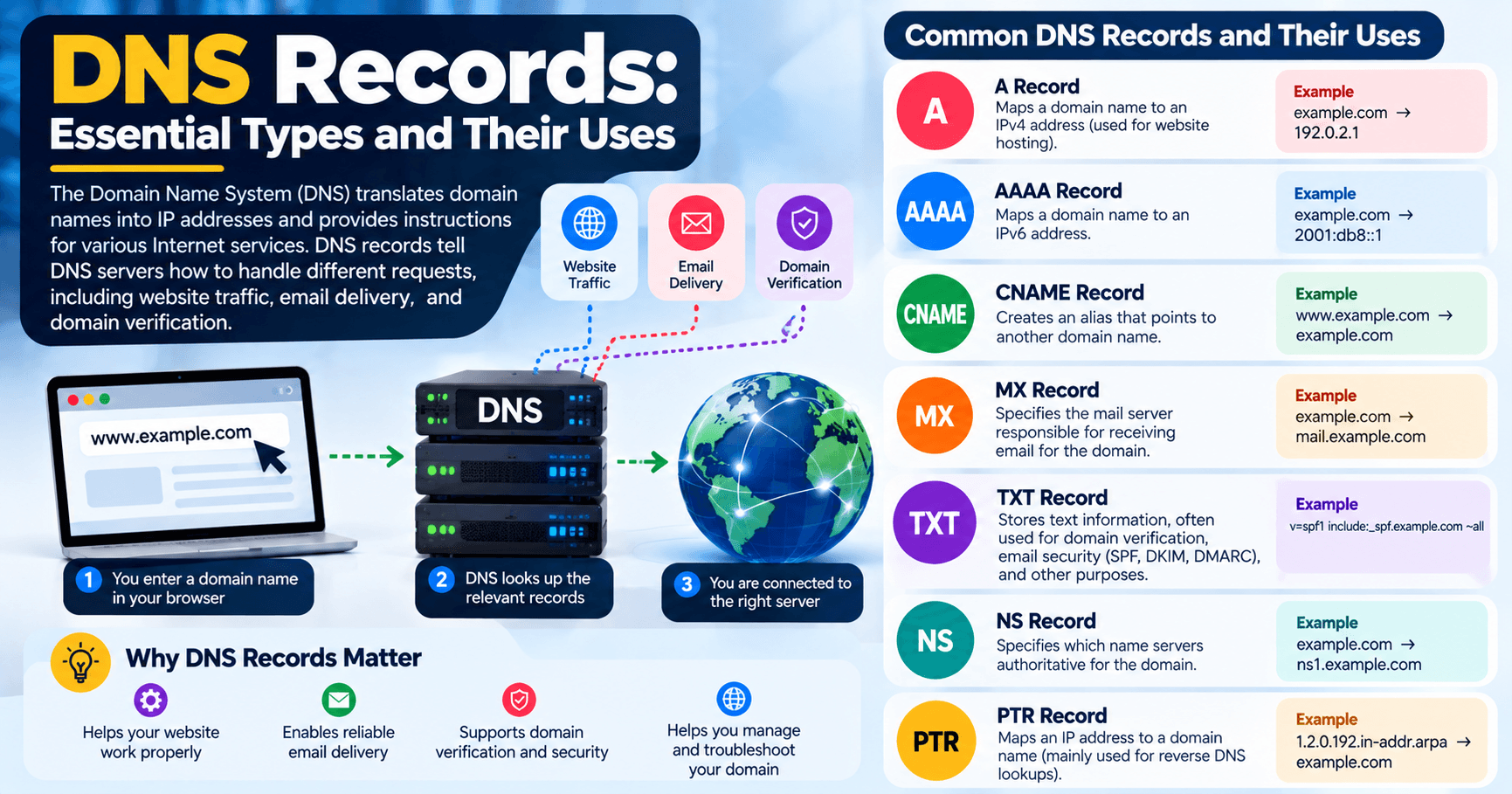
DNS Records: Essential Types and Their Uses
The Domain Name System (DNS) is one of the fundamental systems that makes the Internet easier to use. Instead of requiring people to remember numerical IP addresses, DNS allows users to access websites and online services using recognizable domain names such as example.com.
When someone enters a domain name into a browser, DNS helps determine where that domain’s services are located. DNS records provide the instructions that tell DNS servers how to handle different types of requests, including website traffic, email delivery and domain verification.
Understanding common DNS records is useful when setting up a website, configuring business email, moving a website to a new hosting provider or troubleshooting domain-related problems.
What Are DNS Records?
A DNS record is an entry stored within a DNS zone that provides information about a domain or hostname.
For example, an A record can associate a hostname with an IPv4 address, while an MX record identifies the mail servers responsible for receiving email for a domain. NS records identify the authoritative name servers for a DNS zone.
A domain can have multiple DNS records because different records perform different functions.
Key Functions of DNS
DNS supports several important functions across the Internet.
1. Domain Name Resolution
DNS translates domain names into information that computers and applications can use to locate network services.
For example, when someone visits:
www.example.com
their device can use DNS to determine the appropriate IP address or other DNS information associated with that hostname.
2. Domain Delegation
DNS uses a hierarchical structure that allows responsibility for different parts of the namespace to be delegated to different authoritative name servers.
This makes it possible for different organizations to manage their own domains and DNS zones.
3. Traffic Distribution
DNS can also be used as part of traffic-distribution strategies. For example, a hostname can have multiple address records, allowing DNS responses to provide more than one possible destination.
However, DNS-based traffic distribution is not the same as a dedicated load balancer. Its effectiveness depends on the DNS configuration, resolver behavior and the architecture of the service.
4. Email Routing
DNS plays an important role in email delivery through MX records.
An MX record tells mail systems which servers are responsible for receiving email for a domain.
Common DNS Record Types
There are many DNS record types, but several are particularly important for websites, email and domain management.
1. A Record
An A record maps a hostname to an IPv4 address.
For example:
example.com A 192.0.2.1This tells DNS that the specified hostname is associated with the IPv4 address 192.0.2.1.
A records are commonly used to point a website or other Internet service toward a server. According to ICANN, an A record contains an IPv4 address.
When is an A record used?
An A record may be used when:
- Pointing a domain to a web server
- Connecting a hostname to an IPv4 address
- Moving a website to a new server
- Configuring a subdomain
If the destination uses IPv6 instead, an AAAA record is generally used.
2. AAAA Record
An AAAA record performs a similar function to an A record but stores an IPv6 address.
For example:
example.com AAAA 2001:db8::1A and AAAA records allow a domain or hostname to resolve to IPv4 and IPv6 addresses respectively.
As more networks and services support IPv6, AAAA records are increasingly relevant to modern DNS configurations.
3. CNAME Record
A CNAME (Canonical Name) record creates an alias from one hostname to another hostname.
For example:
www.example.com CNAME example.comInstead of assigning an IP address directly to www, the CNAME tells DNS that the hostname is an alias for another hostname.
CNAME records are commonly useful when a service provider gives you a hostname to use instead of a fixed IP address.
One important consideration is that a hostname with a CNAME generally cannot simultaneously contain other DNS record types at that same name.
4. MX Record
An MX (Mail Exchange) record identifies the mail servers responsible for receiving email for a domain.
For example:
example.com MX mail.example.comMX records are essential when using a custom domain for business email.
If you change email providers, the provider will normally give you the MX records that need to be added to your DNS configuration.
Incorrect MX records can prevent incoming email from reaching the intended mail service.
5. NS Record
An NS (Name Server) record identifies the authoritative name servers for a DNS zone.
For example:
example.com    NS    ns1.example-dns.com
example.com    NS    ns2.example-dns.com
Authoritative name servers contain the DNS information used to answer queries about the zone they manage.
NS records are particularly important when changing DNS providers or configuring a domain’s delegation.
6. TXT Record
A TXT record allows text information to be associated with a domain or hostname.
TXT records are widely used for domain verification and email-security mechanisms such as:
- SPF
- DKIM-related information
- DMARC
- Verification of ownership for third-party services
For example, an email provider may instruct a business to add a TXT record to prove that the business controls a particular domain.
Because TXT records can serve several different purposes, the exact value should always come from the service or administrator that requires the record.
7. PTR Record
A PTR (Pointer) record is primarily used for reverse DNS.
Instead of resolving a domain name to an IP address, reverse DNS looks up information associated with an IP address.
PTR records can be particularly relevant to mail servers because reverse DNS configuration can affect how receiving mail systems evaluate connections from a sending server.
8. SOA Record
The SOA (Start of Authority) record contains important information about a DNS zone, including information about the zone’s authoritative name server and zone-management parameters.
You may not need to modify an SOA record during ordinary website management, but it is an important part of a properly configured DNS zone.
DNS Records at a Glance
| Record | Main purpose |
|---|---|
| A | Maps a hostname to an IPv4 address |
| AAAA | Maps a hostname to an IPv6 address |
| CNAME | Creates an alias from one hostname to another |
| MX | Specifies mail servers for a domain |
| NS | Identifies authoritative name servers |
| TXT | Stores text used for verification, email security and other purposes |
| PTR | Used for reverse DNS |
| SOA | Contains administrative information about a DNS zone |
ICANN identifies A, AAAA, NS and MX among the commonly used DNS resource records, while other records such as CNAME and TXT are also widely used in modern DNS configurations.
DNS Records and Website Hosting
DNS records are closely connected to website hosting.
When moving a website from one hosting provider to another, for example, the website files may be transferred to the new server while the domain’s DNS configuration still points visitors toward the old server.
Changing the appropriate DNS records can direct traffic toward the new hosting environment.
This is one reason DNS changes should be planned carefully. Changing the wrong record can make a website, email service or other online application temporarily unavailable.
If you are setting up or moving a website, Archer IT Solutions provides web hosting services that include website hosting and related management and support.
You can also review Archer’s guide to web hosting for a broader explanation of how hosting works.
DNS Records and Business Email
DNS is not only about websites.
A business using an address such as name@yourcompany.com may rely on several DNS records to ensure that email works correctly.
For example:
- MX records identify receiving mail servers.
- TXT records can be used for email authentication and domain verification.
- A or AAAA records may be used for mail-related hostnames where appropriate.
Email providers normally provide the exact DNS values required for their services. These values should be copied carefully because a small configuration error can affect mail delivery or authentication.
DNS, Security and Website Reliability
DNS configuration is also connected to website security and reliability.
For example, DNS records may be used when configuring domain verification, email authentication, security services and content delivery platforms.
DNS itself should therefore be treated as part of the overall website and IT infrastructure rather than as an isolated setting.
If your business relies on multiple online services, incorrect DNS configuration can potentially affect websites, email, applications or other systems.
Archer IT Solutions provides Managed IT Services that can help businesses manage and maintain their broader IT environment.
For related networking information, see Archer’s guides on firewalls and network protection and wireless networking.
Common DNS Problems
Understanding DNS records can make troubleshooting easier.
Some common problems include:
Website Not Loading
The A or AAAA record may point to the wrong server, or the hostname may not have the required DNS record.
Email Not Arriving
Incorrect or missing MX records can prevent incoming email from reaching the correct mail service.
Domain Verification Failure
A service may require a specific TXT or CNAME record. If the record is missing, incorrectly entered or placed on the wrong hostname, verification may fail.
Changes Not Appearing Immediately
DNS information can be cached by DNS resolvers according to the record’s TTL (Time to Live). As a result, a DNS change may not be visible to every user immediately.
Incorrect Nameserver Configuration
If a domain is delegated to the wrong authoritative name servers, the DNS records configured elsewhere may not control the domain as expected.
Best Practices When Managing DNS Records
When making DNS changes:
- Know what the record does before changing it.
- Record the existing configuration before making significant changes.
- Use the exact values supplied by your hosting or email provider.
- Check the hostname carefully.
- Avoid deleting records simply because you do not recognize them.
- Pay attention to TTL values when planning migrations.
- Verify website and email functionality after making changes.
- Keep DNS access restricted to authorized administrators.
- Document important DNS configurations for future troubleshooting.
DNS changes are often simple to make but can have a broad effect when a domain supports multiple services.
When Should You Get Help With DNS?
Basic DNS changes can often be made through a domain registrar or DNS provider’s control panel. However, more complicated environments may involve websites, email platforms, security services, subdomains, hosting servers and third-party applications.
If you are unsure which DNS records to change, are migrating a website, experiencing website or email problems, or need help connecting a domain to a hosting environment, professional technical assistance can reduce the risk of disrupting an existing service.
You can contact Archer IT Solutions for assistance with website hosting, IT infrastructure and related technical services.
Conclusion
DNS records provide the instructions that help domains connect users and applications with websites, servers, email systems and other Internet services.
The most commonly encountered records include A, AAAA, CNAME, MX, NS and TXT, while PTR and SOA records also have important roles in specific DNS configurations.
Understanding what each record does makes it easier to manage domains, troubleshoot website and email problems, and safely make changes when moving between hosting or service providers.
For additional DNS information, ICANN’s Domain Name System resources provide authoritative background on how DNS works.


No responses yet